4
4
4-33
4-33
Disassembly/Assembly > Document Exposure / Delivery System > Removing the ADF Separation Pad
Disassembly/Assembly > Document Exposure / Delivery System > Removing the ADF Separation Pad
Removing the ADF Separation Pad
Procedure
CAUTION:
Do Not Touch the Surface of the ADF Separation Pad When Removing or Mounting it.
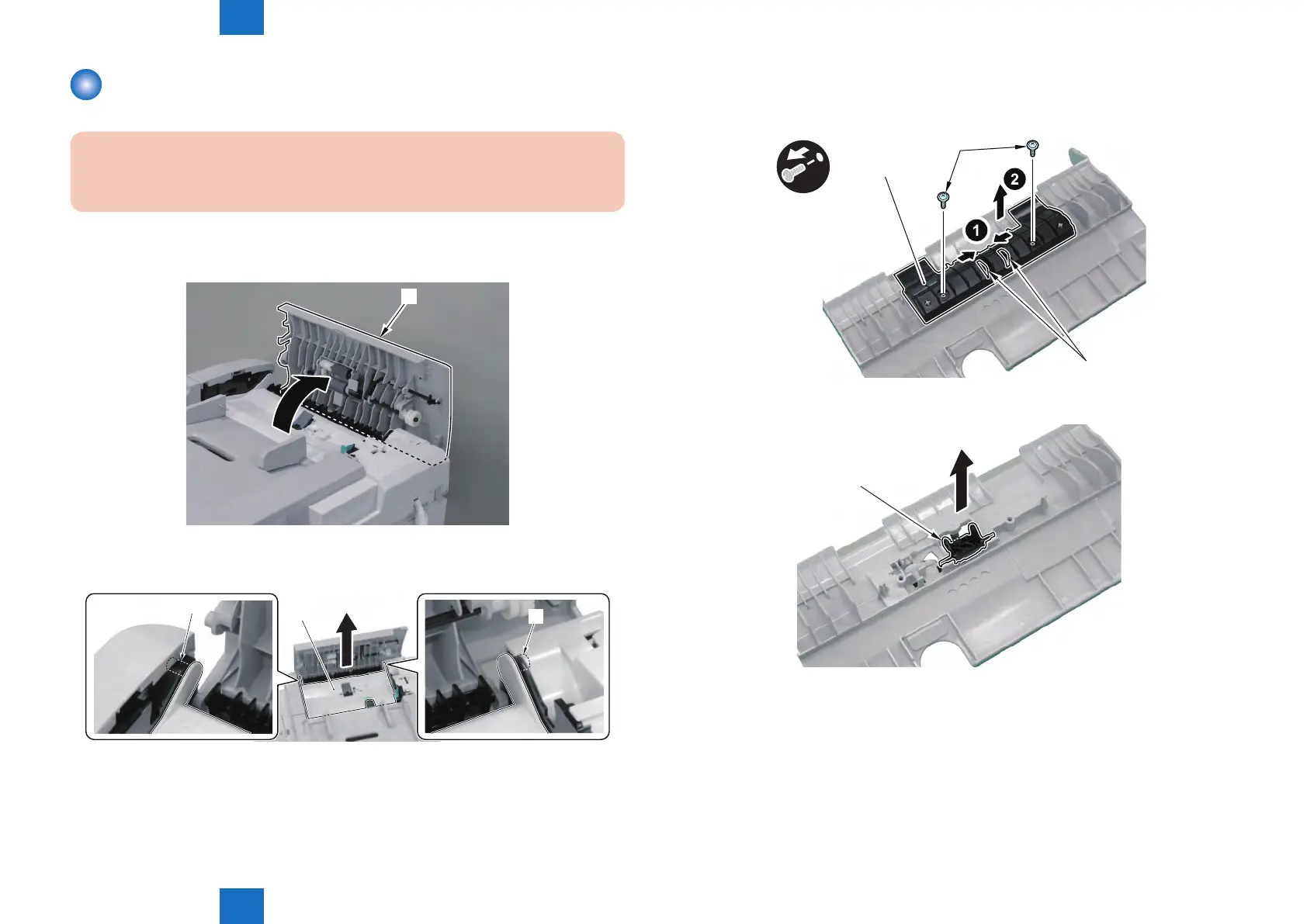
1) Open the ADF Upper Cover [1].
[1]
2) Remove the Feed Guide [1].
• 2 Bosses [2]
[1]
[2]
[2]
F-4-74
F-4-75
3) Remove the Retaining Plate [1] On the Back of the Feed Guide.
• 2 Screws [2]
• 2 Tabs [3] of the Separation Pad Holder
[1]
[3]
x2
4) Remove the Separation Pad Holder [1].
[1]
F-4-76
F-4-77







 To Next Page