8
8
8-6
8-6
Service Mode > COPIER > ADJUST > ADJ-XY
Service Mode > COPIER > ADJUST > ADJ-XY
ADJUST
■
ADJ-XY
COPIER > ADJUST > ADJ-XY
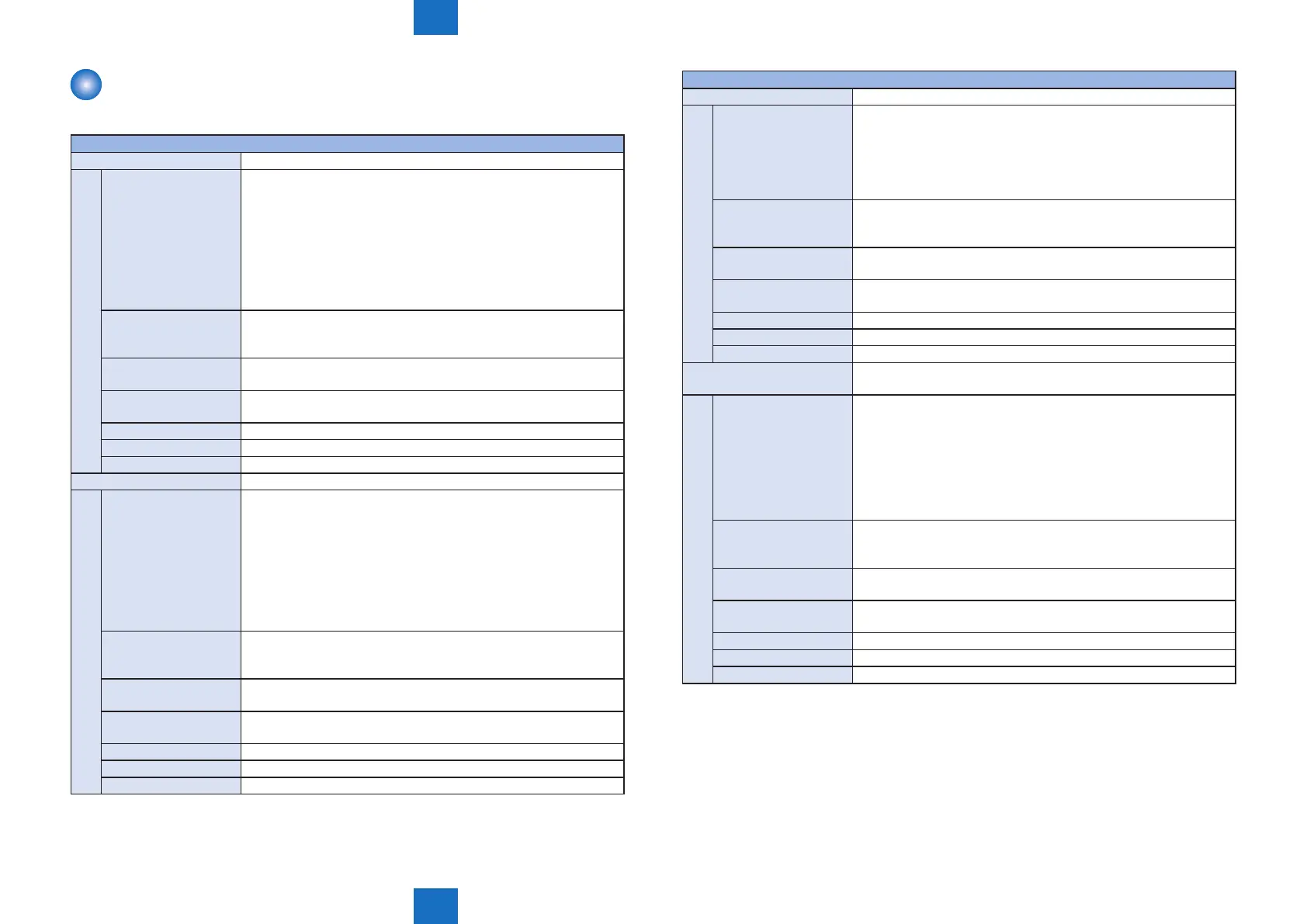
ADJ-X Adj of img pstn in book mode: vert scan
Details To adjust the image reading start position (image leading edge
position) in the vertical scanning direction at copyboard reading.
When replacing the Main Controller PCB/clearing the RAM data,
enter the value of service label.
When the non-image width is larger than the standard value, set the
smaller value.
When out of original area is copied, set the larger value.
As the value is incremented by 1, the image position moves to the
trailing edge side by 0.1 mm.
Use case
• When replacing the Reader Unit
• When replacing the CIS Unit
• When replacing the Main Controller PCB
Adj/set/operate method Enter the setting value (switch negative/positive by -/+ key) and
press OK key.
Caution After the setting value is changed, write the changed value in the
service label.
Display/adj/set range -30 to 30
Unit 0.1 mm
Default value 0
ADJ-Y Adj of img pstn in book mode: horz scan
Details To adjust the image reading start position in the horizontal scanning
direction at copyboard reading.
When replacing the Engine Controller PCB/clearing the RAM data,
enter the value of service label.
When the non-image width is larger than the standard value, set the
smaller value.
When out of original area is copied, set the larger value.
As the value is incremented by 1, the image position moves to the
rear side by 0.1 mm.
Use case
• When replacing the Reader Unit
• When replacing the CIS Unit
• When replacing the Main Controller PCB
Adj/set/operate method Enter the setting value (switch negative/positive by -/+ key) and
press OK key.
Caution After the setting value is changed, write the changed value in the
service label.
Display/adj/set range -10 to 10
Unit 0.1 mm
Default value 0
COPIER > ADJUST > ADJ-XY
ADJ-Y-DF Adj img pstn in ADF mode:horz scan
Details To adjust the image reading start position in the horizontal scanning
direction at ADF reading.
When replacing the Main Controller PCB/clearing the RAM data,
enter the value of service label.
As the value is incremented by 1, the image position moves to the
trailing edge side by 0.1 mm.
Use case
• When replacing the Reader Unit
• When replacing the CIS Unit
• When replacing the Main Controller PCB
Adj/set/operate method Enter the setting value (switch negative/positive by -/+ key) and
press OK key.
Caution After the setting value is changed, write the changed value in the
service label.
Display/adj/set range -10 to 10
Unit 0.1 mm
Default value 0
ADJ-X-MG Fine adjustment of image magnication ratio (vertical scanning
direction)
Details To make a ne adjustment of image magnication ratio in the vertical
scanning direction by changing the reading cycle of CIS.
When replacing the Main Controller PCB/clearing the RAM data,
enter the value of service label.
As the value is incremented by 1, the image magnication changes
by 0.01%.
+: Reduce
-: Enlarge
Use case
• When replacing the Reader Unit
• When replacing the CIS Unit
• When replacing the Main Controller PCB
Adj/set/operate method Enter the setting value (switch negative/positive by -/+ key) and
press OK key.
Caution After the setting value is changed, write the changed value in the
service label.
Display/adj/set range -200 to 200
Unit 0.01
%
Default value 0







 To Next Page