4
4
4-19
4-19
Disassembly/Assembly > External Cover (D1300 Series) > Removing the Upper Cover
Disassembly/Assembly > External Cover (D1300 Series) > Removing the Upper Cover
Procedure at installation:
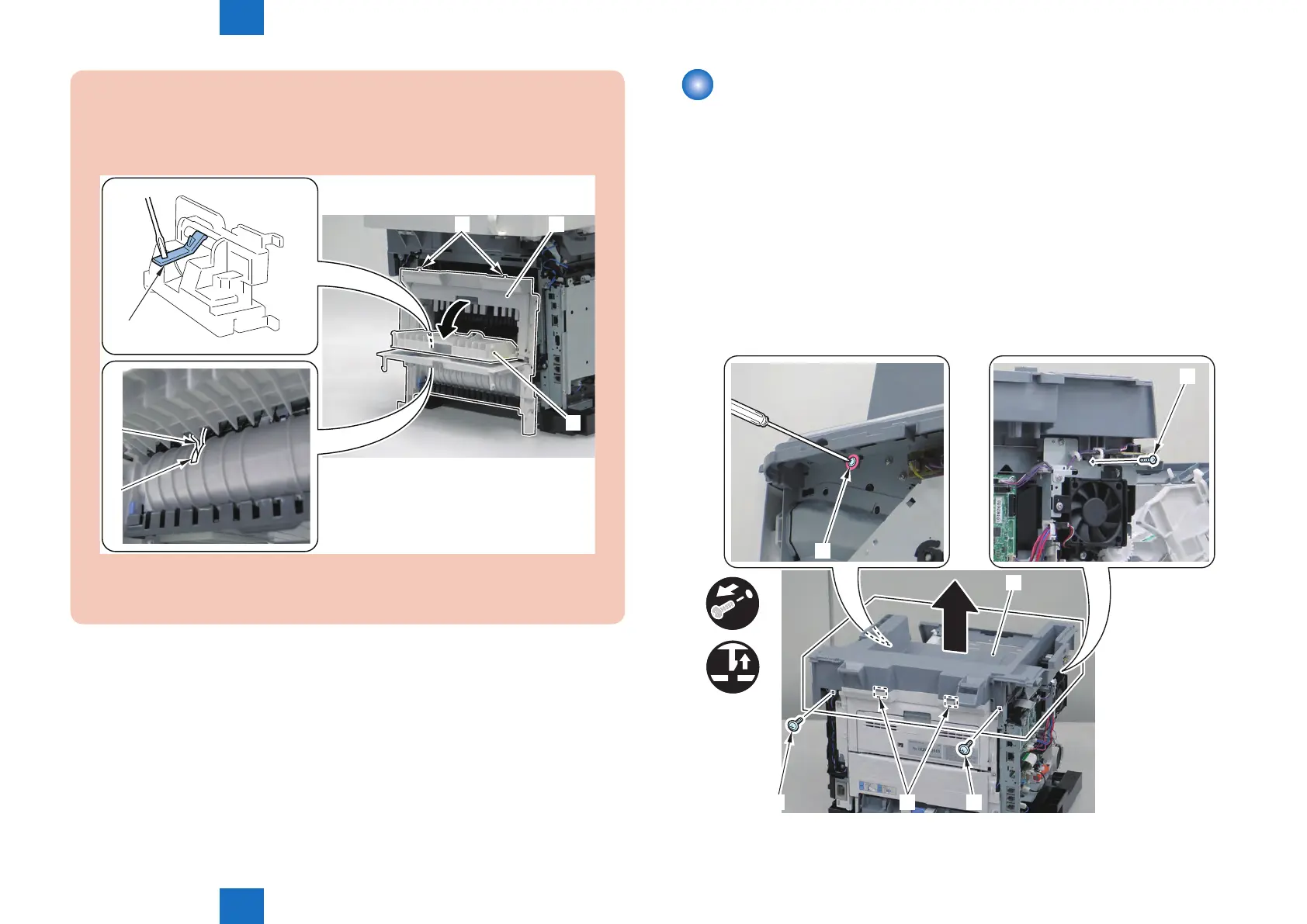
1) Fit the 2 Upper Claw [2] of the Rear Cover Unit [1] With the Upper Cover.
2) Open the Rear Uppe Cover [3] and While Pushing the Duplex Reverse Sensor Flag
[4] Downward, Install the Rear Cover Unit.
[1][2]
[3]
[4]
[5]
[4]
3) Check That the Sensor Flag [4] Through the Hole [5] of the Back of the Duplex Unit
Cover.
F-4-34
Removing the Upper Cover
Preparations
1) Removing the Right Cover Unit.
2) Removing the Left Cover Unit.
3) Removing the Controller Cover.
4) Removing the Left Rear Cover.
5) Removing the ADF Unit + the Reader Unit.
Procedure
1) Remove the Upper Cover [1].
• 3 Screws [2]
• 1 Screw [3] (Loosen)
• 2 Claws [4]
x4
x2
[3]
[4]
[5] [2][2]
[1]
F-4-35







 To Next Page