4
4
4-40
4-40
Disassembly/Assembly > Document Exposure / Delivery System > Removing the CIS Unit
Disassembly/Assembly > Document Exposure / Delivery System > Removing the CIS Unit
Removing the CIS Unit
Preparations
1) Removing the Left Cover Unit.
2) Removing the Controller Cover.
3) Removing the Left Rear Cover.
4) Removing the ADF Unit + Reader Unit.
5) Separate the ADF Unit + Reader Unit.
6) Removing the Reader Unit Upper Cover .
Procedure
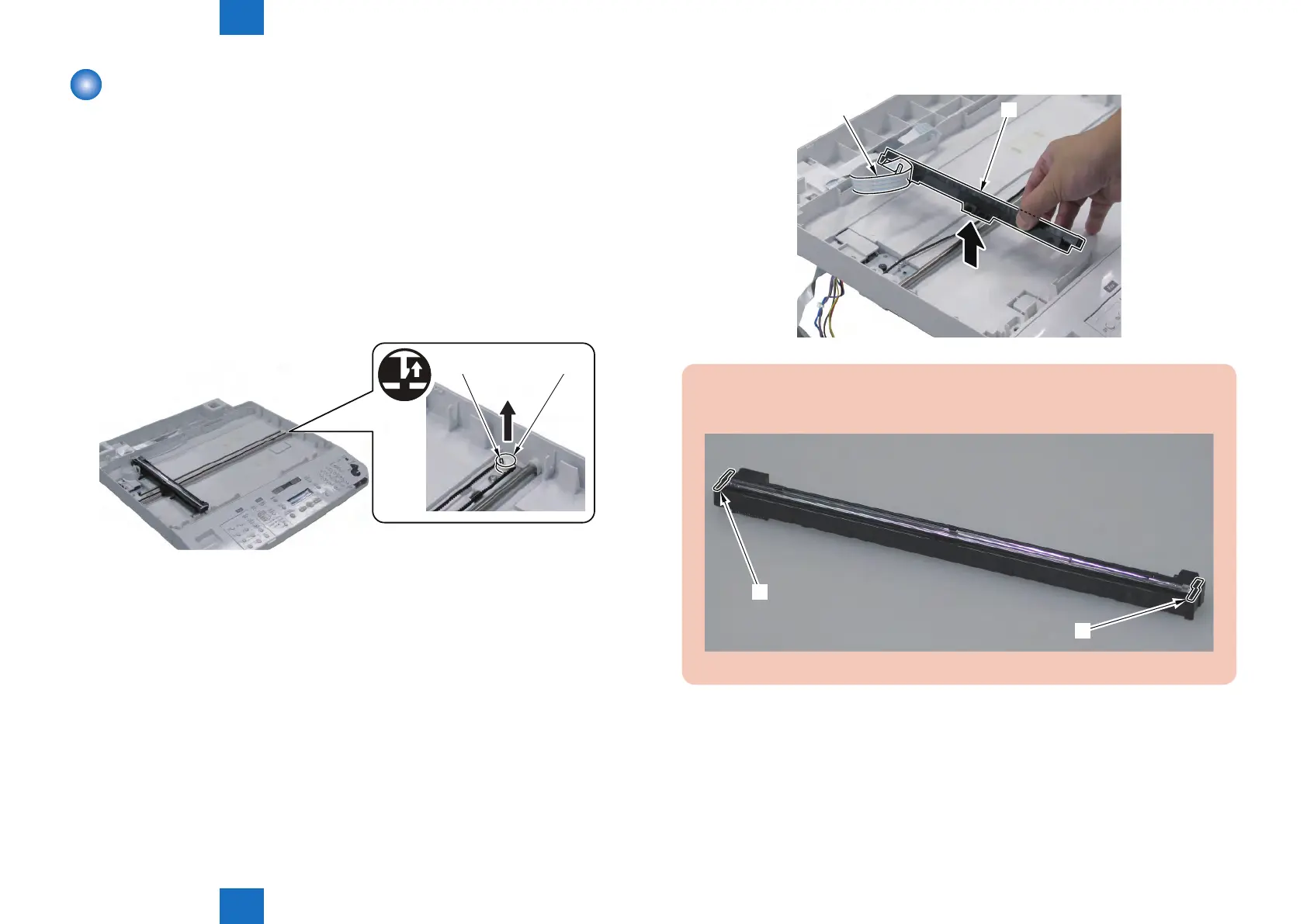
1) Remove the Belt Pulley [1].
• 1 Claw [2]
[1][2]
F-4-97
2) Remove the CIS Mount [1] Upward and Remove the Flat Cable [2].
[1]
[2]
CAUTION:
When CIS Unit Mount is tilt, CIS spacers[1] are removed. Do not lost the CIS spacers.
[1]
[1]
F-4-99
F-4-98







 To Next Page