4
4
4-37
4-37
Disassembly/Assembly > Document Exposure / Delivery System > Removing the ADF Pickup Motor Unit
Disassembly/Assembly > Document Exposure / Delivery System > Removing the ADF Pickup Motor Unit
Removing the ADF Pickup Motor Unit
Preparations
1) Removing the ADF Pickup Feed Unit.
Procedure
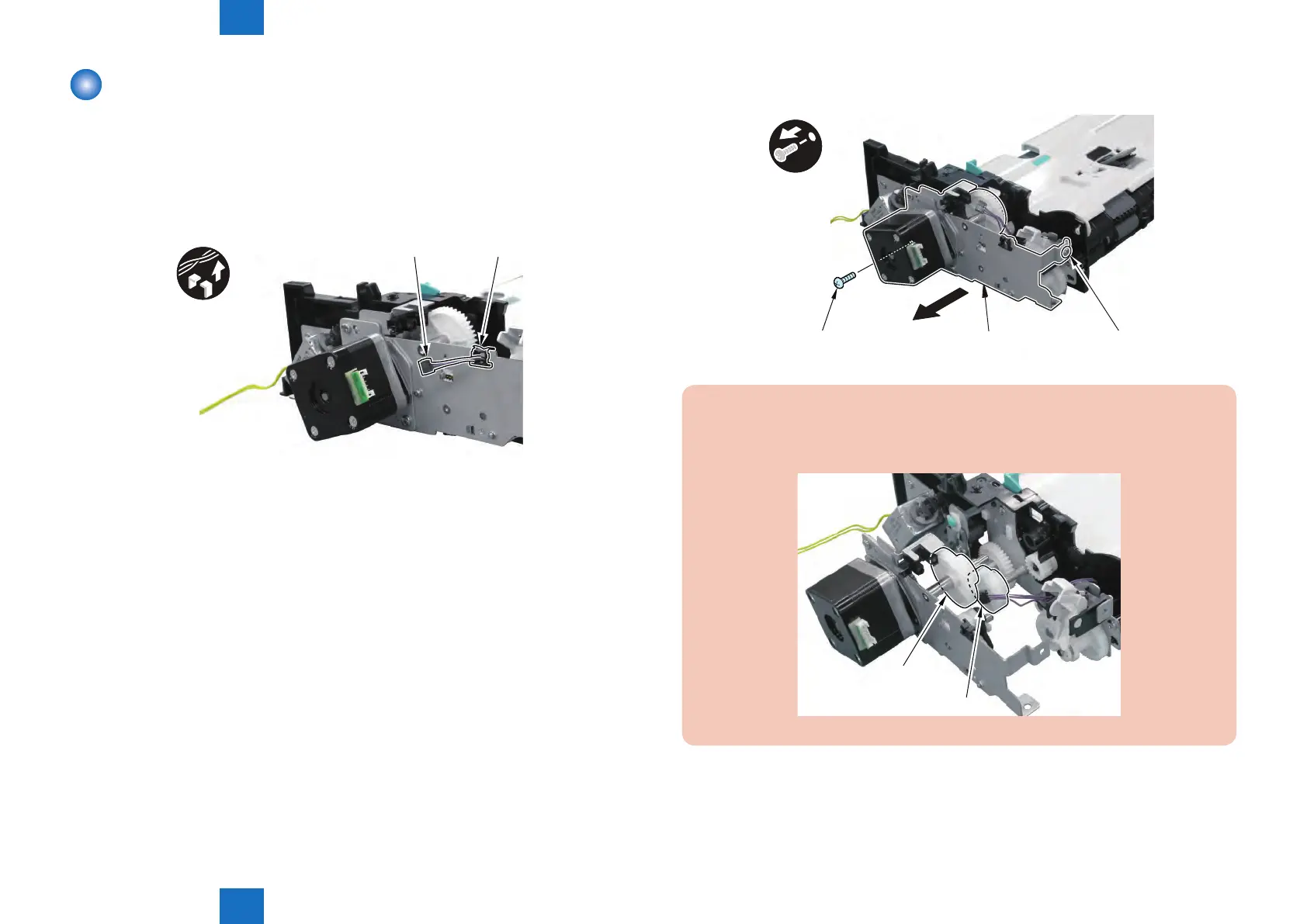
1) Remove the Harness [1] from the Edge Saddle [2].
[1] [2]
F-4-88
2) Remove the ADF Motor Unit [1].
• 2 Screws [2]
[1]
[2][2]
x2
CAUTION :
Since the Gear [1] of the ADF Motor Unit and the Gear [2] on the Frame Side of the
Pickup Feed Unit are not Fixed, be Careful not to Drop or Lose Them.
[1]
[2]
F-4-90
F-4-89







 To Next Page