4
4
4-44
4-44
Disassembly/Assembly > Controller System > Removing the OFF Hook PCB (FAX Model Only)
Disassembly/Assembly > Controller System > Removing the OFF Hook PCB (FAX Model Only)
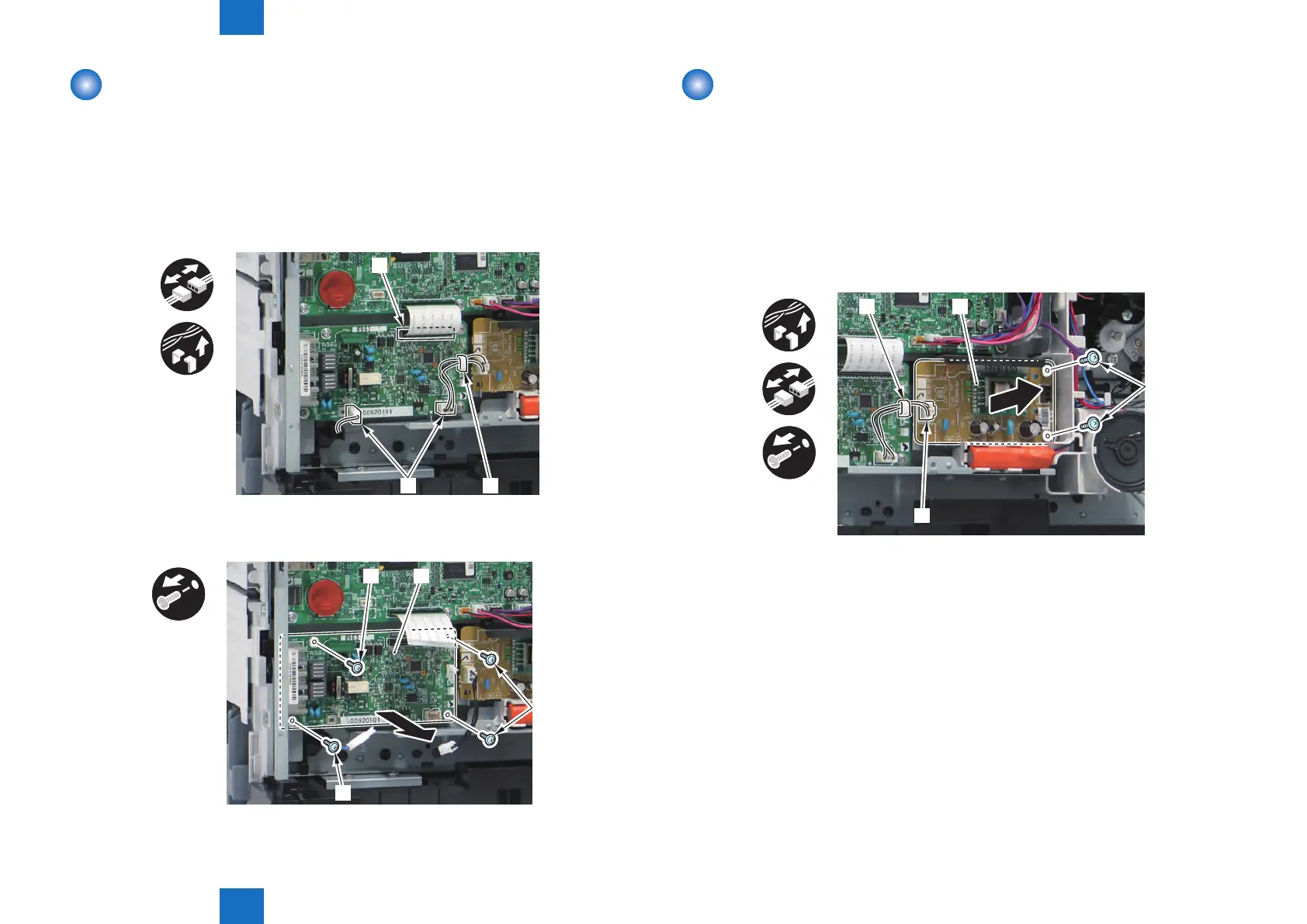
Removing the NCU PCB (FAX Model Only)
Preparations
1) Removing the Left Cover Unit.
2) Removing the Controller Cover.
Procedure
1) Remove the Flat Cable [1] and the Connectors [2].
• 1 Wire saddle [3]
x3
[1]
[3][2]
2) Remove the NCU PCB [1].
• 3 Screws [2]
x4
[1]
[2]
[2]
[2]
F-4-105
F-4-106
Removing the OFF Hook PCB (FAX Model Only)
Preparations
1) Removing the Left Cover Unit.
2) Removing the Controller Cover.
Procedure
1) Remove the OFF Hook PCB [1].
• 1 Wire Saddle [2]
• 1 Connector [3]
• 2 Screws [4]
x2
[1][2]
[3]
[4]
F-4-107




 To Next Page