4
4
4-32
4-32
Disassembly/Assembly > Document Exposure / Delivery System > Removing the ADF Separation Roller
Disassembly/Assembly > Document Exposure / Delivery System > Removing the ADF Separation Roller
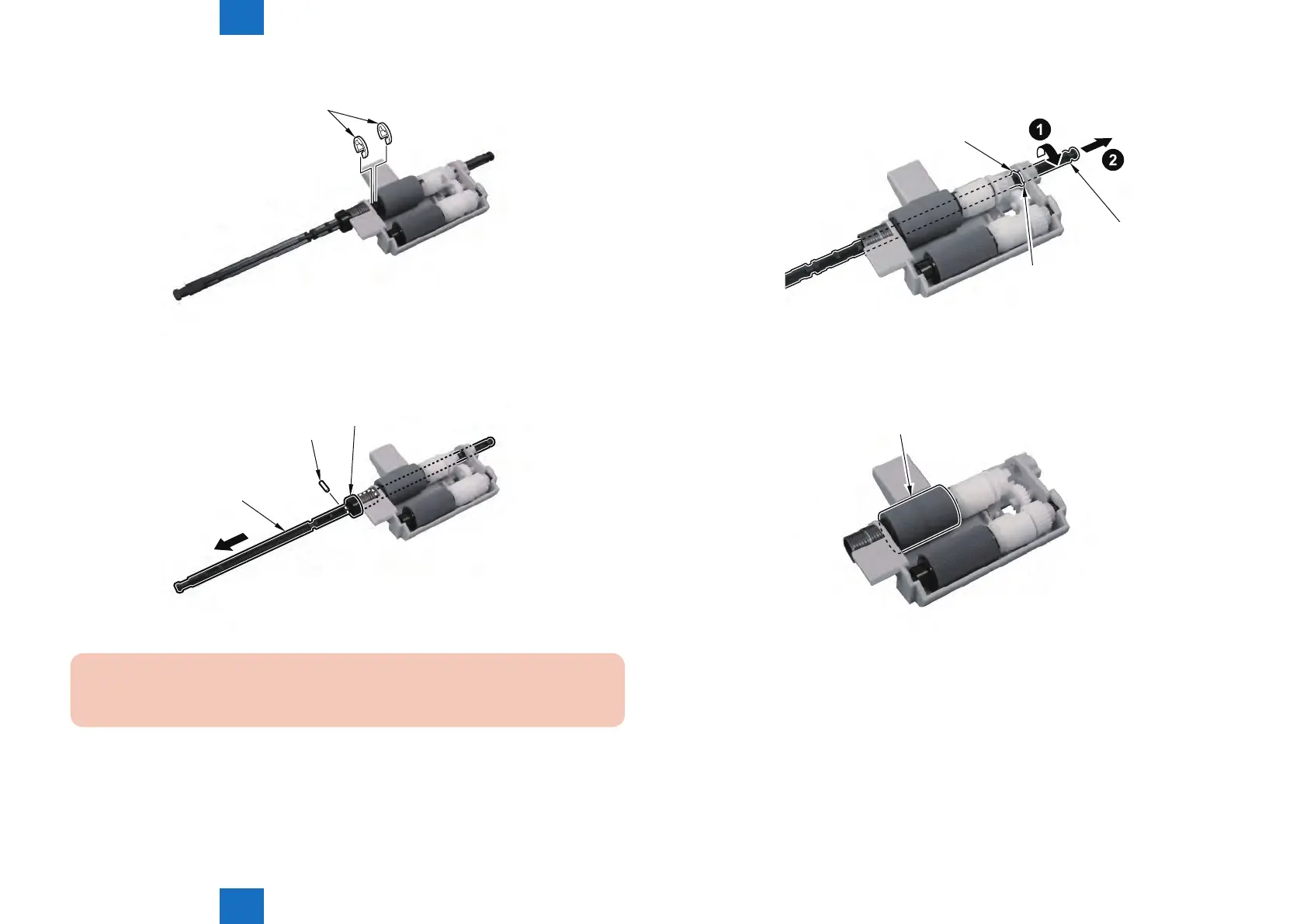
2) Remove the 2 Resin E-rings [1].
[1]
3) Displace the Roller Shaft [1] and Remove the Parallel Pin [2] and the Bushing [3].
[1]
[2]
[3]
CAUTION :
Since the Parallel Pin is very tiny, be Careful not to Lose it.
F-4-70
F-4-71
4) Turn the Shaft [1] In the Direction of the Arrow, Fit the Protrusion [2] With the Hole of the
Roller Holder and Pull It Out.
[1]
[2]
[2]
5) Remove the ADF Separation Roller [1].
[1]
F-4-72
F-4-73




 To Next Page