7
7
7-4
7-4
Error Codes > Error Code
Error Codes > Error Code
E
Code
Detail
Code
Item Description
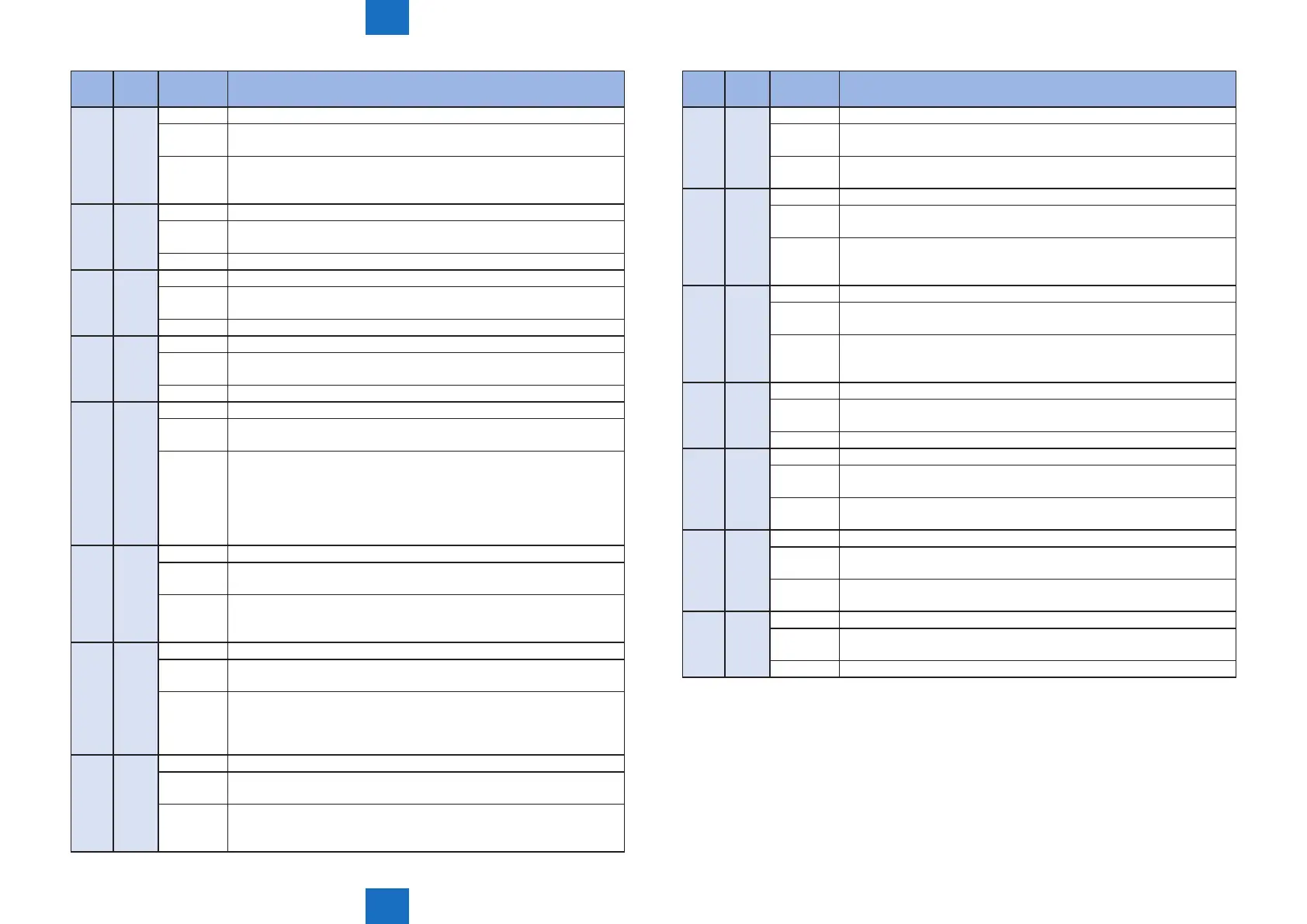
E736 0000 Title Communication error with CCU/modem
Detection
description
Communication error with CCU/modem.
NCU PCB type error.
Remedy
1. Install the set of the controller rmware.
2. Replace the NCU PCB.
3. Replace the Main Controller PCB.
E744 0001 Title Language le version error
Detection
description
Language le version was not matched with the main program.
Remedy Install the set of the controller rmware.
E744 0002 Title Language le size error
Detection
description
The size of the language le exceeded the upper limit.
Remedy Install the set of the controller rmware.
E744 1001 Title Firmware version error
Detection
description
Version of the main program and the version of the start-up program
was not matched.
Remedy Install the set of the controller rmware.
E744 4000 Title Engine ID error
Detection
description
Invalid engine connection was detected.
Remedy
1. Turn OFF and then ON the main power.
2. Check the Engine Controller PCB.
3. Install the Engine Controller PCB.
4. Install the set of the controller rmware.
5. Check the model code. (When the model code and the engine code
are mismatched, E744-4000 occurs.)
E744 5000 Title Error in the Control Panel PCB
Detection
description
Error in the Control Panel PCB (microcomputer).
Remedy
1. Check the Control Panel PCB, and install the rmware (PANEL).
2. Install the set of the controller rmware.
3. Replace the Main Controller PCB.
E744 6000 Title Communication error with the Wireless LAN PCB
Detection
description
Unable to communicate with the Wireless LAN.
Remedy
1. Turn OFF and then ON the main power.
2. Check the connection of the Wireless LAN.
3. Install the set of the controller rmware.
4. Replace the Main Controller PCB.
E744 7000 Title Main Controller PCB error
Detection
description
An error in the microcomputer which retains fax job information of the
Main Controller PCB.
Remedy
1. Install the rmware of BKUP.
2. Install the set of the controller rmware.
3. Replace the Main Controller PCB.
E
Code
Detail
Code
Item Description
E746 0000 Title Main Controller PCB error
Detection
description
Main Controller communication error occurred (other than scan).
Remedy
1. Install the set of the controller rmware.
2. Replace the Main Controller PCB.
E766 xxxx*1 Title Firmware error
Detection
description
An error due to the controller software occurred so that print could not
be proceeded.
Remedy Due to rmware error, the possibility of solving the error by replacing
the Main Controller PCB is low.
Check the installed engine again.
E766 8000 Title Digital registration error
Detection
description
Information at digital registration could not be obtained.
Remedy
1. Install the Engine Controller rmware.
2. Install the set of the controller rmware.
3. Replace the Engine Controller PCB.
E766 9000 Title Scanner power state error
Detection
description
An error was detected in power state of the Laser Scanner Unit.
Remedy ?
E804 0004 Title Controller Fan error
Detection
description
Since the startup of the Controller Fan, the Fan was locked for a
specied consecutive period of time.
Remedy
1. Check power supply to the Controller Fan.
2. Replace the Controller Fan.
E805 0000 Title Main Fan error
Detection
description
The Main Fan was locked for a specied consecutive period of time.
Remedy
1. Check the connection of the Main Fan.
2. Replace the Main Fan.
E808 0000 Title Failure detection of Low Voltage Power Supply PCB
Detection
description
Printer detected failure of the Low Voltage Power Supply PCB.
Remedy Replace the Engine Controller PCB.
T-7-4







 To Next Page