$IBOHJOHUIFEJTQMBZDPOUSBTU
The display can be difficult to see, depending on the ambient brightness and the viewing angle. If the display is
difficult to see, adjust the display contrast. The display contrast can be set to any of nine levels.
FY #FDBVTFUIFEJTQMBZJTGBJOUJODSFBTFUIFEJTQMBZDPOUSBTUUXPTUFQT
Intensity of the back light is not adjustable.
1SFTT<'VOD>
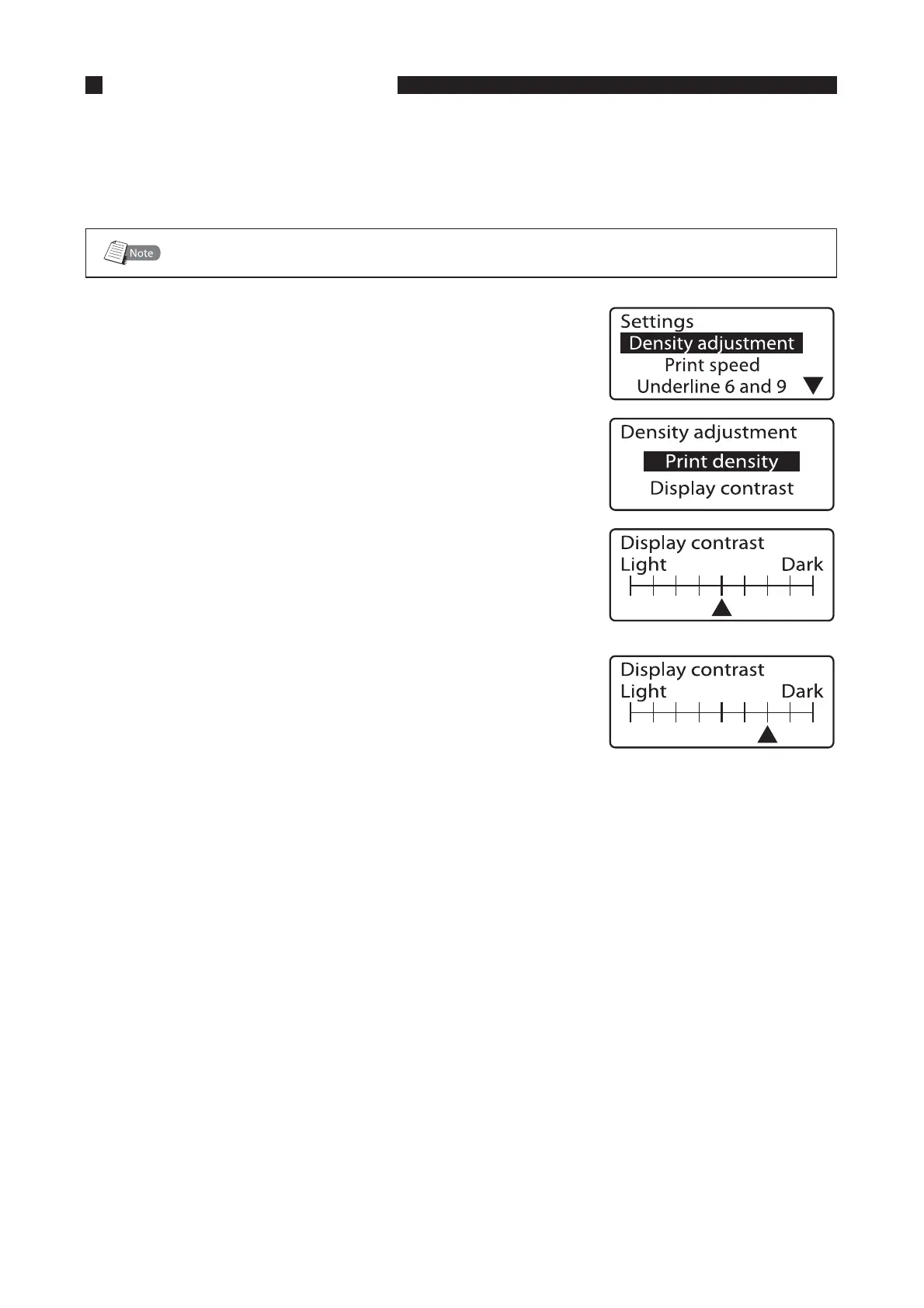
The Settings display appears.•
1SFTT<
▲
>PS<
▼
>UPTFMFDUi%FOTJUZBEKVTUNFOUuBOEUIFO
QSFTT<&OUFS>
The Density adjustment display appears.•
1SFTT<
▲
>PS<
▼
>UPTFMFDUi%JTQMBZDPOUSBTUuBOEUIFOQSFTT
<&OUFS>
The Display contrast display appears.•
<
▲
>JOEJDBUFTUIFDVSSFOUEJTQMBZDPOUSBTU
1SFTT<
►
>UXJDF
-PXFSJOHUIFEJTQMBZDPOUSBTU
Press [
◄
] to lower the display contrast.
1SFTT<&OUFS>
The display returns to the character input display.•




 To Next Page