"EWBODFE0QFSBUJPOT
1BSU
$PNCJOJOHQBHFT
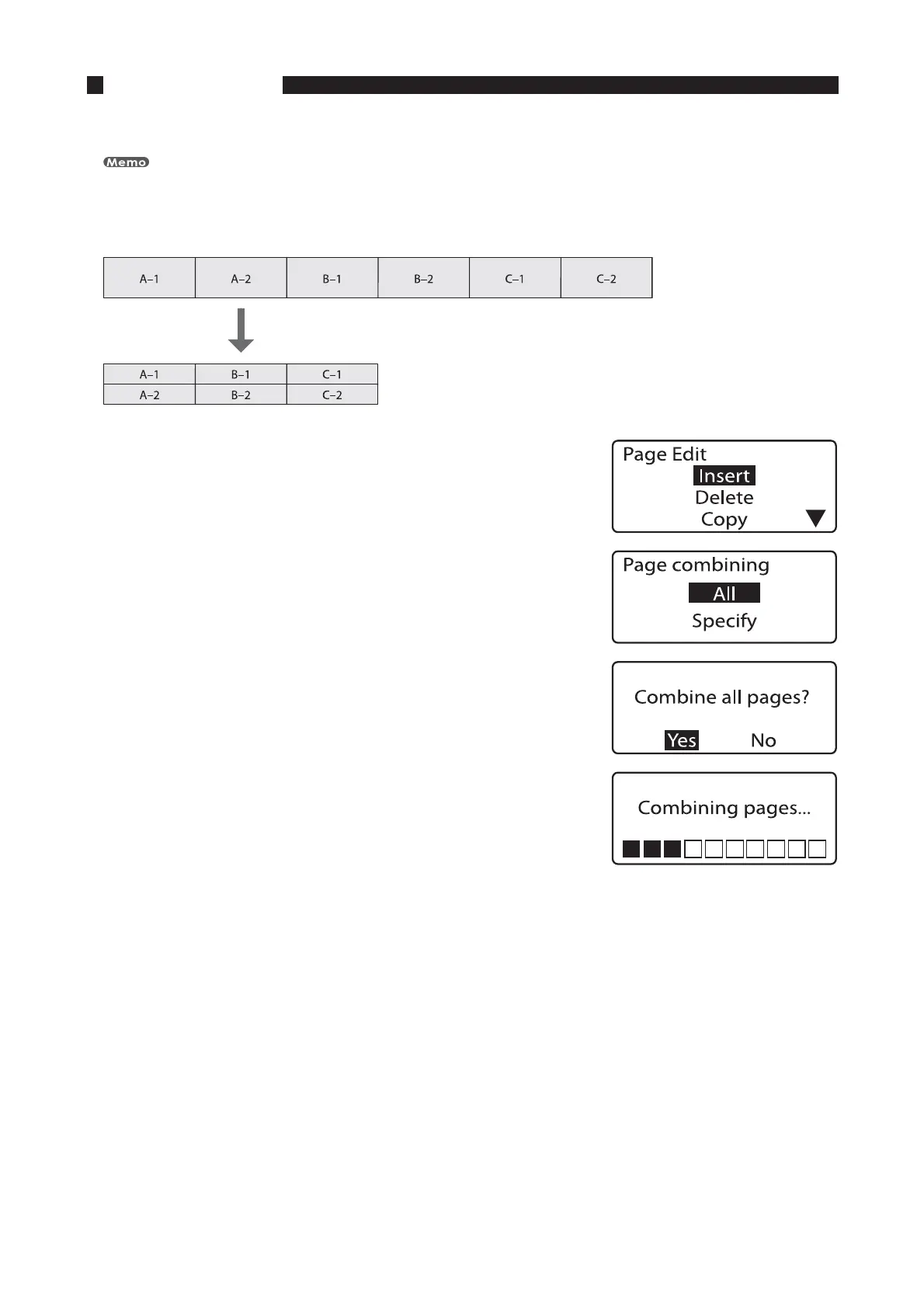
Two pages of data can be combined into two lines on a single page.
Data from the earlier page is on the first line, and that on the latter page is on the second line.
FY4JYQBHFTPGEBUBJTDPNCJOFEJOUPUISFFQBHFT
1SFTT<&EJU>
The Page Edit display appears.•
1SFTT<
▲
>PS<
▼
>UPTFMFDUi$PNCJOJOHuBOEUIFOQSFTT<&OUFS>
The Page combining selection display appears. •
1SFTT<
▲
>PS<
▼
>UPTFMFDUi"MMuBOEUIFOQSFTT<&OUFS>
The combine confirmation display appears. •
1SFTT<
◄
>PS<
►
>UPTFMFDUi:FTuBOEUIFOQSFTT<&OUFS>
After the display shown at right is displayed, the final combined
page appears.
•









 To Next Page