"EWBODFE0QFSBUJPOT
1BSU
"EEJOHBGSBNFUPDIBSBDUFST
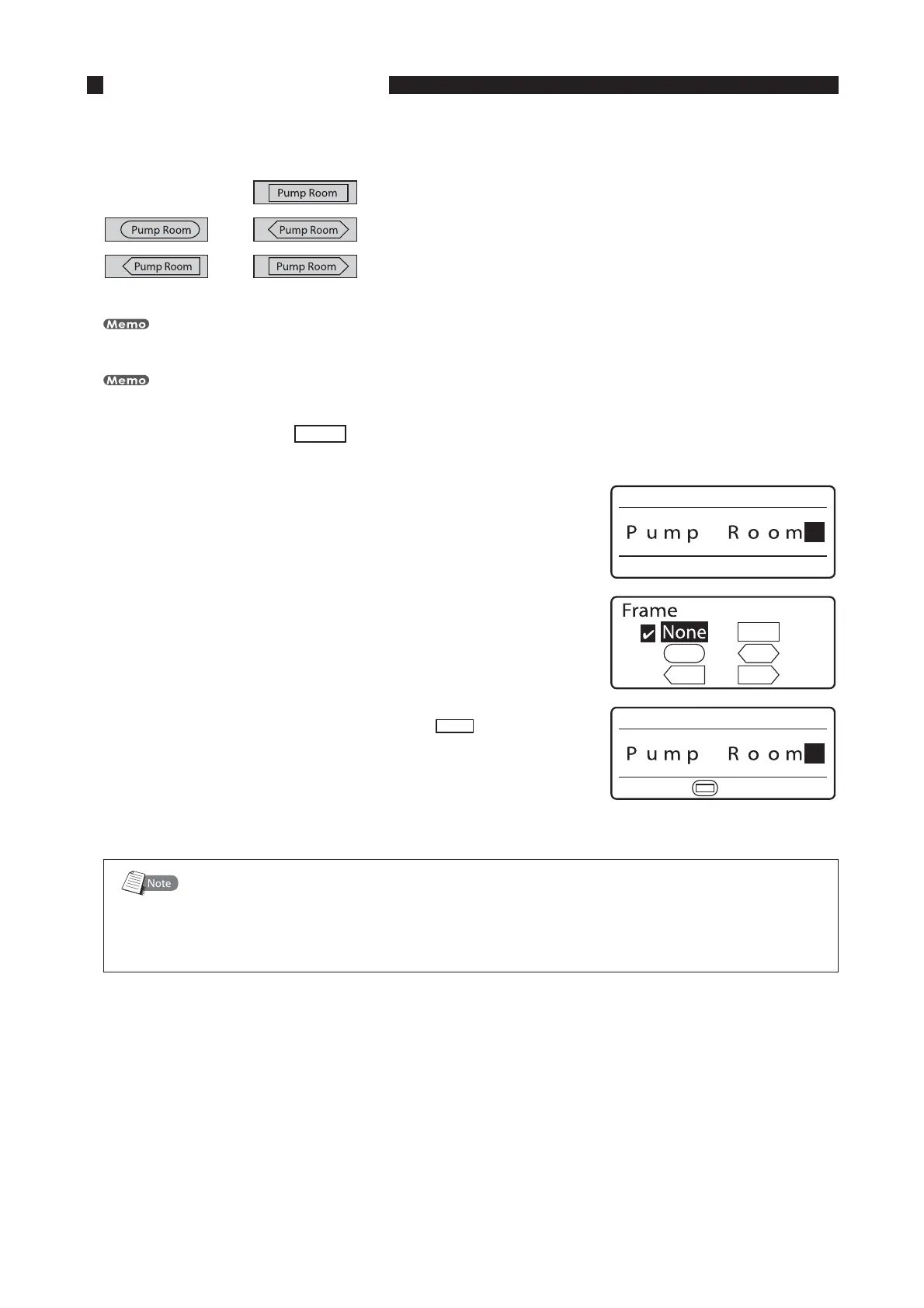
It is possible to add various types of frames to characters as shown below. Initially, the printer is set to print
without frames.
Different types of frames can be specified for individual pages.
When the segment length is shorter than 6 mm, you cannot set a frame.
FY "EEBTRVBSFGSBNF UPUFYU
*OQVUUIFDIBSBDUFST
1SFTT<'SBNF>
The frame selection display appears.•
1SFTT<
▲
>PS<
▼
><
◄
>BOE<
►
>UPTFMFDUi
uBOEUIFO
QSFTT<&OUFS>
The display returns to the character input display; you can now
begin printing with the new frame.
•
5IFTFMFDUFEGSBNFBQQFBST
'SBNFTXIFOVTJOHUXPMJOFPSUISFFMJOFQSJOUJOH
Depending on character size, segment length, and so forth, frames may not print correctly
around text that is printed on two lines or three lines. Furthermore, frames may not print
correctly around large-size characters, even when printing on just one line.








 To Next Page