1SJOUJOHPO1MBUFT
The procedure for printing on plates is shown below.
*OTUBMMDBTTFUUFT
*OTFSUQMBUF
5VSOUIFQPXFSTXJUDIPO
*OQVUDIBSBDUFST
1SJOU
*OTUBMMDBTTFUUFT
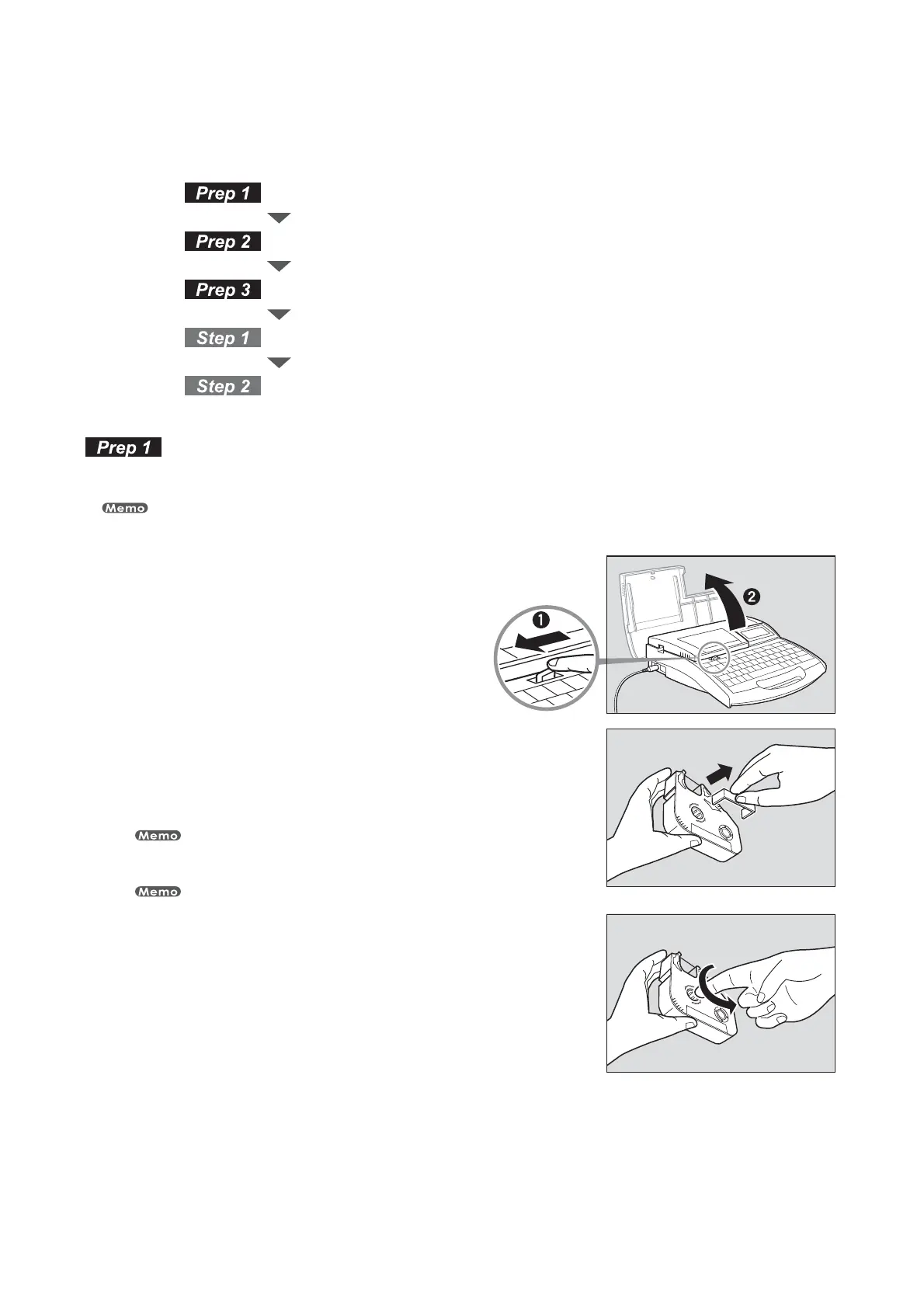
Install the plate ribbon cassette and the plate attachment.
This device may not print properly on some types of plate. Please contact your nearest dealer for details.
0QFOUIFDPWFS
5BLFVQBOZTMBDLJOUIFSJCCPO
Use the plate ribbon cassette.
Remove the stopper and then take up any slack in the ribbon.
The printer cannot detect the ribbon if it has any slack in the ribbon. Always be sure to
take up slack in the ribbon when installing the ribbon cassette.
Dispose the removed stopper according to local government regulation.
•
•








 To Next Page