"EWBODFE0QFSBUJPOT
1BSU
$IBOHJOHUIFTQBDJOHCFUXFFODIBSBDUFST
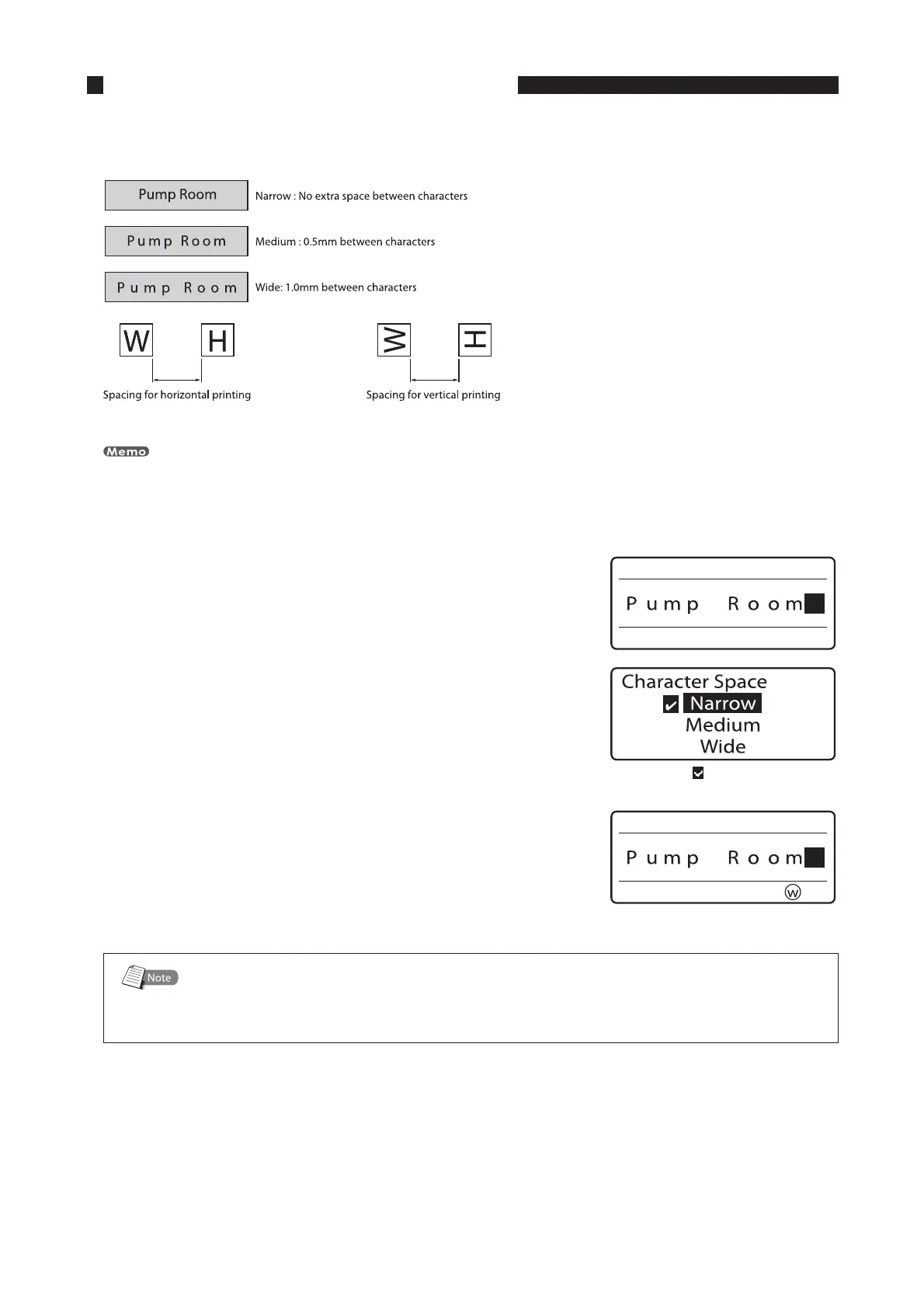
The spacing between printed characters can be changed as desired. There are three possible spacings of printed
characters, as shown below. Initially, “Narrow” is selected.
The spacing between printed characters can be changed for individual pages.
FY TFUUIFTQBDJOHCFUXFFODIBSBDUFSTUPi8JEFu
*OQVUUIFDIBSBDUFST
1SFTT<$IBS4QBDF>
The Character Space selection display appears.•
"DIFDLNBSL JTEJTQMBZFEOFYUUPUIF
DVSSFOUMZTFMFDUFEDIBSBDUFSTQBDJOH
1SFTT<
▲
>PS<
▼
>UPTFMFDUi8JEFuBOEUIFOQSFTT<&OUFS>
The display returns to the character input display; you can now
begin printing with the new spacing.
•
5IFTFMFDUFEDIBSBDUFSTQBDJOHBQQFBST
$IBSBDUFSTQBDJOHTUIBUDBOOPUCFTFMFDUFEQSJOUFE
If the segment length is specified by the user, some character spacings might not be
available, depending on the text data that is input.
•









 To Next Page