$IBSBDUFS*OQVU
1BSU
*OQVUUJOH4ZNCPMT
*OQVUUJOHTZNCPMT
Input the following characters:
FY
ų
When the character size is set to 1.3 mm, no symbol can be entered.
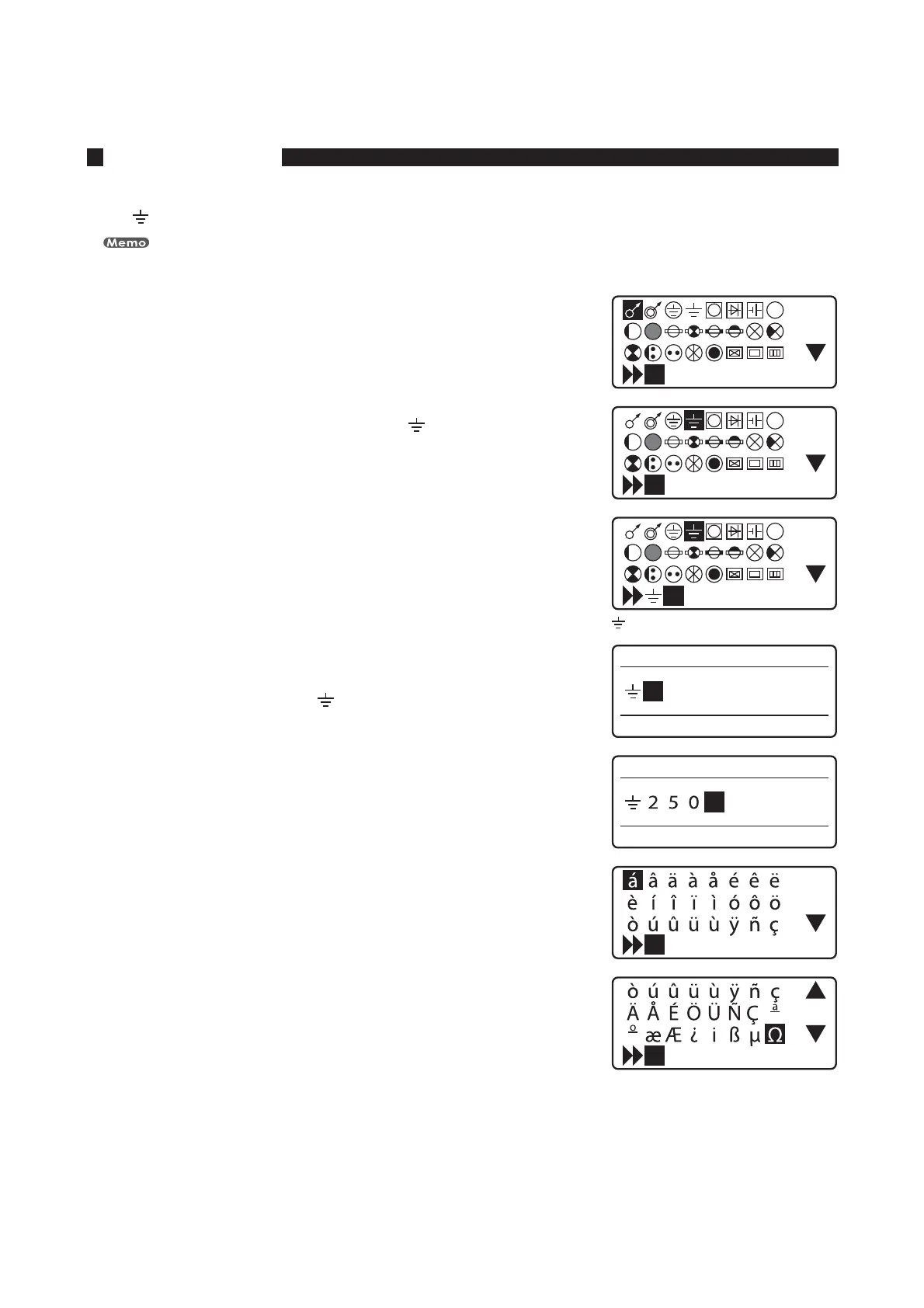
1SFTT<4ZNCPM>
The symbol selection display appears.•
1SFTT<
◄
><
▲
><
►
>PS<
▼
>UPTFMFDUi
u
1SFTT<&OUFS>
*GZPVJOQVUBOJODPSSFDUTZNCPM
Delete the symbol by holding down the [Alt] key while pressing [Back Space] and
then input the correct one. You can also move the cursor by holding down the [Alt]
key while pressing [◄] or [►].
JTEJTQMBZFE
)PMEEPXO<"MU>BOEQSFTT<&OUFS>
This inputs the symbol “
”.•
*OQVUiu
*GZPVJOQVUBOJODPSSFDUDIBSBDUFS
Press [Back Space] to delete the character and then input the correct one.
1SFTT<4ZNCPM>
The symbol selection display appears.•
1SFTT<
◄
><
▲
><
►
>PS<
▼
>UPTFMFDUiųu








 To Next Page