"EWBODFE0QFSBUJPOT
1BSU
4BWJOH3FUSJFWJOHBOE%FMFUJOH$IBSBDUFS
%BUB
'JMFTBOE'PMEFST
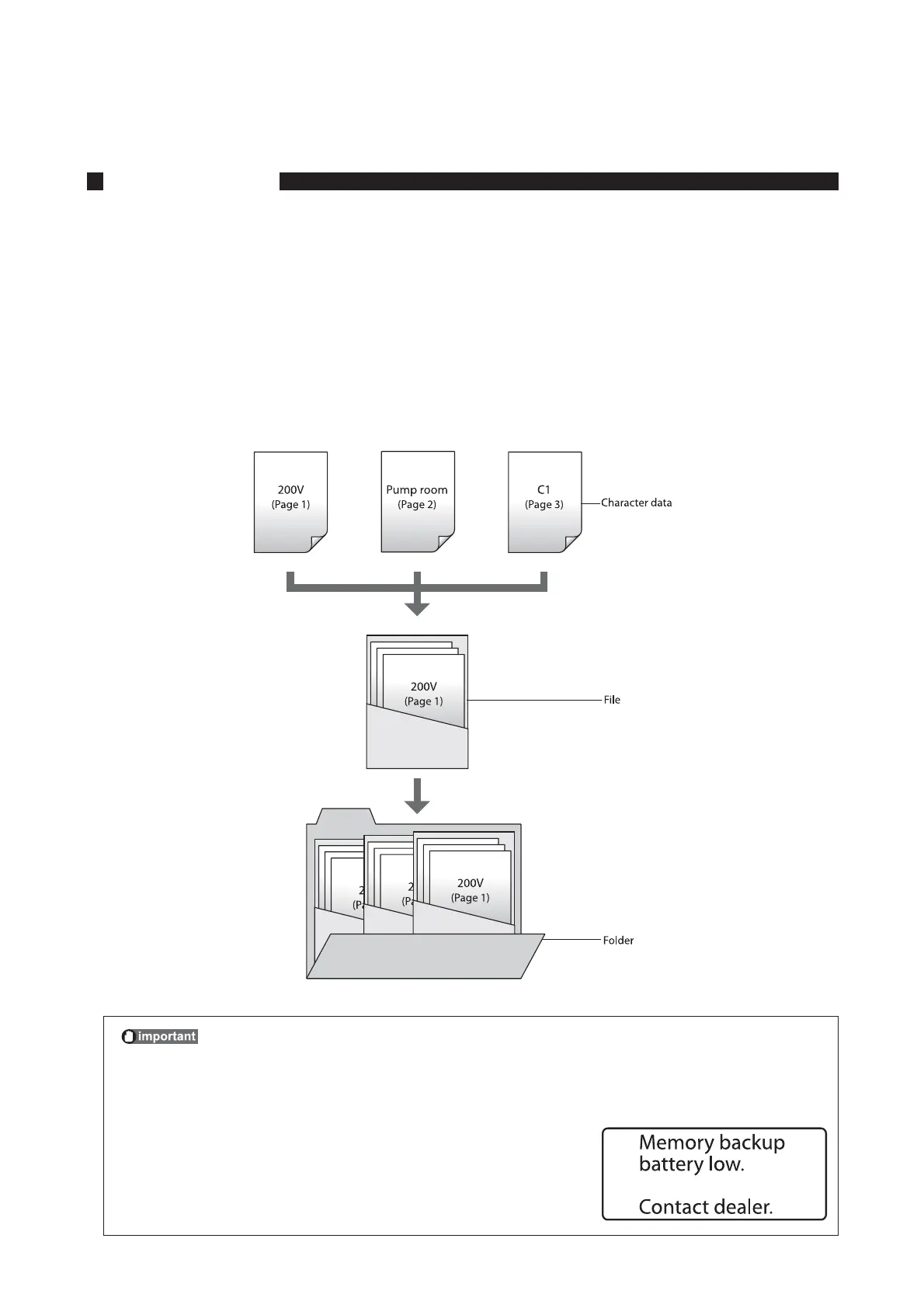
You can save character data that you have created in “files” in the printer’s internal memory. When you save a
file, you have to assign it a file name; the purpose of the file name is to allow you to quickly identify the data
that is stored in that file.
The printer also has three preset folders; when you save a file, you can save the file in one of these three
folders. In other words, a folder can be viewed as a “container” or “holder” of files. Naturally, multiple files
can be stored in a folder.*
Although files can be deleted, folders cannot. Initially, the folders are named “Folder 1”, “Folder 2”, and “Folder
3”, but you can rename these folders as desired.
* One folder can hold up to 50 files, assuming each file contains approximately 100 characters.
5PQSFWFOUBDDJEFOUBMFSBTVSFPGUIFTBWFEEBUB
The machine has a built-in memory backup battery for retaining the saved data. If the
following message appears on the screen, make a backup copy of the saved data and save it
to a PC immediately, then contact your nearest dealer.








 To Next Page