3FOBNJOHBGPMEFS
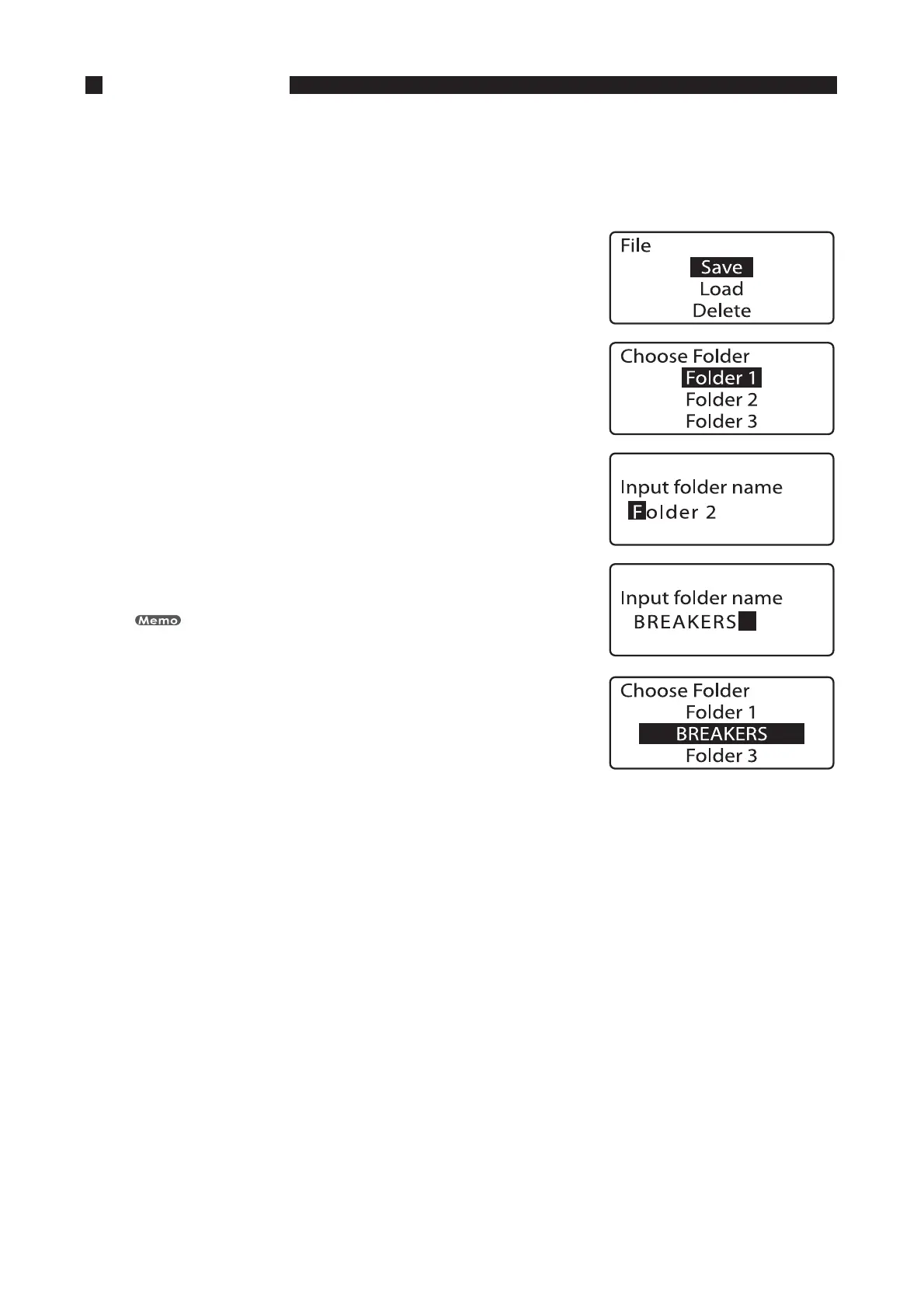
Although the printer has three predefined folders (“Folder 1”, “Folder 2”, and “Folder 3”), these folders can be
renamed freely.
FY3FOBNFi'PMEFSuBTi#3&",&34u
1SFTT<'JMF>
The file operation selection display appears.•
1SFTT<
▲
>PS<
▼
>UPTFMFDUi4BWFuBOEUIFOQSFTT<&OUFS>
The Choose Folder display appears.•
1SFTT<
▲
>PS<
▼
>UPTFMFDUi'PMEFSuBOEUIFOQSFTT<4QBDF>
The Input folder name display appears.
Use [Del] to delete all of the characters.
•
•
*OQVUi#3&",&34u
If you accidentally input an incorrect character, press [Back Space] to delete it and
then input the correct character.
1SFTT<&OUFS>
The display returns to the Choose Folder screen.•
1SFTT<4IJGU><$BOD>
The display returns to the character input display.•




 To Next Page