$IBSBDUFS*OQVU
1BSU
*OTFSUNPEFBOEPWFSXSJUFNPEF
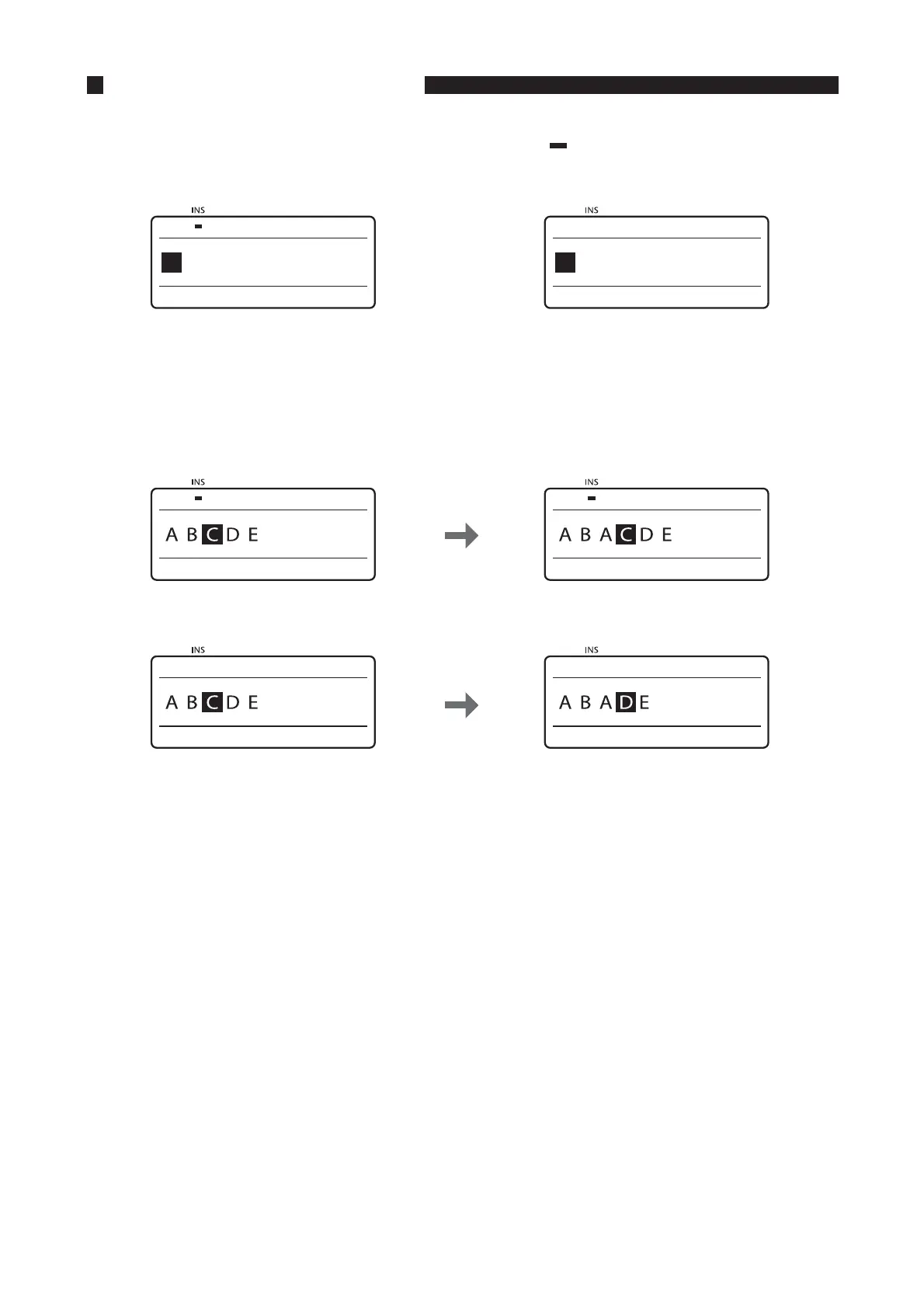
Press the [Ins] key to toggle between “insert mode” and “overwrite mode.” To determine which is the current
mode, check the upper left corner of the display. If the insert mark (
) appears, input is in the insert mode;
otherwise, input is in the overwrite mode.
*OTFSUNPEF 0WFSXSJUFNPEF
Starting from the state shown in Screen 1 below, if “A” is input in insert mode, the display will change to
“ABACDE”, since the character that is input is inserted to the left of the cursor. If the same operation is
performed in overwrite mode (Screen 2), the result is “ABADE”, since the “C” where the cursor is located is
replaced with “A”.
4DSFFOJOJOTFSUNPEF 5IFDIBSBDUFSJTJOTFSUFEUPUIFMFGUPGUIF
DVSTPS
4DSFFOJOPWFSXSJUFNPEF 5IFDIBSBDUFSXIFSFUIFDVSTPSJT
QPTJUJPOFEJTPWFSXSJUUFOXJUIUIFOFX
DIBSBDUFS









 To Next Page