"EWBODFE0QFSBUJPOT
1BSU
*OTFSUJOHQBHFT
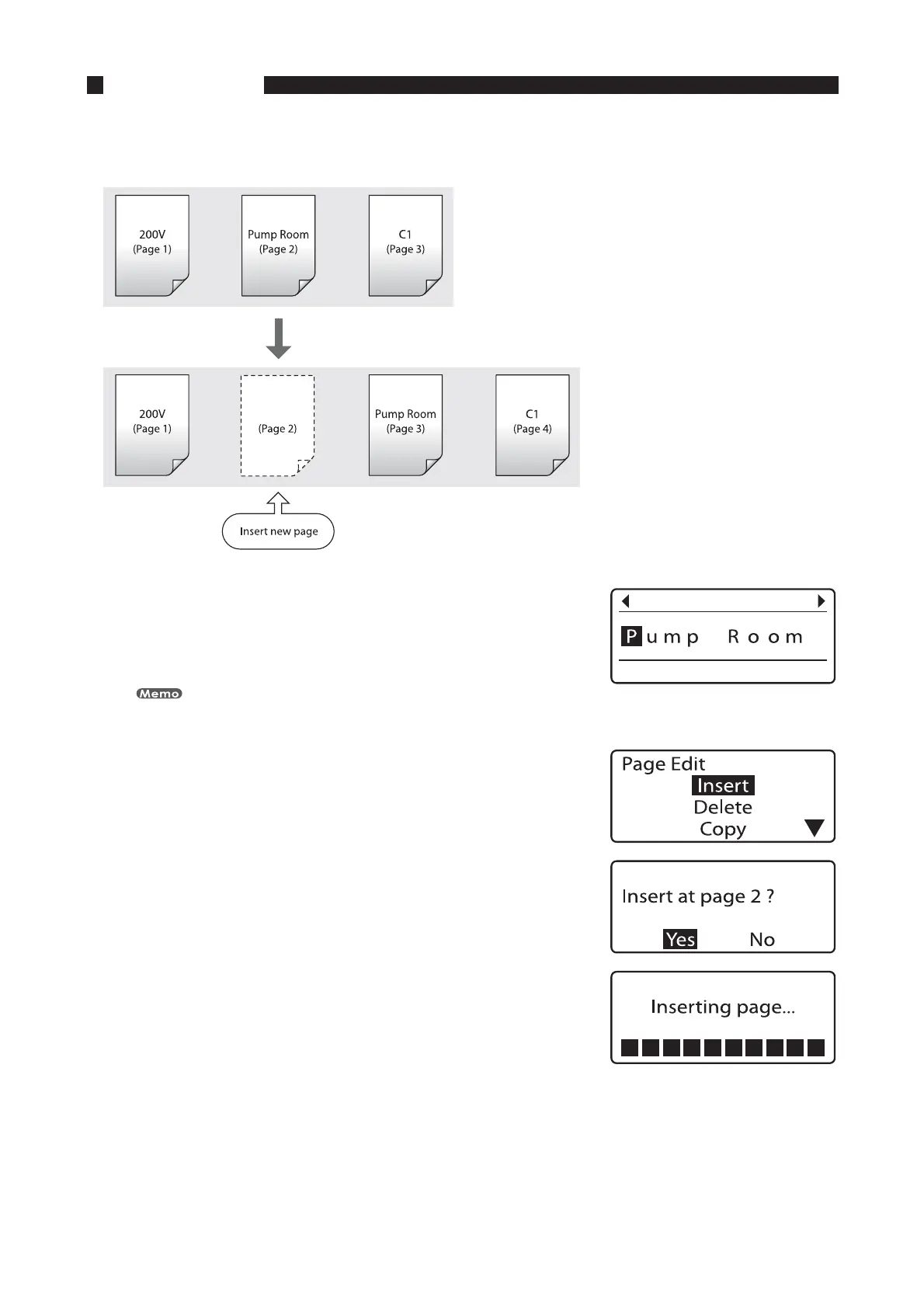
It is possible to insert blank pages. Use this function if you want to insert a new page in a specific location after
you have already input character data for several pages.
FY *OTFSUBCMBOLQBHFCFUXFFOQBHFBOEQBHF
1SFTT<4IJGU><
◄
>PS<4IJGU><
►
>BOEEJTQMBZQBHF
Because the blank page will be inserted in front of the currently
displayed page, display the page that will follow the blank page.
You can press [Page] to quickly find out which page is currently being
displayed. Press any key to return to the character input display.
•
1SFTT<&EJU>
The Page Edit display appears.•
1SFTT<
▲
>PS<
▼
>UPTFMFDUi*OTFSUuBOEUIFOQSFTT<&OUFS>
The insert confirmation display appears.•
1SFTT<
◄
>PS<
►
>UPTFMFDUi:FTuBOEUIFOQSFTT<&OUFS>
After the display shown at right appears, the newly inserted
page is displayed. This indicates that a new page has been
inserted between page 1 and page 2.
•









 To Next Page