#BTJD0QFSBUJPOT
1BSU
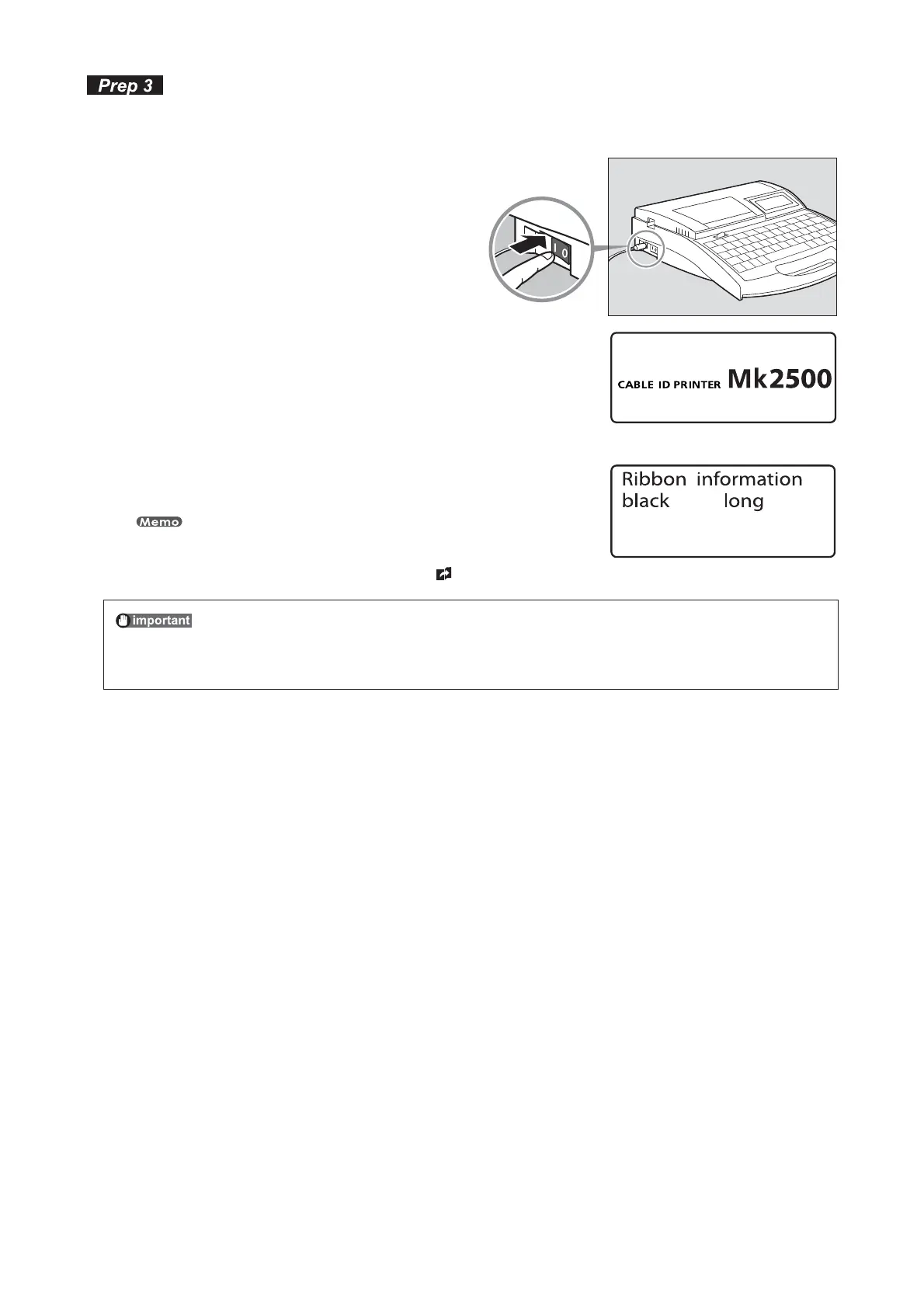
5VSOUIFQPXFSTXJUDIPO
Before turning the power switch on, make sure that the cassettes and tube have been inserted properly, that the
cover is closed, and that the AC adapter has been properly connected.
1SFTTUIFi]uTJEFPGUIFQPXFSTXJUDI
The startup display appears.•
4UBSUVQEJTQMBZ
Character input display appears after displaying the ribbon cassette
information.
The character input display appears immediately if no ribbon cassette is installed.
* If the display remains blank, refer to “Troubleshooting” (
page 147).
•
3JCCPODBTTFUUFJOGPSNBUJPOEJTQMBZ
%POPUUVSOUIFQPXFSTXJUDIPOBOEPGGSBQJEMZ
Turning the power switch on and off rapidly and repeatedly can cause misoperation and
the loss of stored data.







 To Next Page