"EWBODFE0QFSBUJPOT
1BSU
1SFTT<
▲
>PS<
▼
>UPTFMFDUi5FYUTFUUJOHTuBOEUIFOQSFTT
<&OUFS>
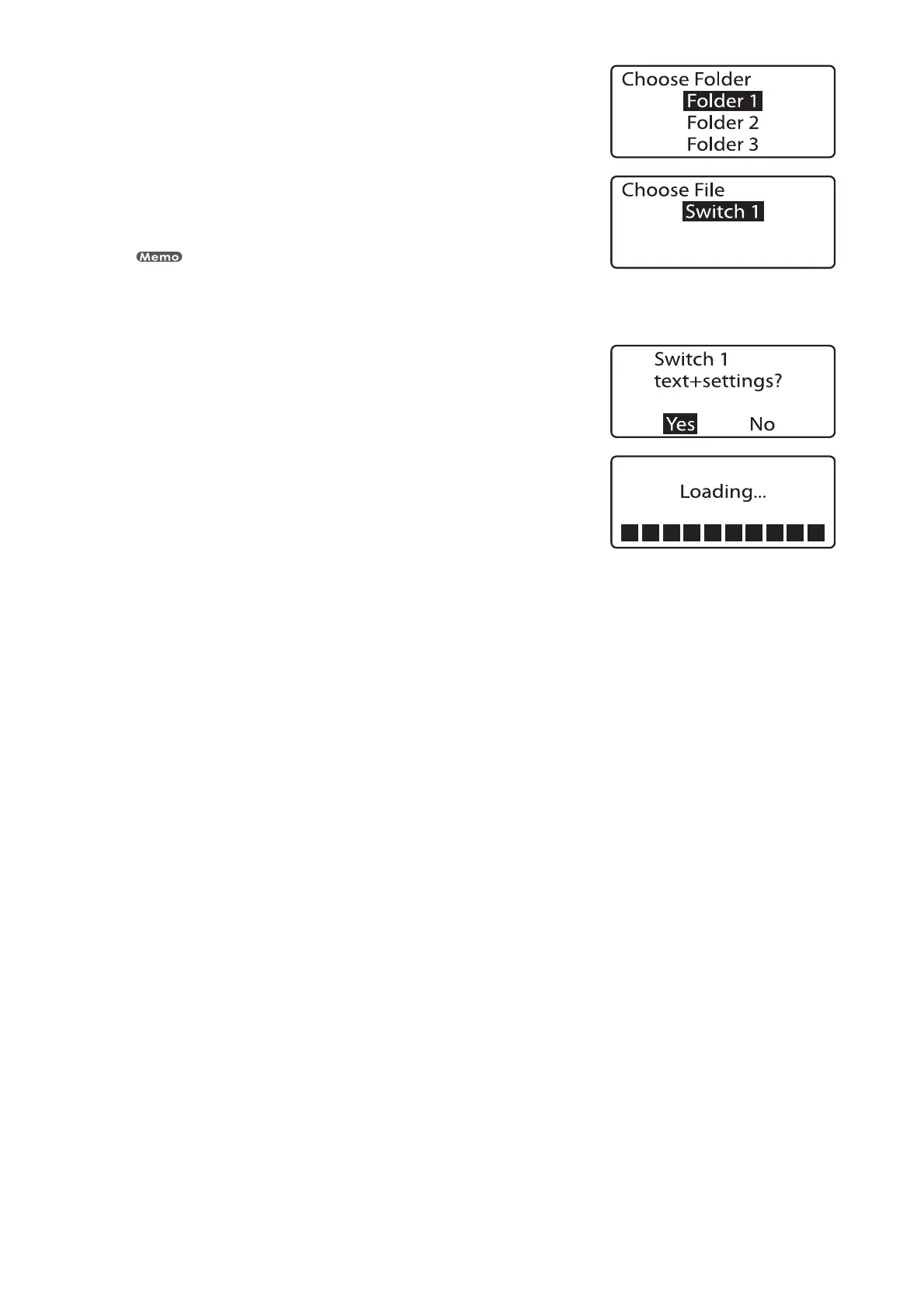
The Choose Folder display appears.•
1SFTT<
▲
>PS<
▼
>UPTFMFDUi'PMEFSuBOEUIFOQSFTT<&OUFS>
The Choose File display appears.
If no files have been saved in the selected folder, the message “No files in selected
folder.” appears and the display returns to the folder selection display.
“*” appears next to the names of files that cannnot be loaded because of their data size.
•
1SFTT<
▲
>PS<
▼
>UPTFMFDUi4XJUDIuBOEUIFOQSFTT<&OUFS>
The “Add” loading confirmation display appears. •
1SFTT<
◄
>PS<
►
>UPTFMFDUi:FTuBOEUIFOQSFTT<&OUFS>
After the display at right appears, the last page of the loaded
character data is displayed.
•





 To Next Page