1.
Press the
power
button.
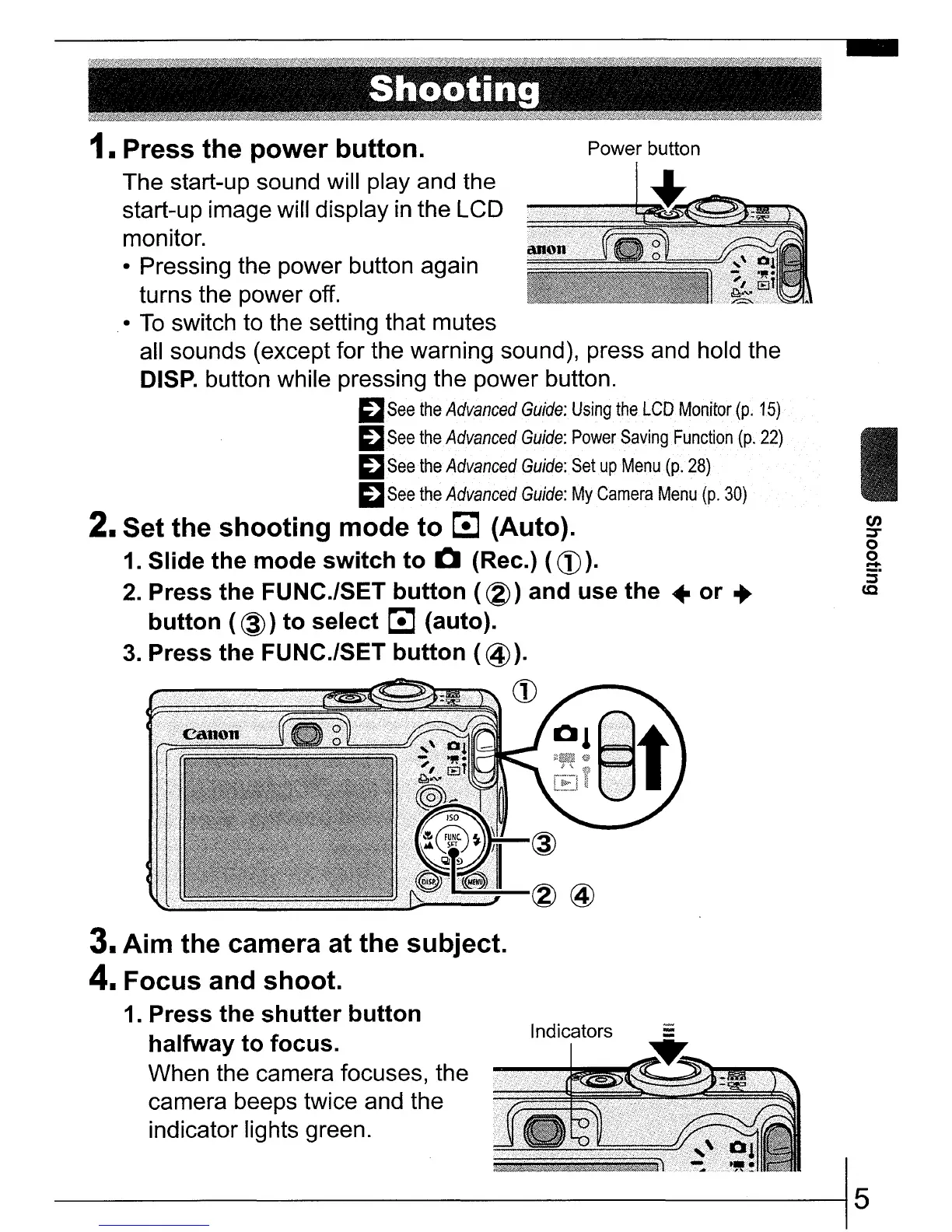
Power button
The start-up sound will play and the
start-up image will display
in
the LCD
monitor.
• Pressing the power button again
turns the power off.
•
To
switch to the setting that mutes
all sounds (except for the warning sound), press and hold the
DISP.
button while pressing the power button.
~
See
the
Advanced
Guide:
Using
the
LCD
Monitor
(p.
15)
~
See
the
Advanced
Guide:
Power
Saving
Function
(po
22)
~
See
the
Advanced
Guide:
Set
up
Menu
(p.
28)
~
See
the
Advanced
Guide:
My
Camera
Menu
(p.
30)
2. Set the
shooting
mode
to
~
(Auto).
1.
Slide the
mode
switch
to
Q (Rec.) (CD).
2.
Press the FUNC./SET
button
(~)
and use
the
•
or
..
button
(@)
to
select
~
(auto).
3.
Press
the
FUNC./SET
button
(
@).
CD
3.
Aim
the camera at the subject.
4.
Focus
and shoot.
1.
Press the
shutter
button
halfway
to
focus.
When the camera focuses, the
camera beeps twice and the
indicator lights green.
---------------------------15















 To Next Page