EasyManua.ls Logo

Canon UC10 - Page 11

Canon UC10
104 pages
Print Icon
To Next Page IconTo Next Page
To Previous Page IconTo Previous Page
Loading...
Before
Using
Your
Camera
9
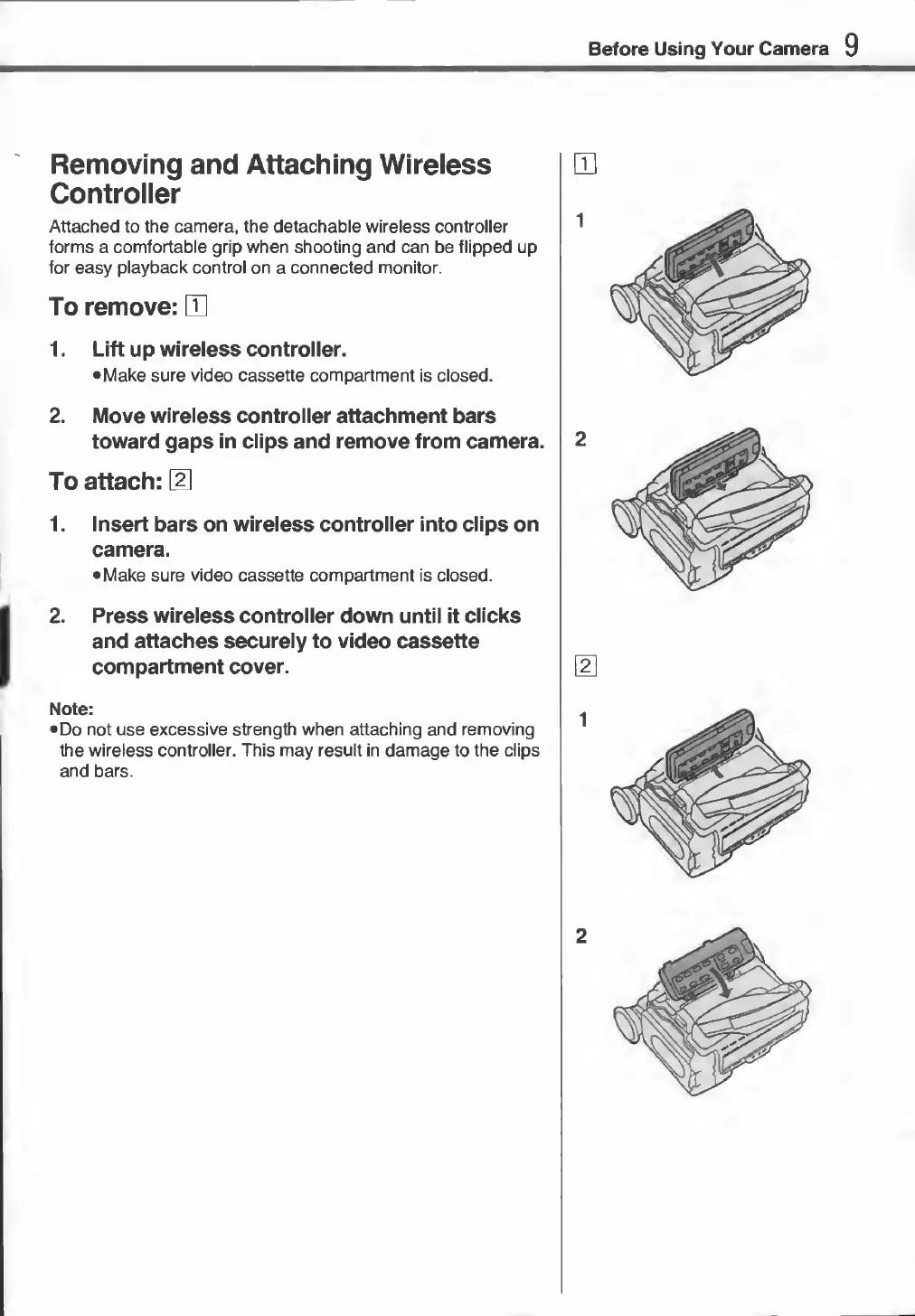
Removing
and
Attaching
Wireless
Controller
Attached
to
the
camera,
the
detachable
wireless
controller
forms
a
comfortable
grip
when
shooting
and
can
be
flipped
up
for
easy
playback
control
on
a
connected
monitor.
To
remove:
E
1.
Lift
up
wireless
controller.
•
Make
sure
video
cassette
compartment
is
closed.
2.
Move
wireless
controller
attachment
bars
toward
gaps
in
clips
and
remove
from
camera.
To
attach:
El
1.
Insert
bars
on
wireless
controller
into
clips
on
camera.
•
Make
sure
video
cassette
compartment
is
closed.
1
2
.
Press
wireless
controller
down
until
it
clicks
and
attaches
securely
to
video
cassette
compartment
cover.
Note:
•
Do
not
use
excessive
strength
when
attaching
and
removing
the
wireless
controller.
This
may
result
in
damage
to
the
clips
and
bars.