EasyManua.ls Logo

Canon UC10 - Page 12

Canon UC10
104 pages
Print Icon
To Next Page IconTo Next Page
To Previous Page IconTo Previous Page
Loading...
10
Operation
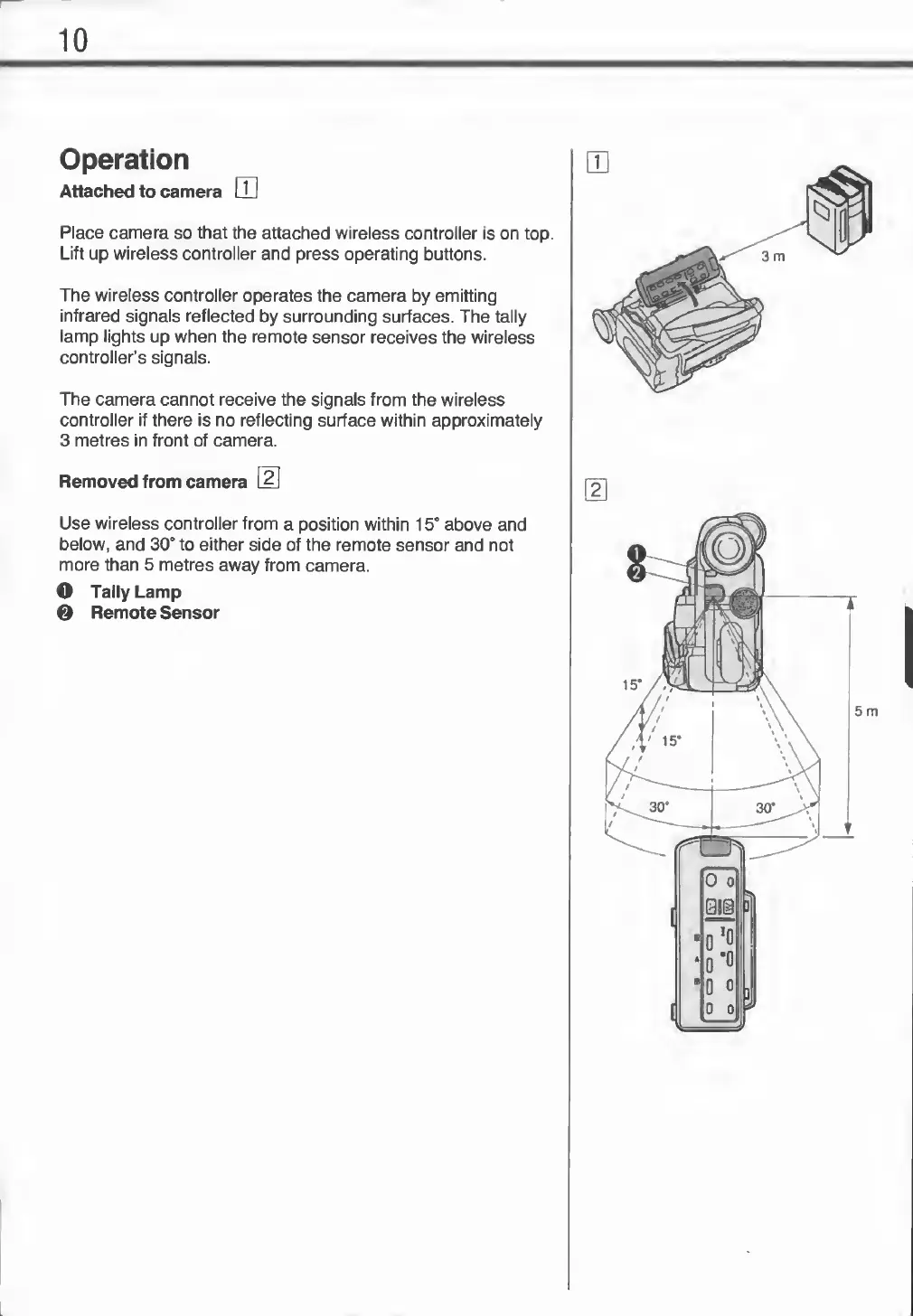
Attached
to
camera
LU
Place
camera
so
that
the
attached
wireless
controller
is
on
top.
Lift
up
wireless
controller
and
press
operating
buttons.
The
wireless
controller
operates
the
camera
by
emitting
infrared
signals
reflected
by
surrounding
surfaces.
The
tally
lamp
lights
up
when
the
remote
sensor
receives
the
wireless
controller’s
signals.
The
camera
cannot
receive
the
signals
from
the
wireless
controller
if
there
is
no
reflecting
surface
within
approximately
3
metres
in
front
of
camera.
Removed
from
camera
2
Use
wireless
controller
from
a
position
within
15°
above
and
below,
and
30°
to
either
side
of
the
remote
sensor
and
not
more
than
5
metres
away
from
camera.
O
Tally
Lamp
©
Remote
Sensor
I
5
m