EasyManua.ls Logo

Canon UC10 - Page 43

Canon UC10
104 pages
Print Icon
To Next Page IconTo Next Page
To Previous Page IconTo Previous Page
Loading...
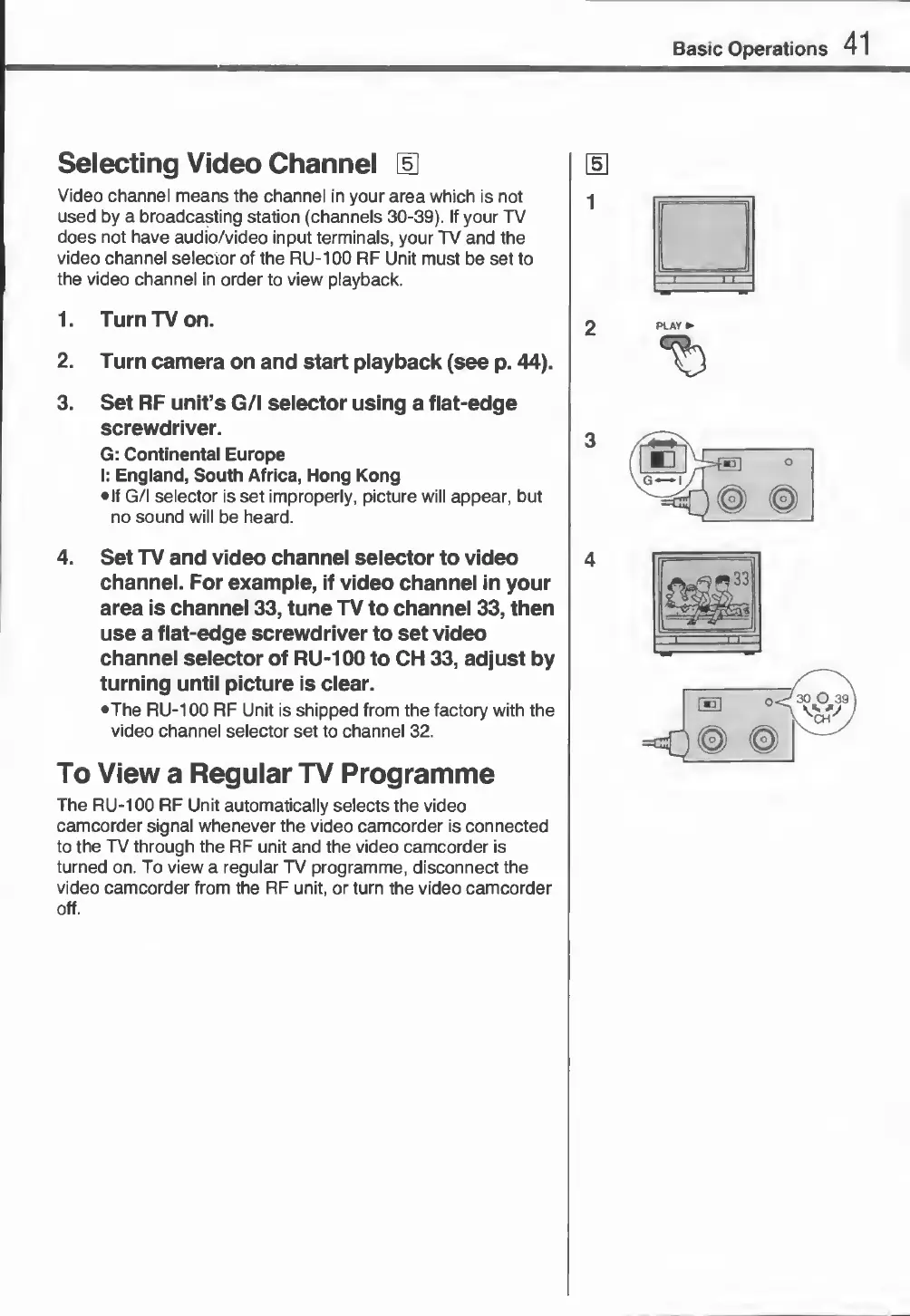
Selecting
Video
Channel
[U
Video
channel
means
the
channel
in
your
area
which
is
not
used
by
a
broadcasting
station
(channels
30-39).
If
your
TV
does
not
have
audio/video
input
terminals,
your
TV
and
the
video
channel
selector
of
the
RU-100
RF
Unit
must
be
set
to
the
video
channel
in
order
to
view
playback.
5
1
1.
Turn
TV
on.
2.
Turn
camera
on
and
start
playback
(see
p.
44).
3.
Set
RF
unit’s
G/l
selector
using
a
flat-edge
screwdriver.
G:
Continental
Europe
I:
England,
South
Africa,
Hong
Kong
•
If
G/l
selector
is
set
improperly,
picture
will
appear,
but
no
sound
will
be
heard.
4.
S
et
TV
and
video
channel
selector
to
video
channel.
For
example,
if
video
channel
in
your
area
is
channel
33,
tune
TV
to
channel
33,
then
use
a
flat-edge
screwdriver
to
set
video
channel
selector
of
RU-100
to
CH
33,
adjust
by
turning
until
picture
is
clear.
•The
RU-100
RF
Unit
is
shipped
from
the
factory
with
the
video
channel
selector
set
to
channel
32.
4
To
View
a
Regular
TV
Programme
The
RU-100
RF
Unit
automatically
selects
the
video
camcorder
signal
whenever
the
video
camcorder
is
connected
to
the
TV
through
the
RF
unit
and
the
video
camcorder
is
turned
on.
To
view
a
regular
TV
programme,
disconnect
the
video
camcorder
from
the
RF
unit,
or
turn
the
video
camcorder
off.
Basic
Operations
41
I
'
1~T
PLAY
►
t)