EasyManua.ls Logo

Canon UC10 - Page 70

Canon UC10
104 pages
Print Icon
To Next Page IconTo Next Page
To Previous Page IconTo Previous Page
Loading...
68
Blank
Tape
Search
(B.T.S.)
(CAMERA
Mode)
1
M
E
NU
2
The
blank
tape
search
function
allows
you
to
locate
the
end
of
the
recorded
section
of
a
tape.
This
function
is
useful
when
you
want
to
continue
recording
on
a
partially
recorded
tape.
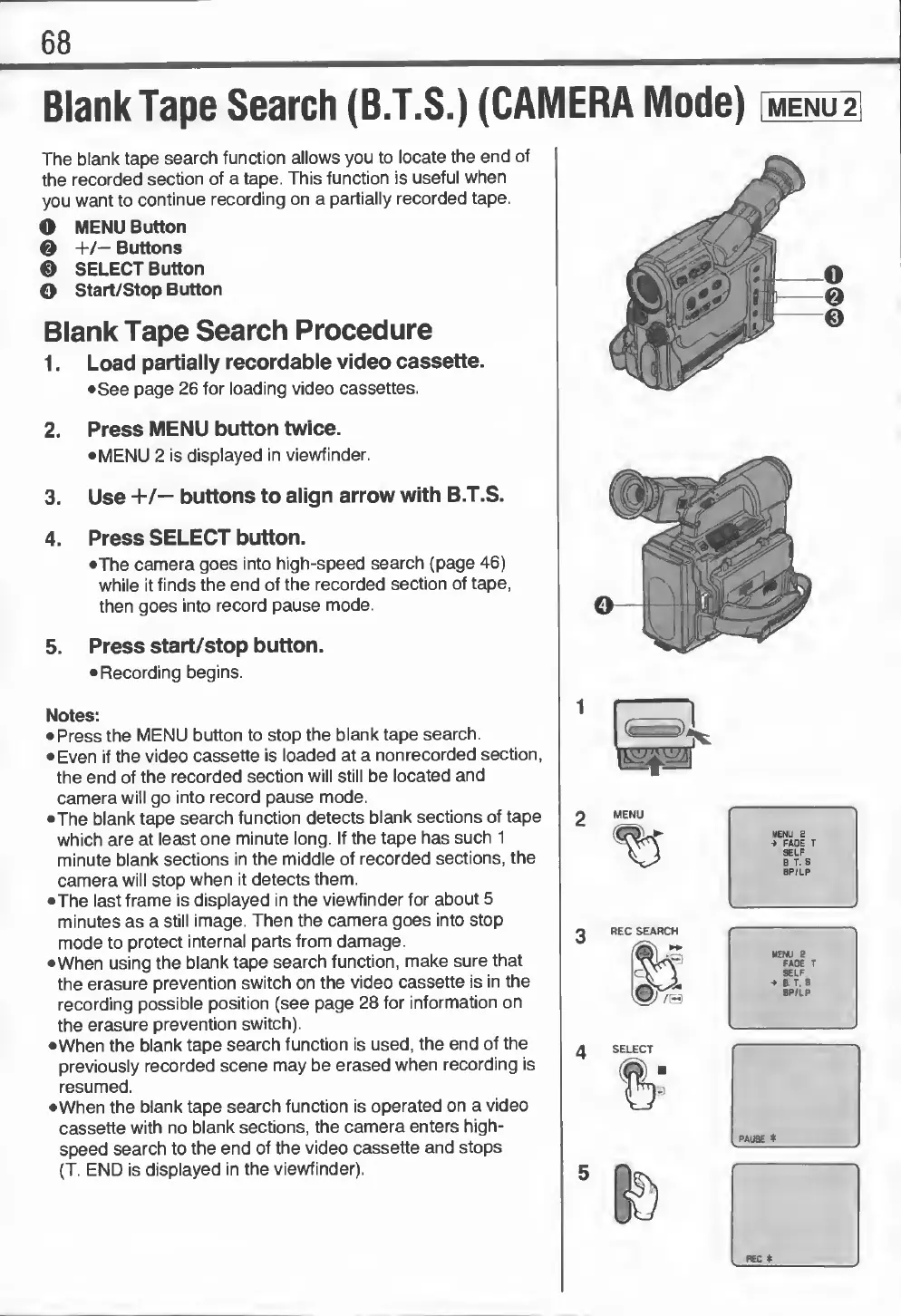
O
MENU
Button
0
+/—
Buttons
0
SELECT
Button
O
Start/Stop
Button
Blank
Tape
Search
Procedure
1.
L
oad
partially
recordable
video
cassette.
•
See
page
26
for
loading
video
cassettes.
2.
Press
MENU
button
twice.
•
MENU
2
is
displayed
in
viewfinder.
3.
Use
+/—
buttons
to
align
arrow
with
B.T.S.
4.
Press
SELECT
button.
•The
camera
goes
into
high-speed
search
(page
46)
while
it
finds
the
end
of
the
recorded
section
of
tape,
then
goes
into
record
pause
mode.
5.
Press
start/stop
button.
•
Recording
begins.
Notes:
•
Press
the
MENU
button
to
stop
the
blank
tape
search.
•
Even
if
the
video
cassette
is
loaded
at
a
nonrecorded
section,
the
end
of
the
recorded
section
will
still
be
located
and
camera
will
go
into
record
pause
mode.
•
The
blank
tape
search
function
detects
blank
sections
of
tape
which
are
at
least
one
minute
long.
If
the
tape
has
such
1
minute
blank
sections
in
the
middle
of
recorded
sections,
the
camera
will
stop
when
it
detects
them.
•The
last
frame
is
displayed
in
the
viewfinder
for
about
5
minutes
as
a
still
image.
Then
the
camera
goes
into
stop
mode
to
protect
internal
parts
from
damage.
•When
using
the
blank
tape
search
function,
make
sure
that
the
erasure
prevention
switch
on
the
video
cassette
is
in
the
recording
possible
position
(see
page
28
for
information
on
the
erasure
prevention
switch).
•When
the
blank
tape
search
function
is
used,
the
end
of
the
previously
recorded
scene
may
be
erased
when
recording
is
resumed.
•When
the
blank
tape
search
function
is
operated
on
a
video
cassette
with
no
blank
sections,
the
camera
enters
high¬
speed
search
to
the
end
of
the
video
cassette
and
stops
(T.
END
is
displayed
in
the
viewfinder).
MENU
2
->
FADE
T
SELF
B
T.
S
BP/LP
SELF
4
a
T.
8.
8P/LP
©O©