EasyManua.ls Logo

Canon UC10 - Page 71

Canon UC10
104 pages
Print Icon
To Next Page IconTo Next Page
To Previous Page IconTo Previous Page
Loading...
Advanced
Operations
69
Selecting
Tape
Speed
(CAMERA
Mode)
MENU
2
The
camera
has
two
recording
speeds
for
normal
or
double
recording
time.
For
normal
recording
time
and
best
picture
quality,
select
SP
(Standard
Play).
For
double
recording
time,
select
LP
(Long
Play).
During
playback,
the
camera
automatically
selects
the
tape
speed
the
video
cassette
tape
was
recorded
in.
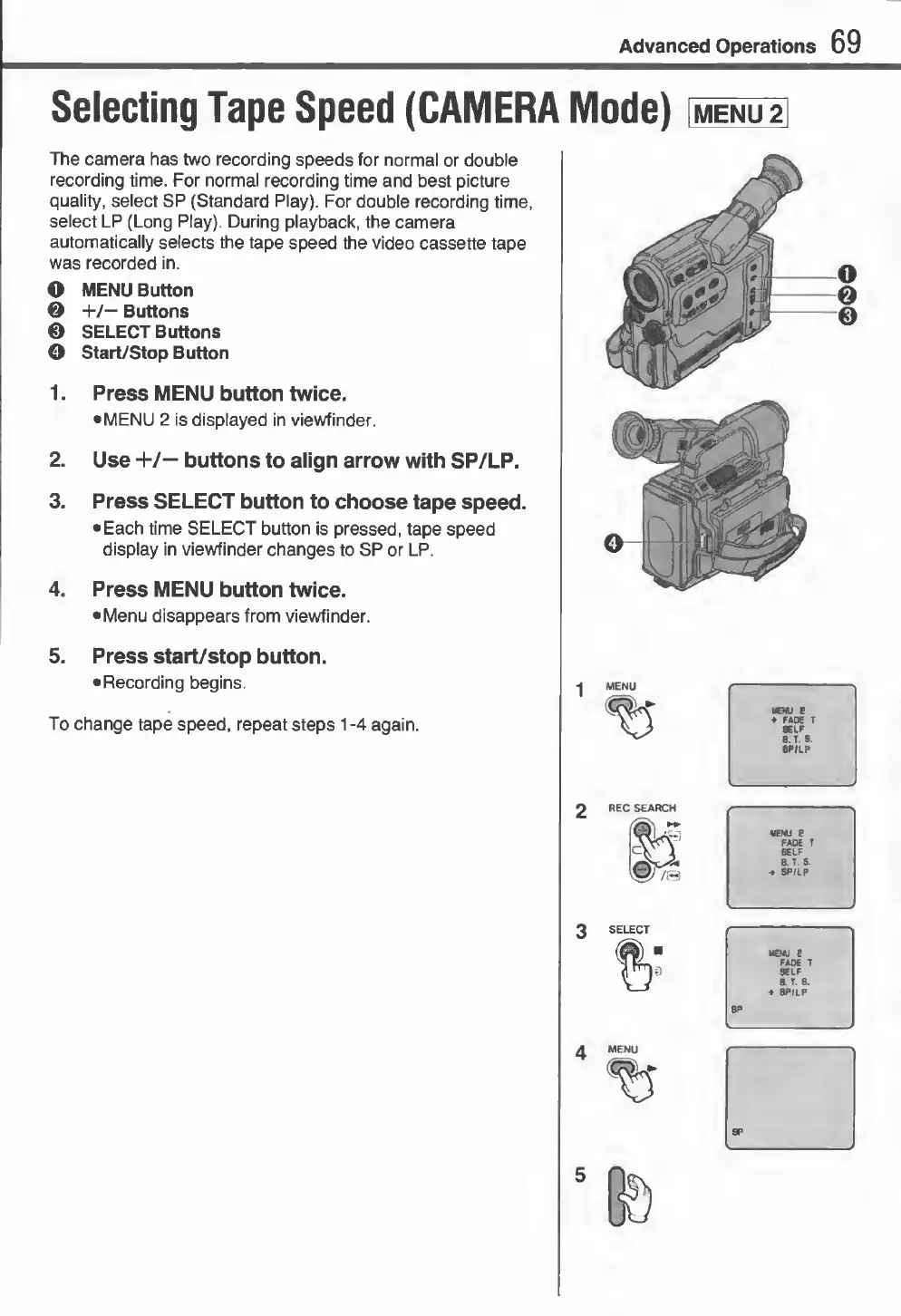
O
MENU
Button
©
+/—
Buttons
0
SELECT
Buttons
©
Start/Stop
Button
1.
Press
MENU
button
twice.
•
MENU
2
is
displayed
in
viewfinder.
2.
Use
+/—
buttons
to
align
arrow
with
SP/LP.
3.
Press
SELECT
button
to
choose
tape
speed.
•
Each
time
SELECT
button
is
pressed,
tape
speed
display
in
viewfinder
changes
to
SP
or
LP.
4.
Press
MENU
button
twice.
•
Menu
disappears
from
viewfinder.
5.
Press
start/stop
button.
•
Recording
begins.
To
change
tape
speed,
repeat
steps
1
-4
again.
MENU
e
♦
FADE
T
SELF
B.
T.
S.
SP/LP
MENU
8
FADE
T
SELF
B.
T.
8.
-»
SP/LP
MENU
E
FADE
T
SELF
IT
8,
■
»
SP/LP
SP
5
©©O