EasyManua.ls Logo

Canon UC10 - Page 72

Canon UC10
104 pages
Print Icon
To Next Page IconTo Next Page
To Previous Page IconTo Previous Page
Loading...
70
Adding
Titles
to
Recordings
(CAMERA
Mode)
The
camera
enables
previously
stored
lettering
and
illustrations
to
be
superimposed
on
scenes
during
recording.
Two
pages
(2
full
screens)
of
titling
can
be
stored
in
the
memory.
The
two
titles
can
have
different
colours,
shading,
and
appear
transparent.
They
can
be
combined
and/or
wiped
or
scrolled
in
4
directions
to
produce
some
truly
interesting
titles.
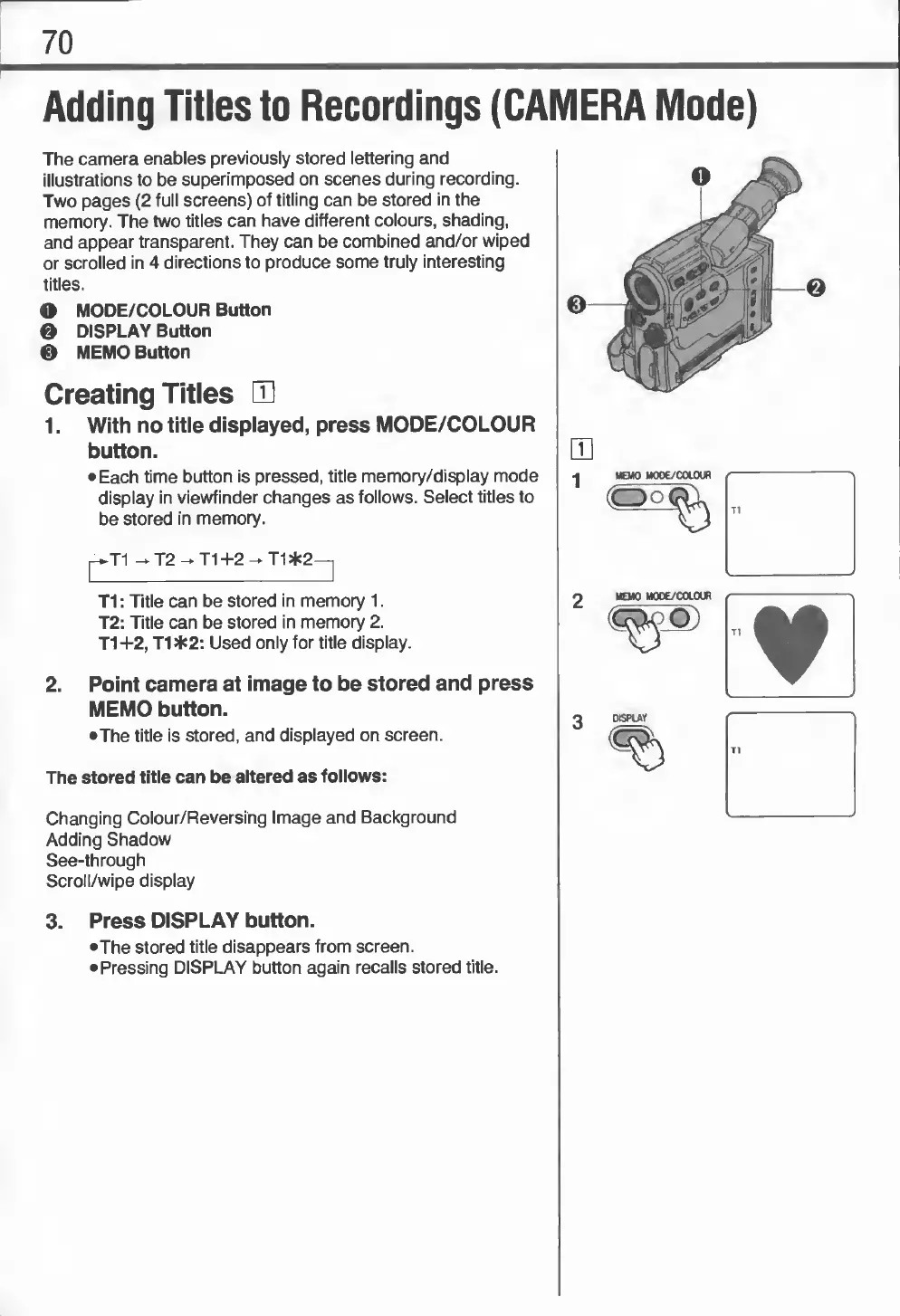
O
MODE/COLOUR
Button
0
DISPLAY
Button
0
MEMO
Button
Creating
Titles
E
1.
With
no
title
displayed,
press
MODE/COLOUR
button.
•
Each
time
button
is
pressed,
title
memory/display
mode
display
in
viewfinder
changes
as
follows.
Select
titles
to
be
stored
in
memory.
|-»T1
^
T2
-
T1
+2
-
T1
*2—^
T1
:
Title
can
be
stored
in
memory
1.
T2:
Title
can
be
stored
in
memory
2.
T1+2,
T1*2:
Used
only
for
title
display.
2.
Point
camera
at
image
to
be
stored
and
press
MEMO
button.
•The
title
is
stored,
and
displayed
on
screen.
The
stored
title
can
be
altered
as
follows:
Changing
Colour/Reversing
Image
and
Background
Adding
Shadow
See-through
Scroll/wipe
display
•A
MEMO
MOOE/COL
OUR
"
3.
Press
DISPLAY
button.
•The
stored
title
disappears
from
screen.
•
Pressing
DISPLAY
button
again
recalls
stored
title.