EasyManua.ls Logo

Carrier TRANSICOLD Vector 8700 - Operation; Display

Carrier TRANSICOLD Vector 8700
374 pages
Print Icon
To Next Page IconTo Next Page
To Previous Page IconTo Previous Page
Loading...
3–1 62-12259
SECTION 3
Operation
3.1 Display
WARNING
!
Unit may start automatically at any time even if the switch is in the OFF position. Use proper
lockout/tagout procedures before inspection/servicing. All unit inspection/servicing by
properly trained personnel only.
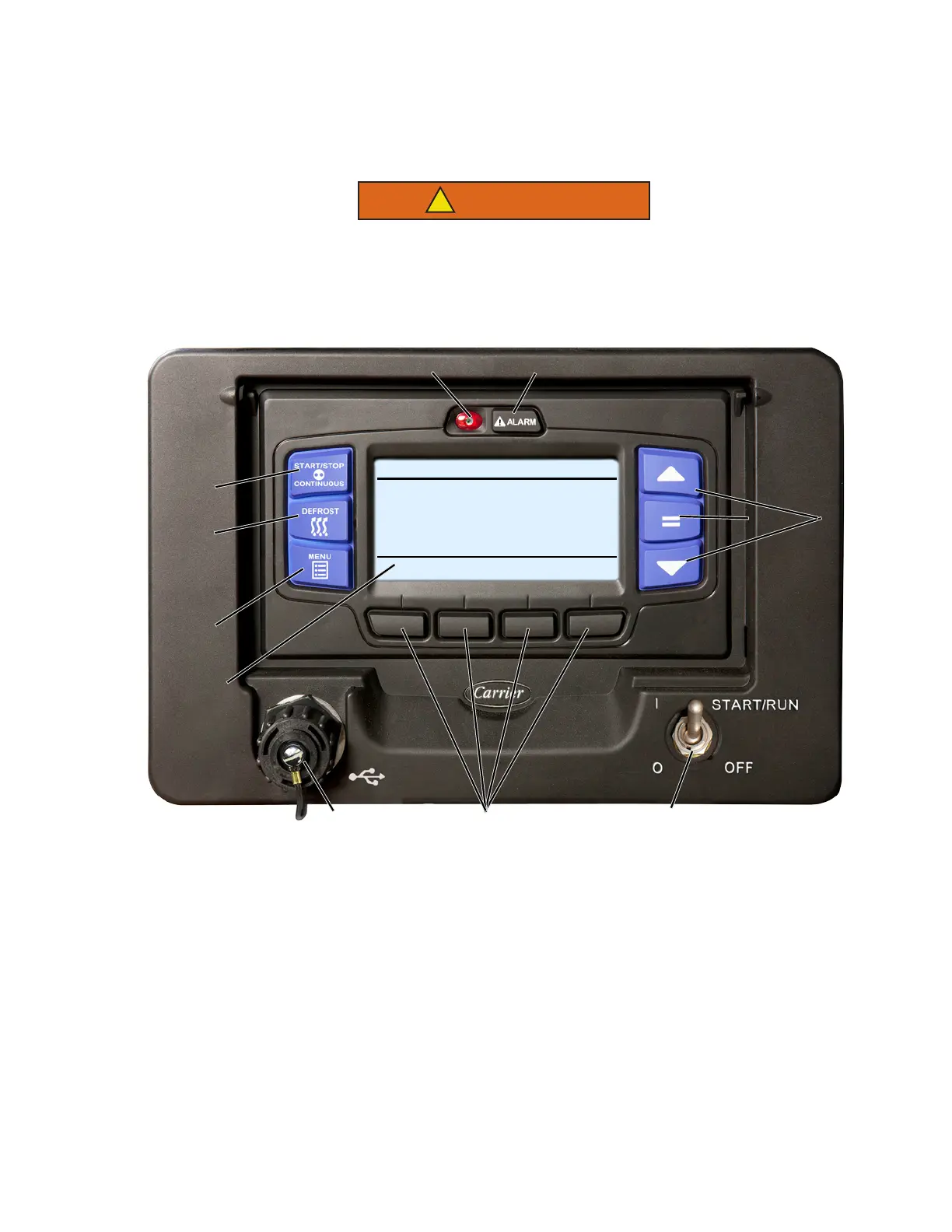
Figure 3.1 Display Module
1. Display Screen
2. MENU key
3. DEFROST key
4. START/STOP - CONTINUOUS Key
5. Alarm LED
6. Alarm Key
7. Arrow Keys
8. “=” (Select) Key
9. START/RUN-OFF Switch
10. Soft Keys
11. USB Interface Port
4
3
2
11 10 9
7
8
6
5
1
START/STOP DIESEL COOL
BOX TEMPERATURE
o
F SETPOINT
o
F
STATUS OK
34.3
34

Table of Contents

Related product manuals