CHAPTER 7 - ELECTRICAL
7-6
Issued 8-04 Bur 6-34551NA
CT02D254
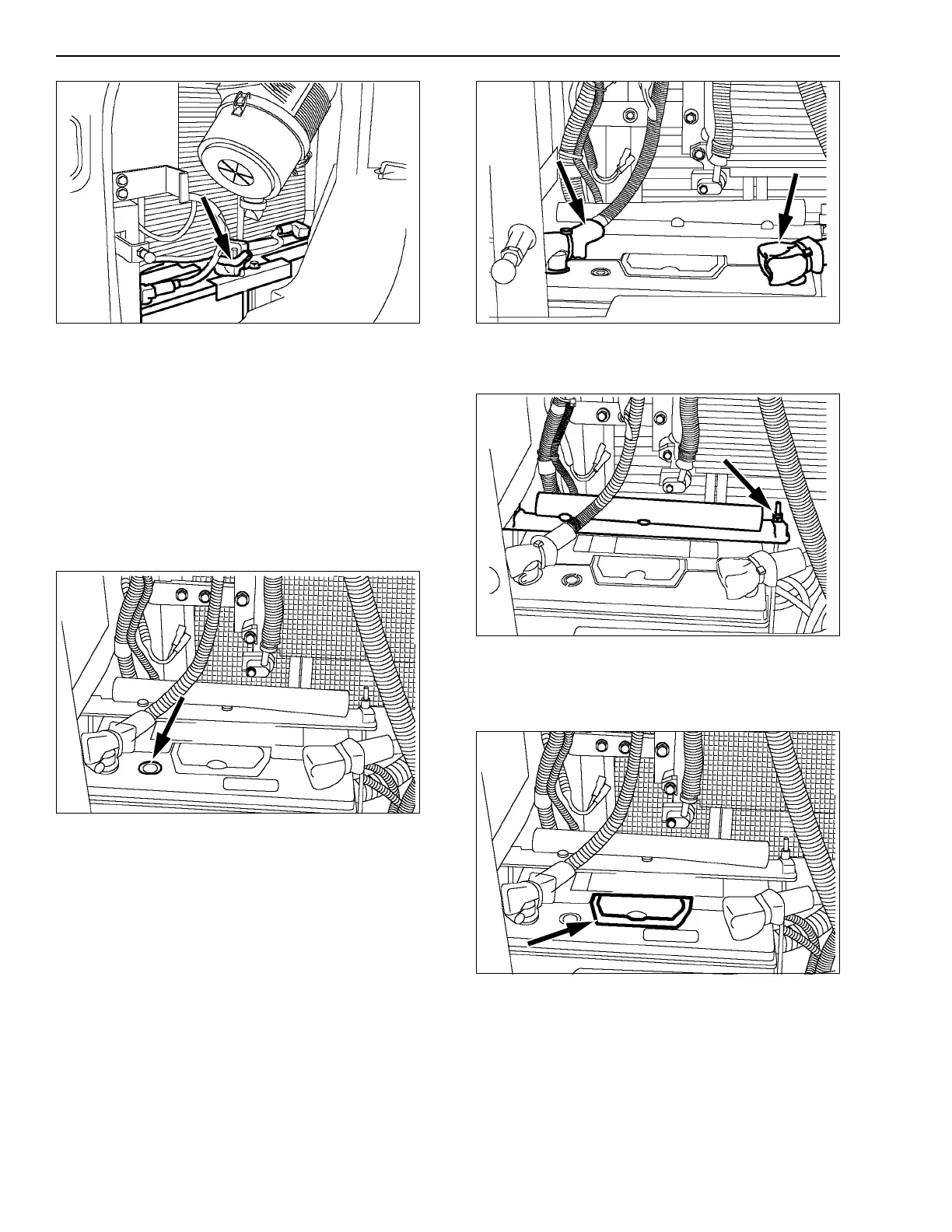
Figure 6
CHECKING A BATTERY
Make sure the battery terminals are clean and
coated with grease and that the cables are properly
tightened.
Checking the charging state and the electrolyte level
is carried out using the indicator:
Green: Normal.
Black: Recharge the battery.
White: Change the battery.
CT02C065A
Figure 7
REPLACING A BATTERY - CX75SR, CX80
REMOVAL
1. Remove the terminal sleeves, disconnect the
cable (negative terminal) then the cable (positive
terminal).
CT02D259
Figure 8
2. Remove the nuts, the washers and the angle
iron.
CT02D260
Figure 9
3. Remove the battery using the handle.
4. Clean the battery compartment, remove all
foreign bodies, clean any spilled electrolyte.
CT02C065B
Figure 10
INSTALLATION
1. Install a new battery. Clean the cables and
battery terminals and coat them with grease.
2. Install the angle iron, the washers and tighten the
nuts.
3. Connect the cable (positive terminal), the cable
(negative terminal) then install the terminal
sleeves.



 To Next Page