CHAPTER 4 - OPERATING INSTRUCTIONS
4-9
6-34551NA Issued 8-04 Bur
CS98M548
Figure 15
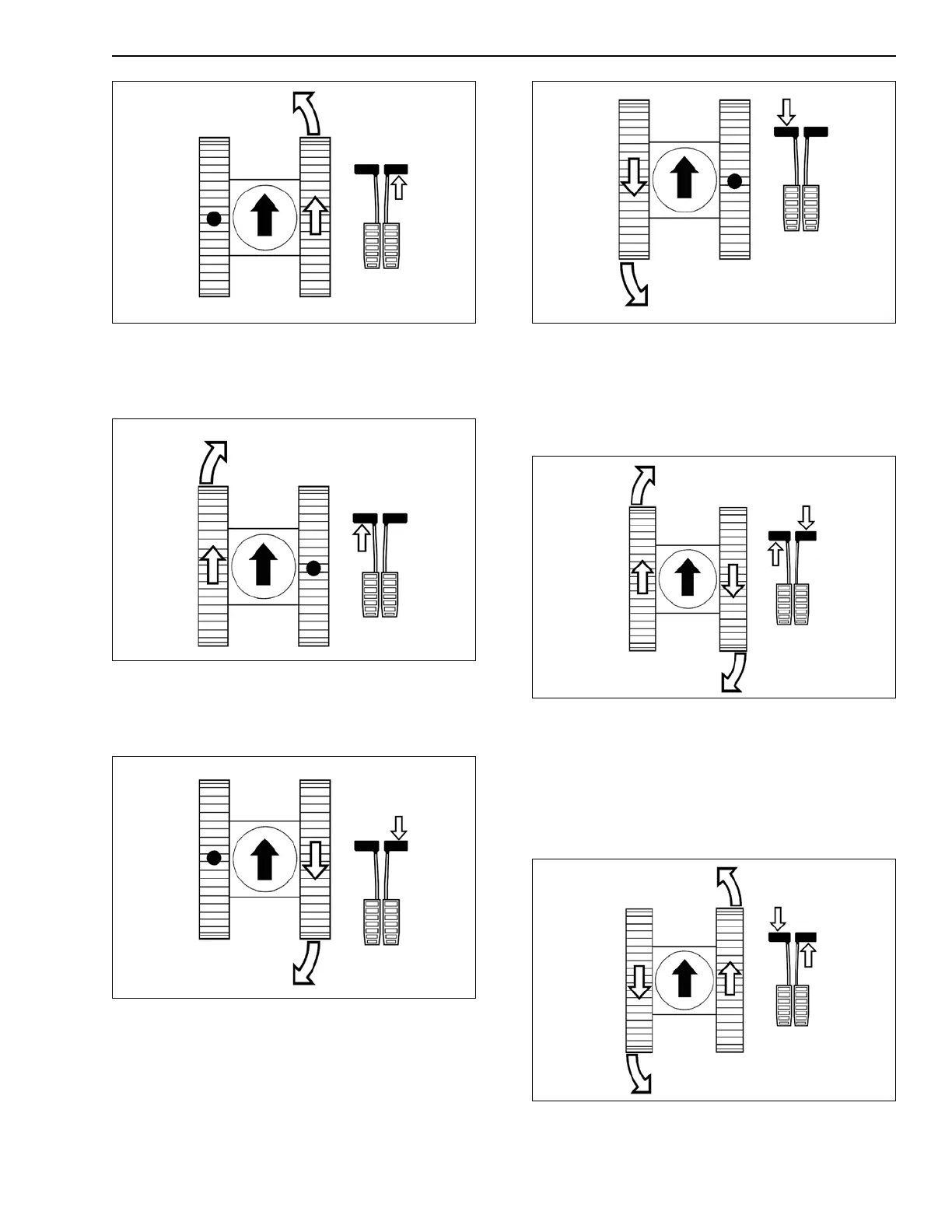
4. Turning to the right (Forward Travel)
Simply press the left-hand pedal or the left-hand
lever forwards.
CS98M551
Figure 16
5. Turning to the left (Reverse Travel)
Simply press the right-hand pedal or the
right-hand lever rearwards.
CS98M549
Figure 17
6. Turning to the right (Reverse Travel)
Simply press the left-hand pedal or the left-hand
lever rearwards.
CS98M550
Figure 18
7. Turning on the spot, to the right
Press the left-hand pedal or the left-hand lever
forwards and at the same time press the
right-hand pedal or the right-hand lever
rearwards.
CS98M552
Figure 19
8. Turning on the spot, to the left
Press the right-hand pedal or the right-hand lever
forwards and at the same time press the
left-hand pedal or the left-hand lever rearwards.
IMPORTANT: Turning on the spot cannot be
done if high speed travel is selected.
CS98M553
Figure 20
9. Gradual turn on the move



 To Next Page