132
User’s Manual
CellaVision
®
DM1200
11.2.8 Gripper Service
A broken slide can cause serious cuts and poses a danger of
infection. Always use protective gloves and tweezers when removing
glass shards from the system.
Open the animated tutorial, goto Help/Tutorial.
Move Gripper to Service position
a) Go to Maintenance/Gripper Service.
b) Click OK.
c) Wait until the gripper is in service position dialog appears.
d) Open the hood and remove the slide.
e) Close the hood.
f) Restart the SSU and the progam.
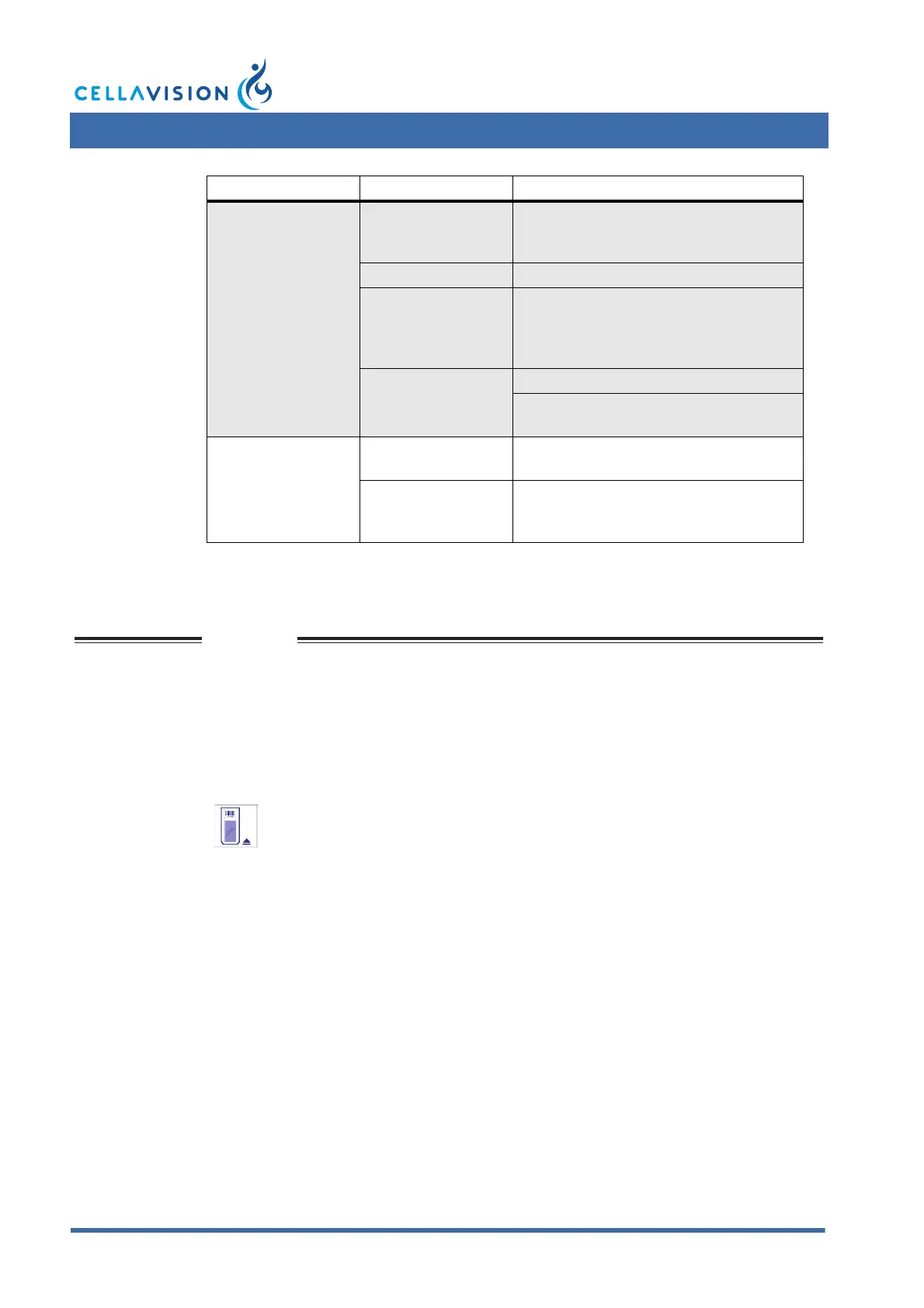
Problem Cause Action
Samples have dark
areas of stain or
other artefacts.
Drying is occurring
during the period of
staining.
Ensure the adequate drying of samples
previous to staining.
Unclean slides. Use clean slides.
Inadequate washing
(not washing
enough to remove
the metallic scum).
Increase wash step.
A stain is forming
precipitate in the
solution.
Filter the stain.
Ensure that the stain has not exceeded
the expiration date.
Same cell counted
more than once/
duplicate cell
images are shown
by the system.
Understaining. The fixation and staining time may be
increased.
Overwashing. The washing technique may be
corrected so that it is adequate but not
excessive.
Click Gripper service.



 To Next Page