33
User’s Manual
CellaVision
®
DM1200
4 Verifying Processed Slides
4.1 Peripheral Blood
Opening an unsigned slide leads directly to the Verification View, where various
tabs can be selected in order to review WBC, RBC and PLT and to Sign the Slide.
To open a slide, see 6.1.3 Opening an Order/Slide.
Note! With DMConfiguration tool it is possible to add user defined WBC cell
classes and RBC characteristics. To do this, contact your service personnel.
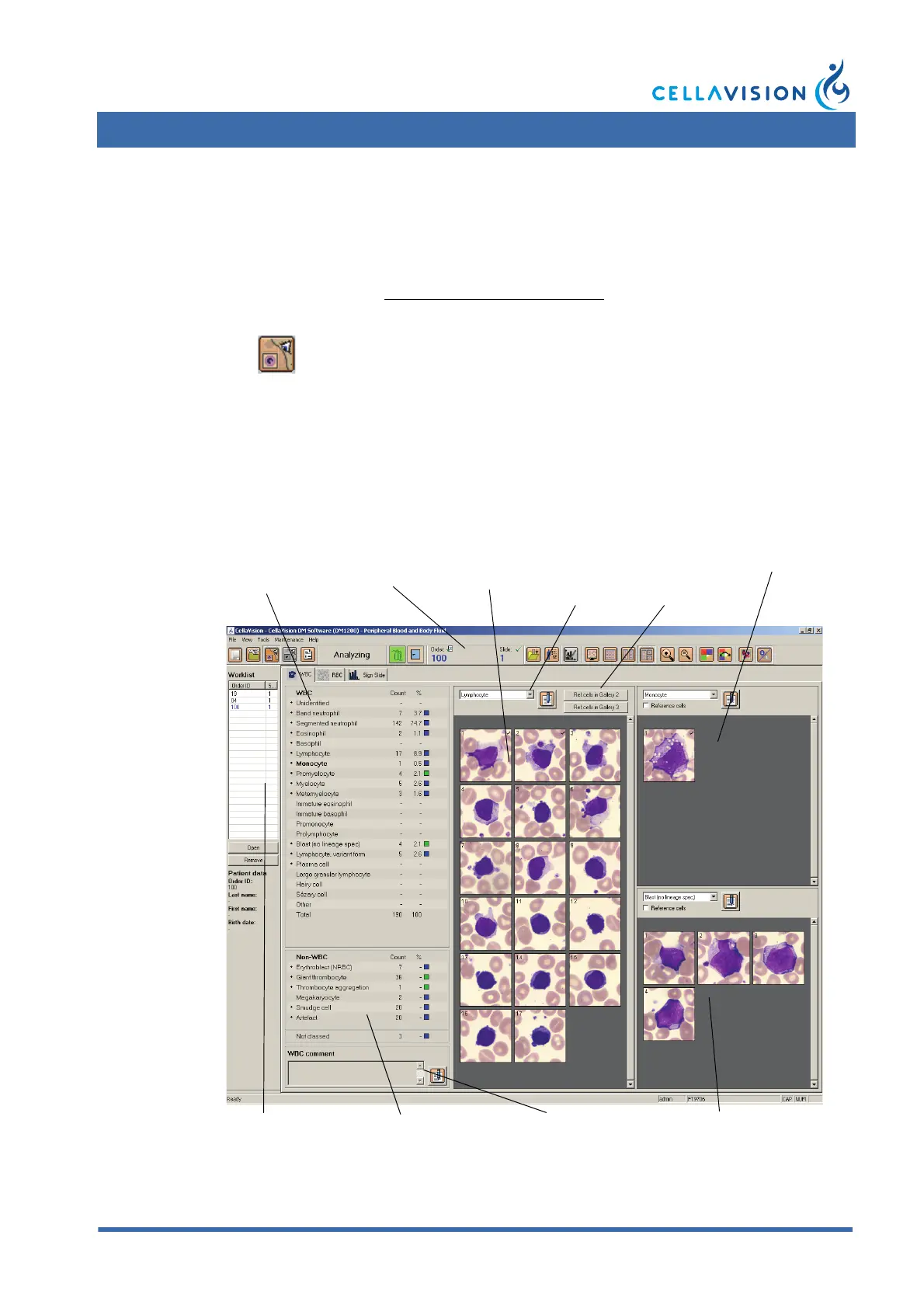
4.1.1 White Blood Cell Classification
You can view all WBCs identified by the system. You may also reclassify WBCs
and add comments.
(Cont'd)
Click Verification View in the toolbar.
WBC panel Opened
order/slide
Main
gallery
Add cell
class
comment
Shortcuts to
reference
cells
2nd gallery
Worklist Non-WBCs panel Add WBC
comment
3rd gallery



 To Next Page