27
User’s Manual
CellaVision
®
DM1200
(Cont'd)
The Result
When a slide has been examined a result is automatically calculated. The
percentage indicates how many nucleated cells the system found including the
manually added number of missed cells.
It is possible to adjust the total number of found nucleated cells, if it is determined
that some found cells are neither WBC nor NRBC. For instance, if the system
identifies 187 nucleated cells but the user thinks 3 of them do not fall under this
category, he/she can enter 184 in the Manual correction field and this number will
be used in the calculation.
The cell location results can be printed by clicking the Print Result button.
(Cont'd)
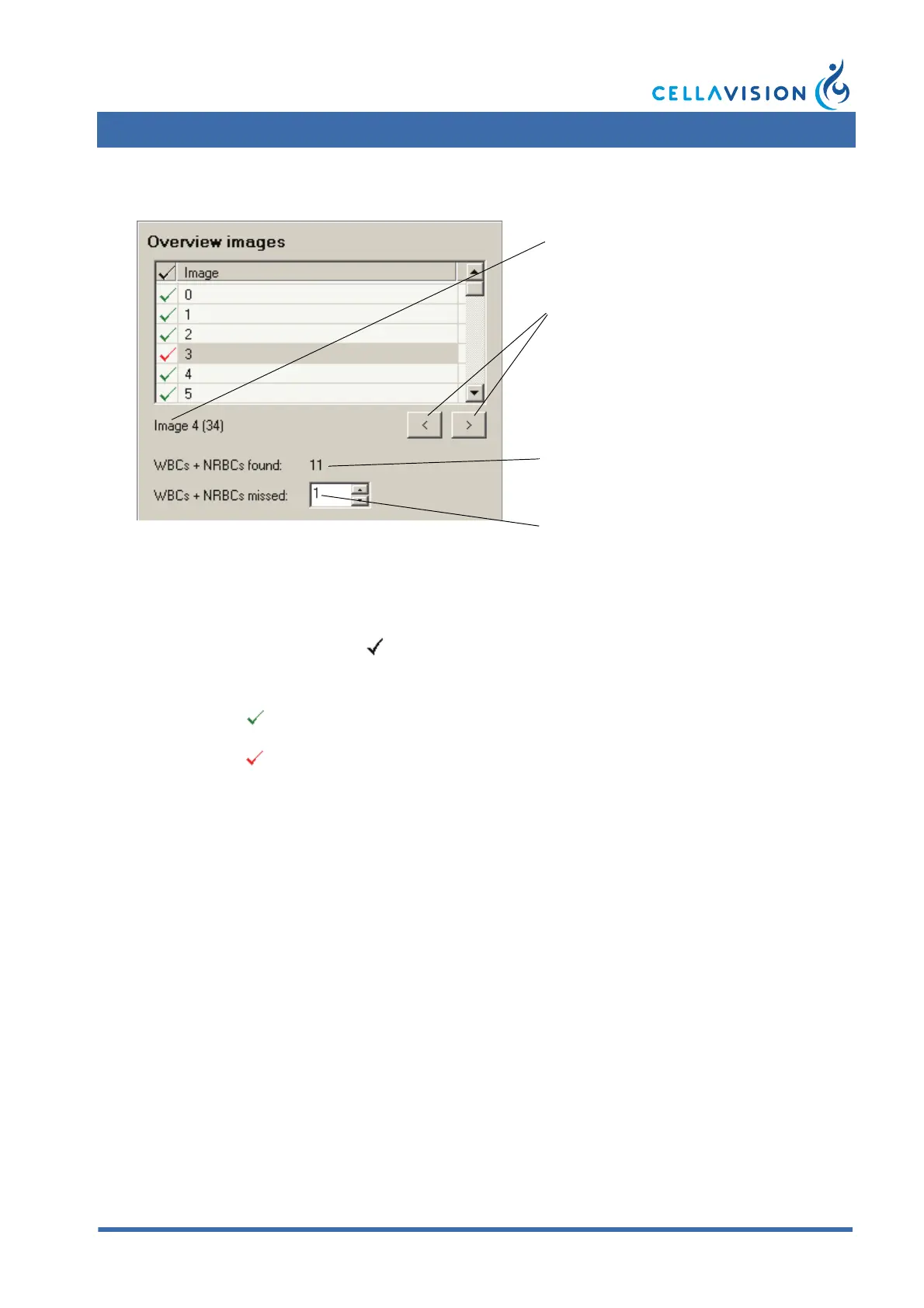
Image status
Empty Image has not been viewed.
Image has been viewed and has no missed nucleated cells.
Image has been viewed but contains missed nucleated cells.
Looking at image X of a total of Y images.
Step one image back or forth.
Number of missed nucleated cells in the
image shown (number entered by the
user).
Number of nucleated cells in the image
shown.


 To Next Page