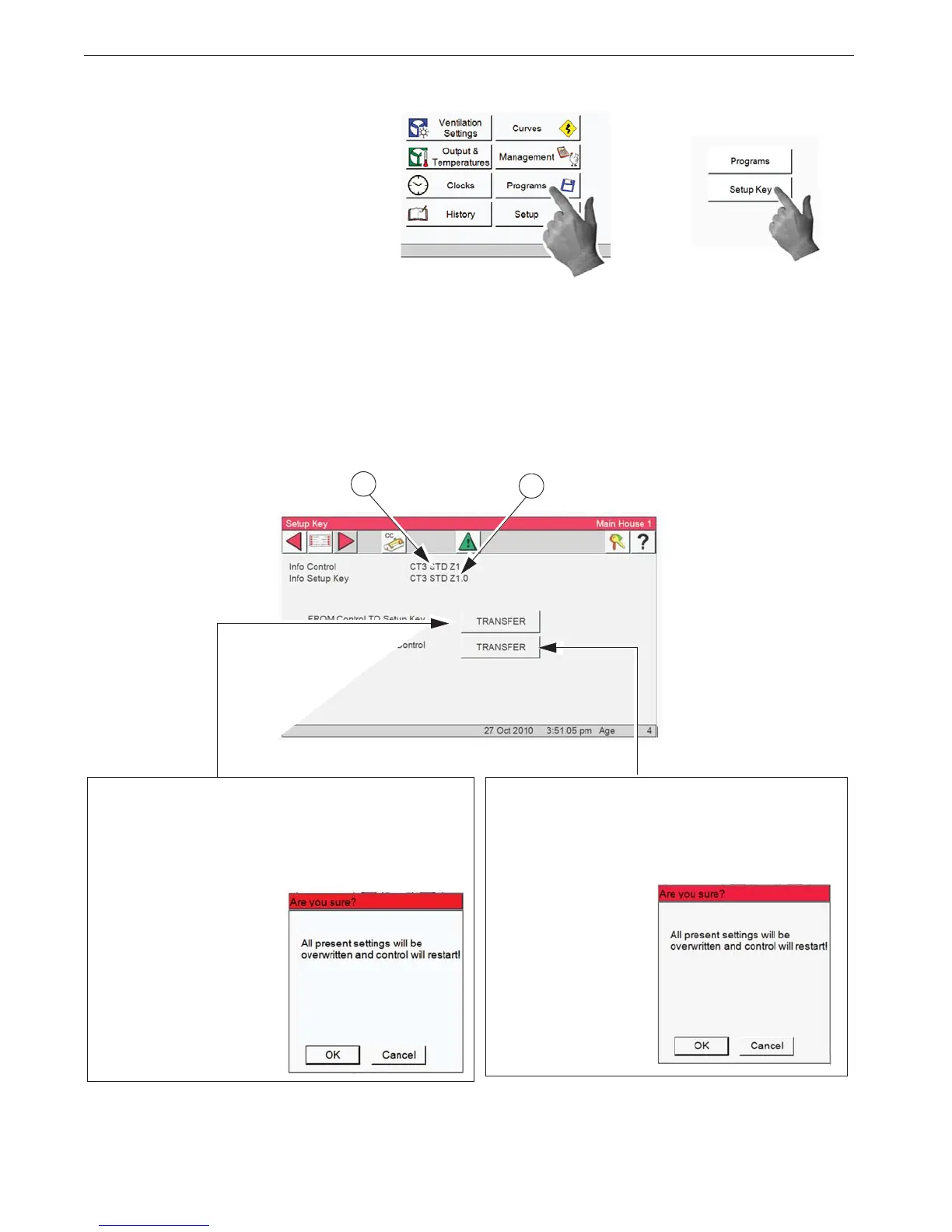
1. Select the Programs Button.
2. Select the Setup Key button. This
screen is only available if a Setup Key
(USB drive ) is inserted in the USB plug
located on the lower left side of the Con-
trol.
5. Transfer FROM Control TO Setup
Key- Select the Transfer button to the left
of Transfer FROM Control TO Setup Key
to transfer all of the Controls settings to
the setup key.
3
4
The Alarm will be sent two messages, Power Failure and Program "x" Activated. At this time you
should notice the alarms and they will be sent to the Alarm history. These are not hard alarms.
3. Info Control- The current software level operat-
ing on the Control.
4. Info Setup Key- The software level of the contents stored on the Setup Key. The software level
stored on the Setup Key must match the current Control software level in order to transfer settings
from the Setup Key to the Control.
6. Transfer From Setup Key to Control- Se-
lect the Transfer button to the left of Transfer
From Setup Key to Control to transfer the
settings currently stored on the Control to the
Setup Key.


 To Next Page