9
INSTALLING SIM CARD, SAM CARD AND MEMORY CARD
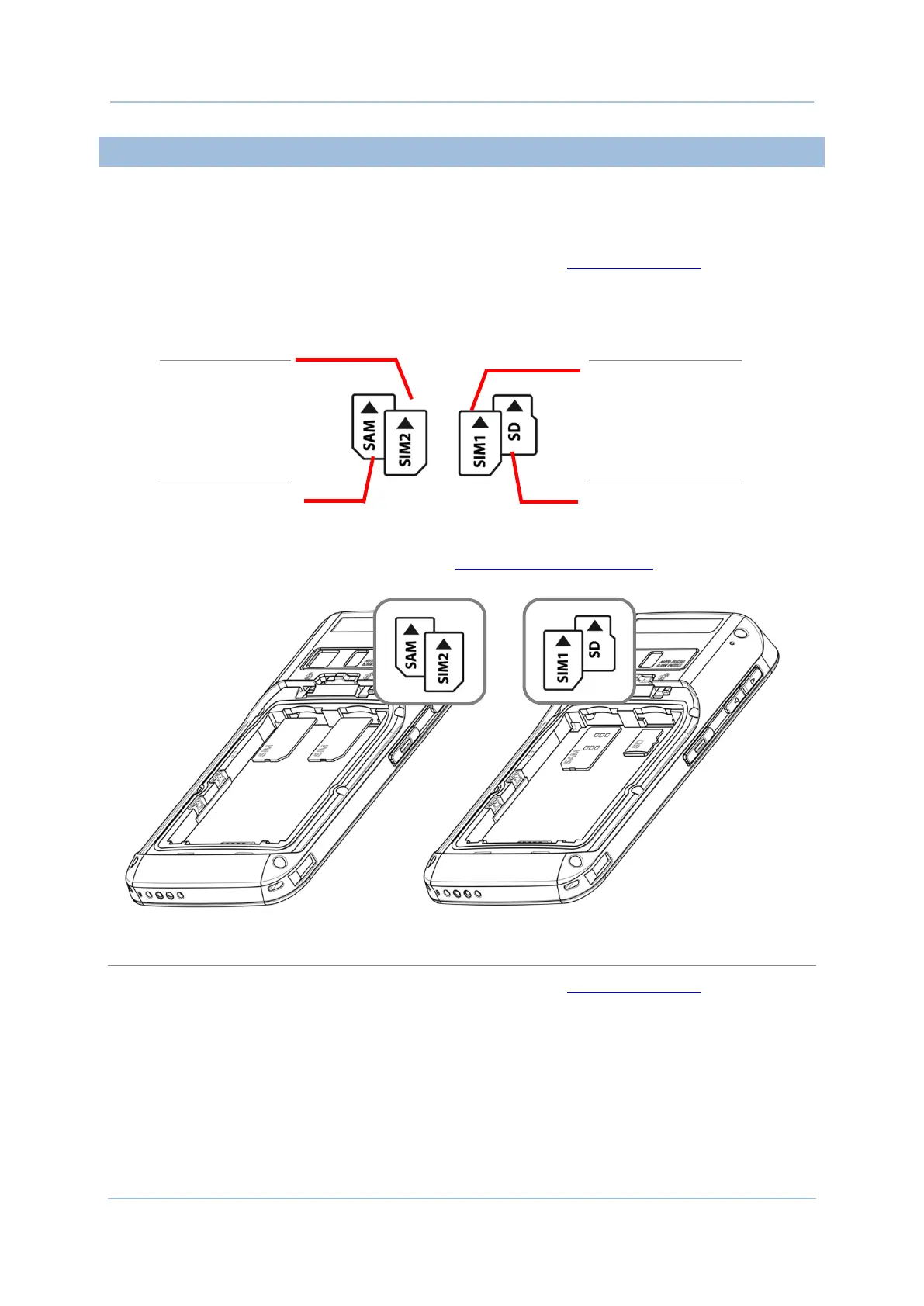
The RS30 Mobile Computer is equipped with two SIM card slots, one SAM card slot and one
memory card slot.
To insert the cards:
1) Remove the battery cover as described in steps 1-3 of Installing Battery
.
2) Insert the cards into their respective slots according to the directions indicated. Push the
cards to lock them in.
SIM2 card slot
(GSM only)
SIM1 card slot
(GSM & WCDMA)
SAM card slot SD card slot
The SIM 1 slot (on the right) supports both 2G and 3G networks, while the SIM 2 slot (on
the left) supports only 2G networks. See Data Connection Settings
for how to configure
2G and 3G networks.
3) Replace the battery cover and push the battery lock back to the lock position.
1) Remove the battery cover as described in steps 1-3 of Installing Battery.
2) Push the SIM cards, SAM card and SD card to eject them from their slots.
3) Replace the battery cover and push the battery lock back to the lock position.



 To Next Page