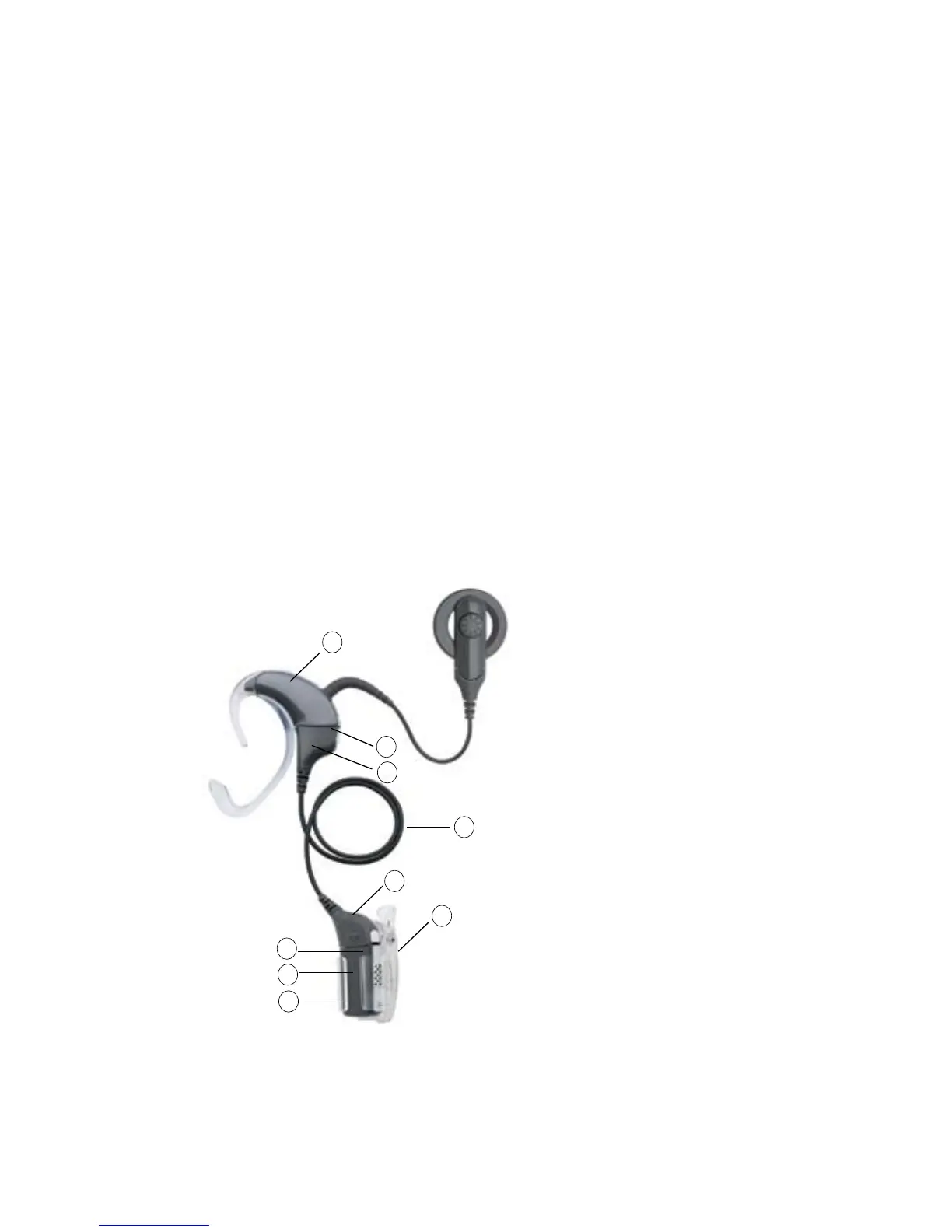
Processing unit1.
LiteWear Cable upper 2.
shoe locking latch (on
the processing unit)
LiteWear Cable upper 3.
shoe
LiteWear Cable4.
LiteWear Cable lower 5.
shoe
LiteWear Fixing Aid 6.
(Alligator Clip)
LiteWear Case7.
Battery module8.
LiteWear Cable lower 9.
shoe locking latch (on
the lower shoe)
Figure 10: LiteWear
1
5
2
3
4
6
7
8
9
Changing the way you wear your processor
The Cochlear Nucleus
CP800 Series LiteWear option provides greater
comfort and flexibility in the way children and adults wear the
processor. It allows the battery module to be attached to the body. The
processing unit is worn behind the ear and is connected to the battery
module by the Cochlear
™
Nucleus
®
CP800 Series LiteWear Cable.
The Cochlear
™
Nucleus
®
CP800 Series LiteWear Case protects and holds
the battery module securely. The LiteWear Case can be connected to
your clothing with a Cochlear
™
Nucleus
®
CP800 Series LiteWear Fixing
Aid.
You cannot use a Cochlear
™
Nucleus
®
CP800 Series Compact
Rechargeable Battery Module or a Cochlear
™
Nucleus
®
CP800 Series
Sound Processor Cover with the LiteWear Cable.



 To Next Page