Comau Robotics Product Instruction
22
ROBOT CONFIGURATION CUSTOMIZATION
3.2 Hardware customization
– Connection of any additional emergency push-buttons
– Connection of any interlocking devices associated with guards
– Simultaneous connection of additional emergency push-button and interlocking
device associated with guards
– e.DO Gripper assembly
– e.DO Marker Holder assembly
– Connecting e.DO to Desk Simulator and use through Teach Pendant TP5
3.2.1 Connection of any additional emergency push-buttons
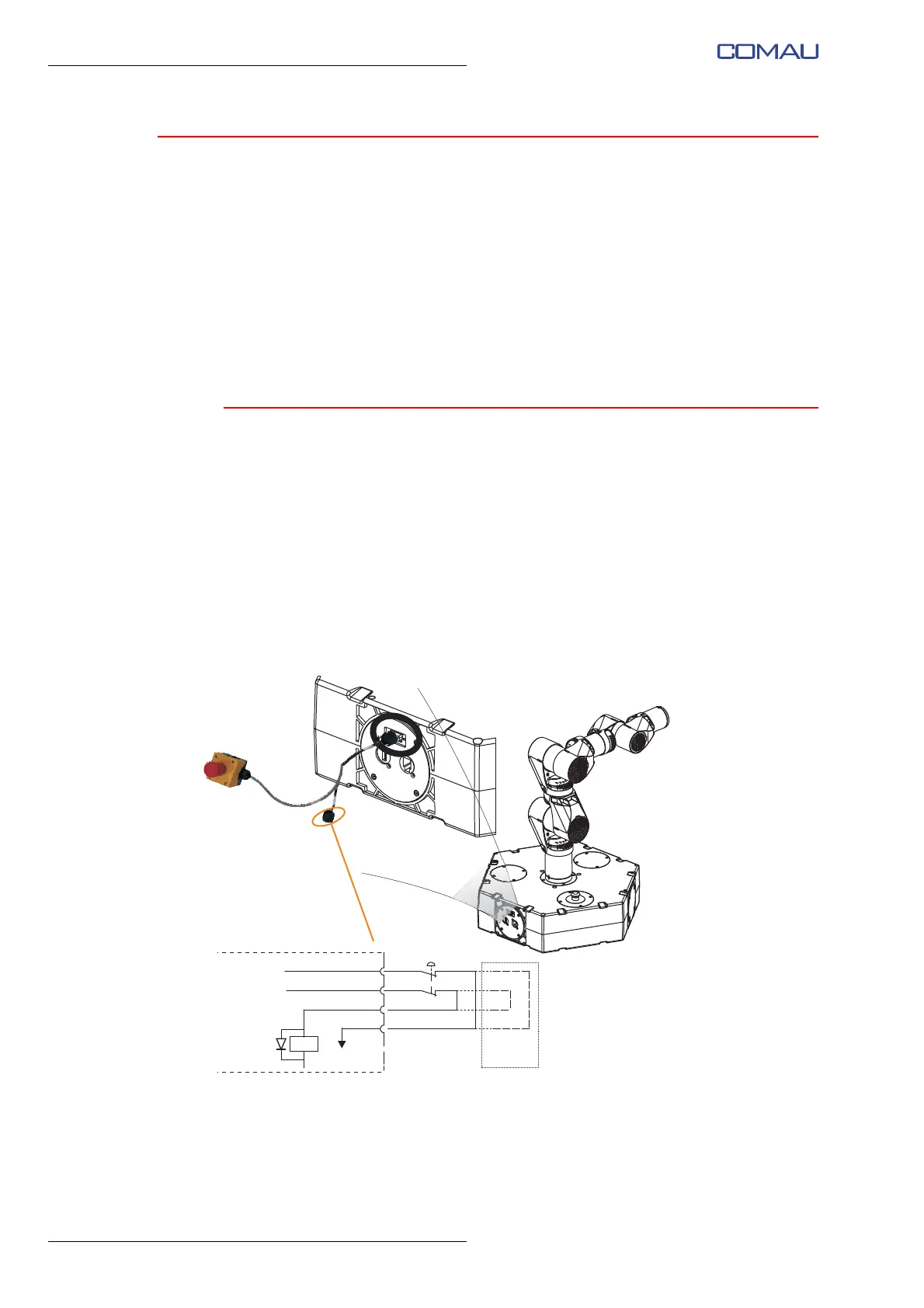
The Robot is equipped for connection of additional emergency devices, through
“E-Stop” input on a specific connector (used also for
Connecting e.DO to Desk Simulator
and use through Teach Pendant TP5); depending on the application provided, evaluate
the need to install additional emergency push-buttons. The emergency stop push-button
must be of red mushroom head type with a yellow background, with mechanical latching
and equipped with 2 normally closed contacts (with forced opening) in accordance with
the requirements of the standard UNI EN ISO 13850. If not used, the “E-Stop” input must
be closed again with a special cap connector.
Fig. 3.2 - “E-Stop” input connection diagram - central e.DO
E-stop
Hexagonal base
(internal connections)
1
2
3
4
Mating
connector




 To Next Page