2626
EN
Legend
A
Lock- release
CCS
Switchboard call
INTb
Two-family intercom
- for KIT only
Speech
K
Guardian door-entry phone
call
NULL
No function
ACT
Actuator
D
Doctor
PROG
Programmed functions,
see pages 26-27-28-29
In this Dip switch setting, the
buttons control the programmed
functions; the NON-programmed
buttons control functions
referred to on line 0000
AI
Self-ignition
PAN
Panic
CCP
Main switchboard call
INT
Programmable intercom,
general or selective
- standard single-family calling
for KIT and Simplebus Top
General button programming warnings
If the default settings (see table on page 26) do not refl ect requirements, the
buttons can be programmed differently by carrying out the steps below.
At the end, set S2 DIP switches 1-2-3-4 to the combination 1111 (PROG
setting in the confi guration tables on pages 26,27,28,29).
In this dip switch setting, the buttons control the programmed functions;
the NON-programmed buttons control functions referred to on line 0000
(see table on page 26). Restore the user code setting on S1, see table A
on page 25.
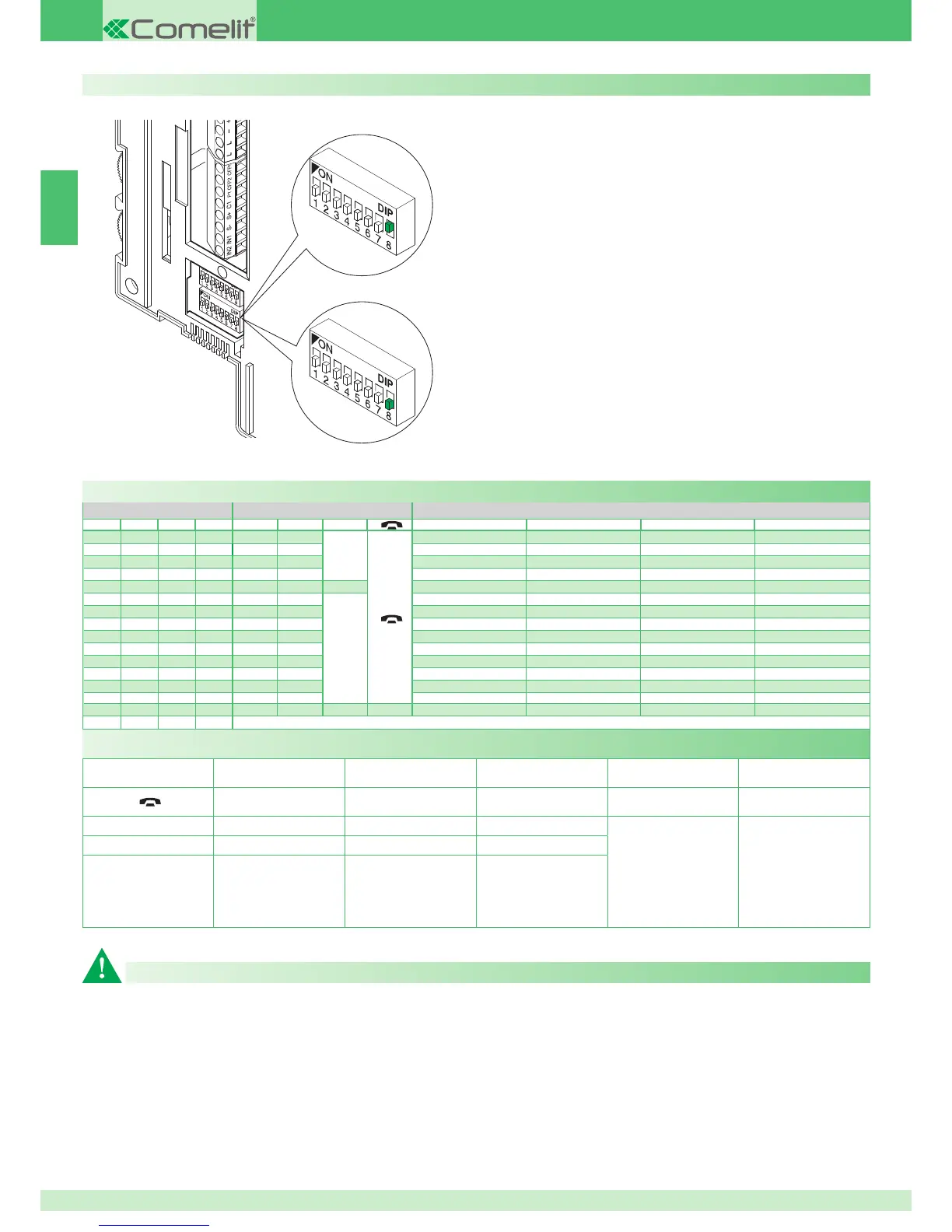
DIP S2 with Art. 6433, 6434
DIP 1 DIP 2 DIP 3 DIP 4 P1 P2
A
P3 P4 P5 P6
0000
CCS AI
A
ACT D PAN K
1000
ACT AI INT INTb D CCS
0100
INT AI INTb ACT CCS CCP
1100
ACT CCS CCP PAN K D
0010
ACT ACT ACT ACT ACT ACT ACT
1010
INT ACT
A
CCS CCP INTb PAN
0110
AI D K CCS CCP INTb
1110
INTb INT AI INT PAN D
0001
CCS PAN D AI INT INTb
1001
K CCS PAN CCP AI INT
0101
CCP K PAN ACT INT AI
1101
PAN CCP CCS K ACT D
0011
D INTb INT ACT AI CCS
1011
INT INT INT INT INT INT
0111
NULL NULL NULL NULL NULL NULL NULL NULL
1111
PROG
Default button settings
Additional main or secondary monitors
The setting of S2 DIP 8 defines whether the bracket in question will be
managed as main (M) or secondary (S).
The external unit can manage up to a maximum of 4 door entry monitors
or door-entry phones for each call button.
In the classic Magis Kit configuration, it is therefore possible to have at
most 2 secondary door entry monitors and 2 main door entry monitors for
each call button, all powered by the same Art. 1205/B.
It is possible to manage up to 3 main door entry monitors within the same
family unit (i.e. set to the same user code). In this particular configuration,
the additional main door entry monitors must each be powered by the
special Art. 1212/B (see variant MSK/HCA and MSK/IC, page 120, 121).
When a call is made from the external unit, the monitor switched on will be
the main door entry monitor.
Any other secondary monitors in the same family unit will remain off.
When responding to a call from the external unit using a secondary door
entry monitor, the image is automatically displayed on the monitor.
At this point, the main door entry monitor switches off and the image
appears on the door entry monitor on which the 2 Self-ignition / Video
request button was pressed.
To display the image without activating audio communication with the
external unit, press the 2 button - Self-ignition / Video request.
Secondary Monitor
Main Monitor



 To Next Page
 Loading...