2727
EN
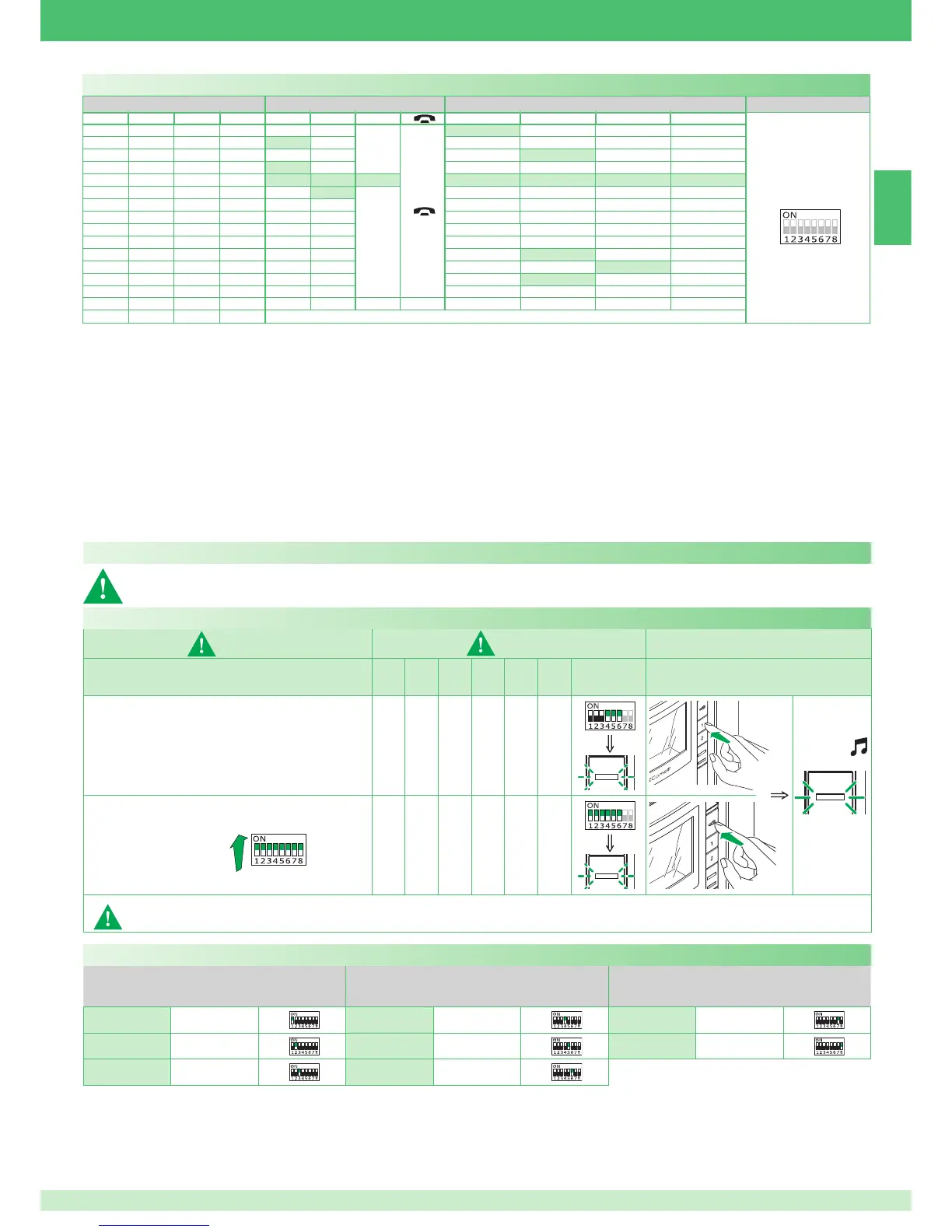
Programming buttons for generic or coded actuator
DIP S2 with Art. 6433, 6434
DIP S1
DIP 1 DIP 2 DIP 3 DIP 4 P1 P2
A
P3 P4 P5 P6
ADDRESS
0000
A
ACT
1000
ACT
0100
ACT
1100
ACT
0010
ACT ACT ACT ACT ACT ACT ACT
1010
ACT
A
0110
1110
0001
1001
0101
ACT
1101
ACT
0011
ACT
1011
0111
1111
PROG
Example:
on a monitor with user code 5, P1 programming = generic actuator, P2 =
coded actuator (code 125).
1. Set S2 DIP switch 5-6 to the combination 01.
» the LED (green) fl ashes.
2. Refer to the table on page 27 and select a combination in which the
actuator function (ACT) is listed for the buttons you wish to program.
E.g.: for P1= generic actuator, set S2 DIP switches 1-2-3-4 to the
combination 1000 or 1100 or 0010 (P1=ACT), set S1 DIP switches to the
combination 11111111, go to point 3.
E.g.: for P2= coded actuator (code 125), set S2 DIP switches 1-2-3-4
to the combination 0010 or 1010 (P2=ACT), set S1 with address 125 in
accordance with table C on page 29, go to point 3.
3. Press and release the button to be associated with the function.
» the LED (green) lights up.
» confi rmation tone in handset.
4. To exit programming mode, set S2 DIP switches 5-6 to the combination 00.
» the LED (green) switches off.
5. When programming is complete, set S2 DIP switches 1-2-3-4 to the
combination 1111. Restore the user code setting on S1, see table
A on page 25.
Programming for intercom call
General and selective intercoms CANNOT be used together on the same riser.
1) 2) 3)
S1
DIP
1
DIP
2
DIP
3
DIP
4
DIP
5
DIP
6
S2
Programming; set code, TAB. B on page 27
000111
Cancellation 111111
Take note of the S2, S1 setting and restore it when programming is complete.
DIP ON
2 sec
Programming/deleting intercom address (selective intercom only)
Code Dip switch ON S1 Code Dip switch ON S1 Code Dip switch ON S1
1
1
4
4
7
7
2
2
5
5
8
8
3
3
6
6
TAB. B Selective intercom addresses
You must set the intercom address on all the riser’s internal units.
You can assign the same intercom address to a maximum of 3 internal units.
For group calls, select the desired intercom codes simultaneously (max. 3).



 To Next Page
 Loading...