AUTOMATION
18
AUTOMATION
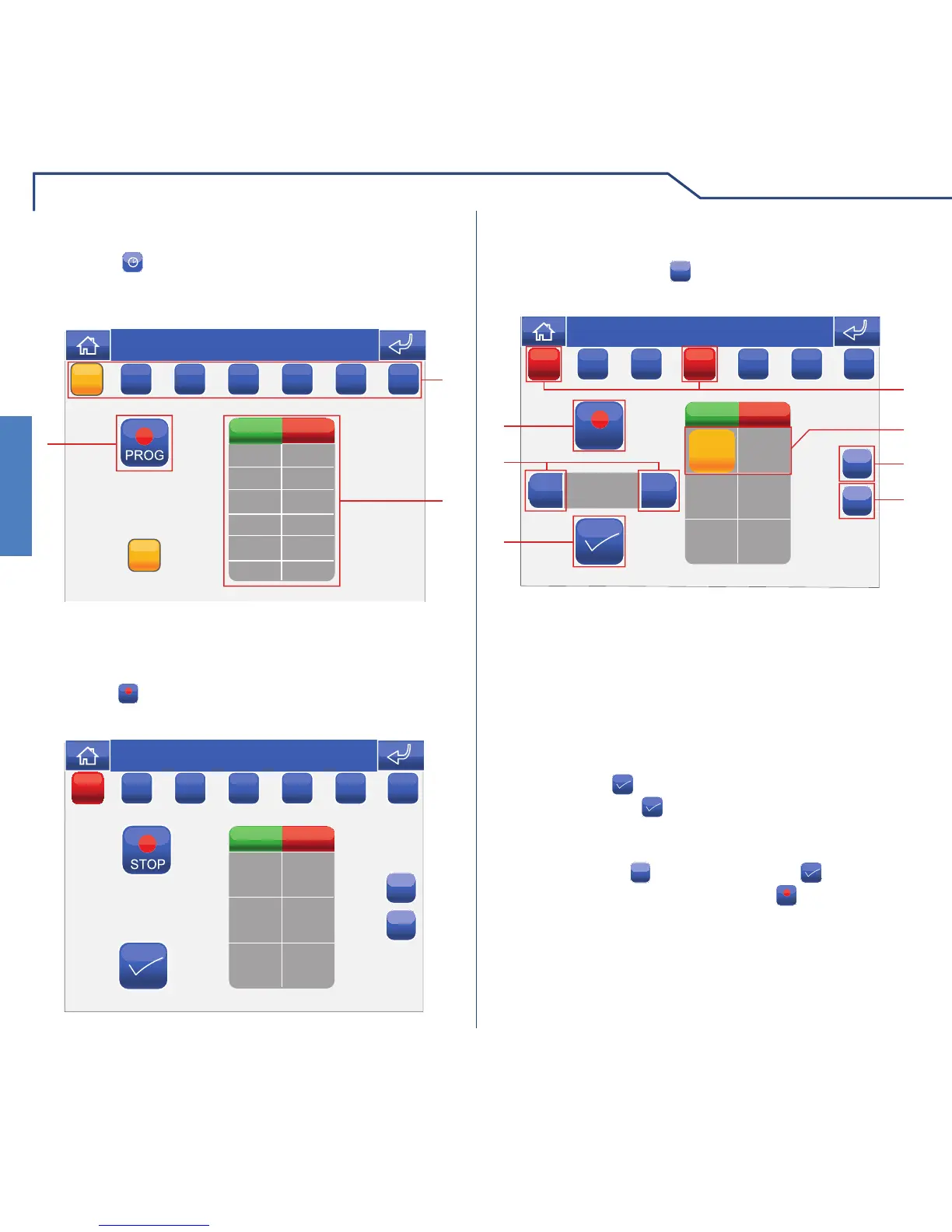
AUTOMATION SCHEDULING
Press the icon followed by the icon representing
one of the available areas (e.g. entrance gate), to
access the automation scheduling menu.
1 Days of the week.
2 List of logged programming.
3 Start procedure.
MM
ON STATUS
TIME
Thu 05/09/09 - 16:07 0W
M
T
W
T
FSS
Select the days of the week for which you wish to
program the activity (selected days will be highlighted
in red) and press the
+
icon to add a programming
schedule to the list.
Set the desired activity time using the selector keys
and press the
icon to confi rm. Select the desired
action and press
to confi rm. Repeat the above
steps as necessary to add several programming
schedules. To delete a programming schedule, select
it and press the
x
icon, followed by to confi rm.
When you have fi nished, press the
STOP
icon to log the
information.
1 Days of the week selected.
2 Programming saved.
3 Add programming.
4 Delete programming.
5 Confi rm.
6 Selector keys to modify time and status.
7 Save.
+
+
00:00
STOP
+
-
x
ON
00:00 OFF
4
1
36
5
7
2
Thu 05/09/09 - 16:07 0W
STATUS
TIME
MM
T
W
T
FSS












 To Next Page