33
SETUP
SETUP
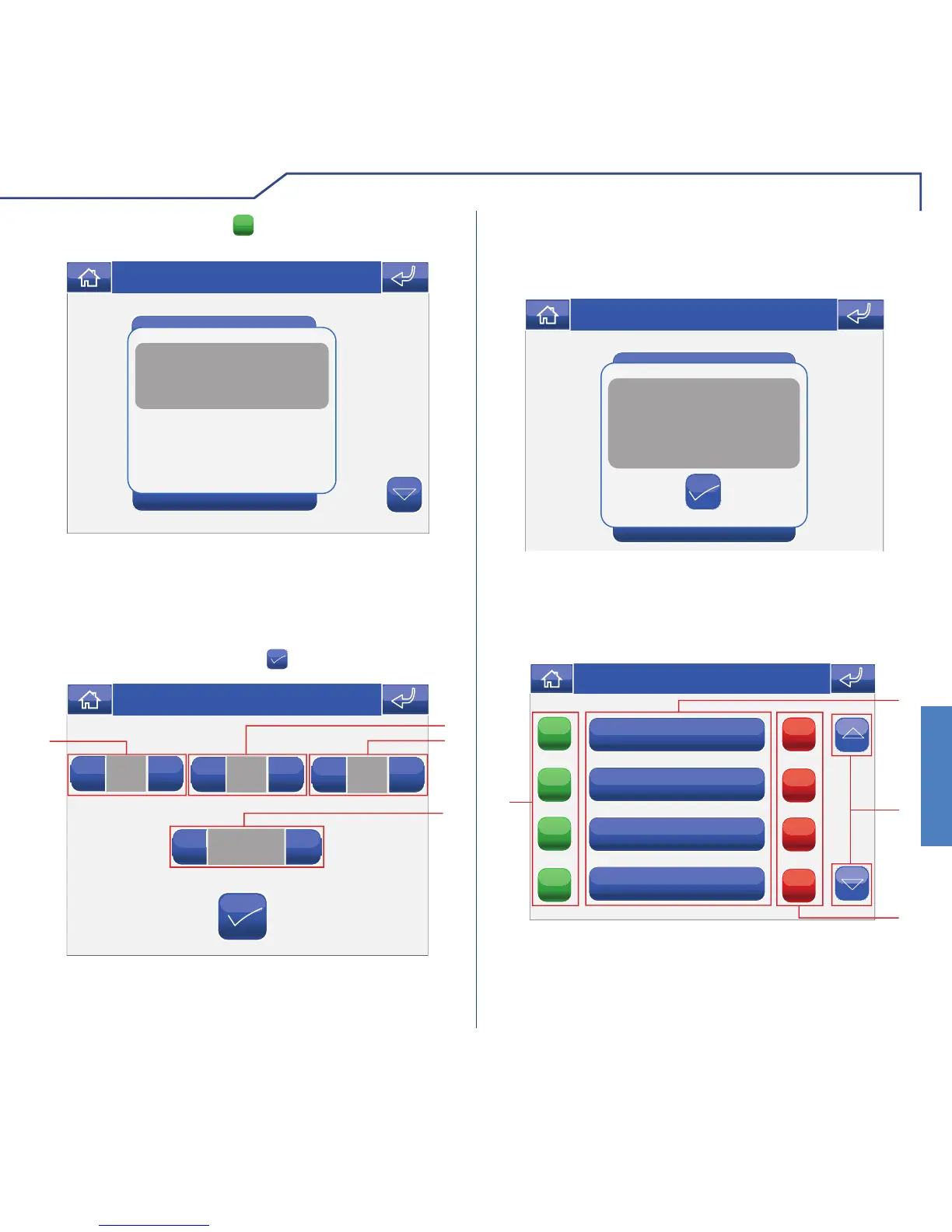
To set the date and time, access the menu Setup >
Set date and time.
Use the + and – icons to set the various fi elds. When
you have fi nished, press the icon to confi rm.
SETTING THE DATE & TIME
05
+
-
16:07
+
-
05
+
-
09
+
-
2
3
1
4
Thu 05/09/09 - 16:07 0W
1 Day.
2 Month.
3 Year.
4 Time.
To view the software version installed, access the
Information menu.
INFORMATION
Adjust volumes
Set melodies
Prog. keys
Information
B
VERS. SW: 1.5
VERS. EE: 1.3.2 6214C
SB CODE: 5P RANGE: 0 - 0
Intercom add. : 5
SLAVE
Thu 21/06/12 - 16:07 0W
Confi rm by pressing the
YES
icon.
Information
Set date and time
Language
Keypad locked
Thu 05/09/09 - 16:07 0W
CONDITIONS
This menu is only available if the system has
conditioned outputs and if the monitor is set as a
Master.
Conditioned output 3
ON
ON
ON
ON
OFF
OFF
OFF
OFF
1
4
2
3
Thu 21/06/12 - 16:07 0W
1 Available outputs.
2 Scroll through the screen.
3 Deactivate corresponding output.
4 Activate corresponding output.












 To Next Page