EasyManua.ls Logo

Commodore 128D - Page 125

Commodore 128D
427 pages
Print Icon
To Next Page IconTo Next Page
To Previous Page IconTo Previous Page
Loading...
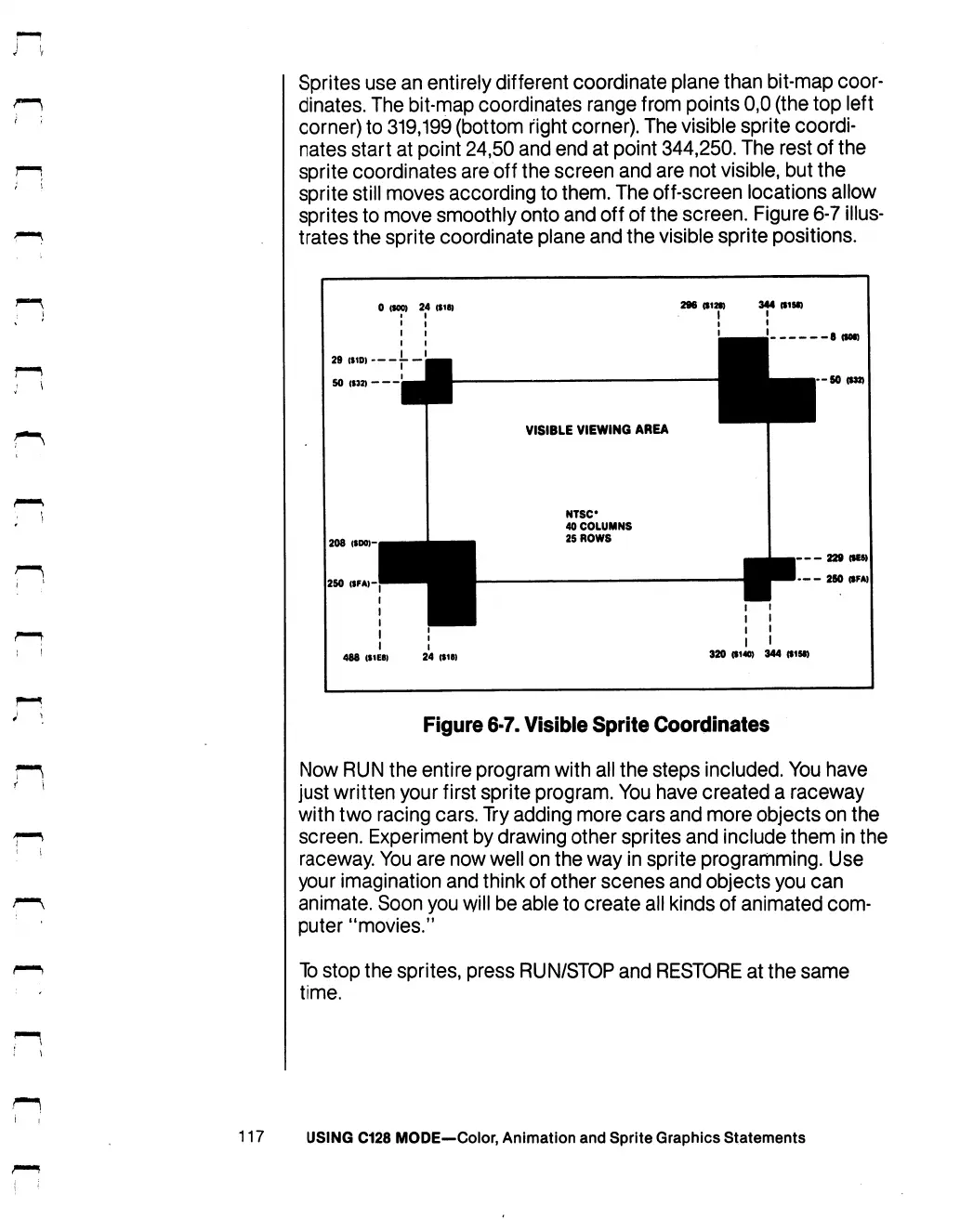
Sprites
use
an
entirely
different
coordinate
plane
than
bit-map
coor
dinates.
The
bit-map
coordinates
range
from
points
0,0
(the
top
left
corner)
to
319,199
(bottom
right
corner).
The
visible
sprite
coordi
nates
start
at
point
24,50
and
end
at
point
344,250.
The
rest
of
the
sprite
coordinates
are
off
the
screen
and
are
not
visible,
but
the
sprite
still
moves
according
to
them.
The
off-screen
locations
allow
sprites
to
move
smoothly
onto
and
off
of
the
screen.
Figure
6-7
illus
trates
the
sprite
coordinate
plane
and
the
visible
sprite
positions.
0
(MO)
24
($18)
344
<I1M)
208
(tOO)-,
250
(SFA>-
VISIBLE
VIEWING
AREA
NTSC
40
COLUMNS
25
ROWS
8
(tot)
-50
(132)
229
(MS)
-
250
(SFA)
I
488
(S1EB)
24
($18)
I
I
I
I I
I I
I
($140)
344
(fiM)
Figure
6-7.
Visible
Sprite
Coordinates
Now
RUN
the
entire
program
with
all
the
steps
included.
You
have
just
written
your
first
sprite
program.
You
have
created
a
raceway
with
two
racing
cars.
Try
adding
more
cars
and
more
objects
on
the
screen.
Experiment
by
drawing
other
sprites
and
include
them
in
the
raceway.
You
are
now
well
on
the
way
in
sprite
programming.
Use
your
imagination
and
think
of
other
scenes
and
objects
you
can
animate.
Soon
you
will
be
able
to
create
all
kinds
of
animated
com
puter
"movies."
To
stop
the
sprites,
press
RUN/STOP
and
RESTORE
at
the
same
time.
117
USING
C128
MODE—Color,
Animation
and
Sprite
Graphics
Statements

Table of Contents

Other manuals for Commodore 128D

Related product manuals