EasyManua.ls Logo

Commodore 128D - Page 369

Commodore 128D
427 pages
Print Icon
To Next Page IconTo Next Page
To Previous Page IconTo Previous Page
Loading...
APPENDIX
D
SCREEN
DISPLAY
CODES
Screen
Display
Codes
40
Columns
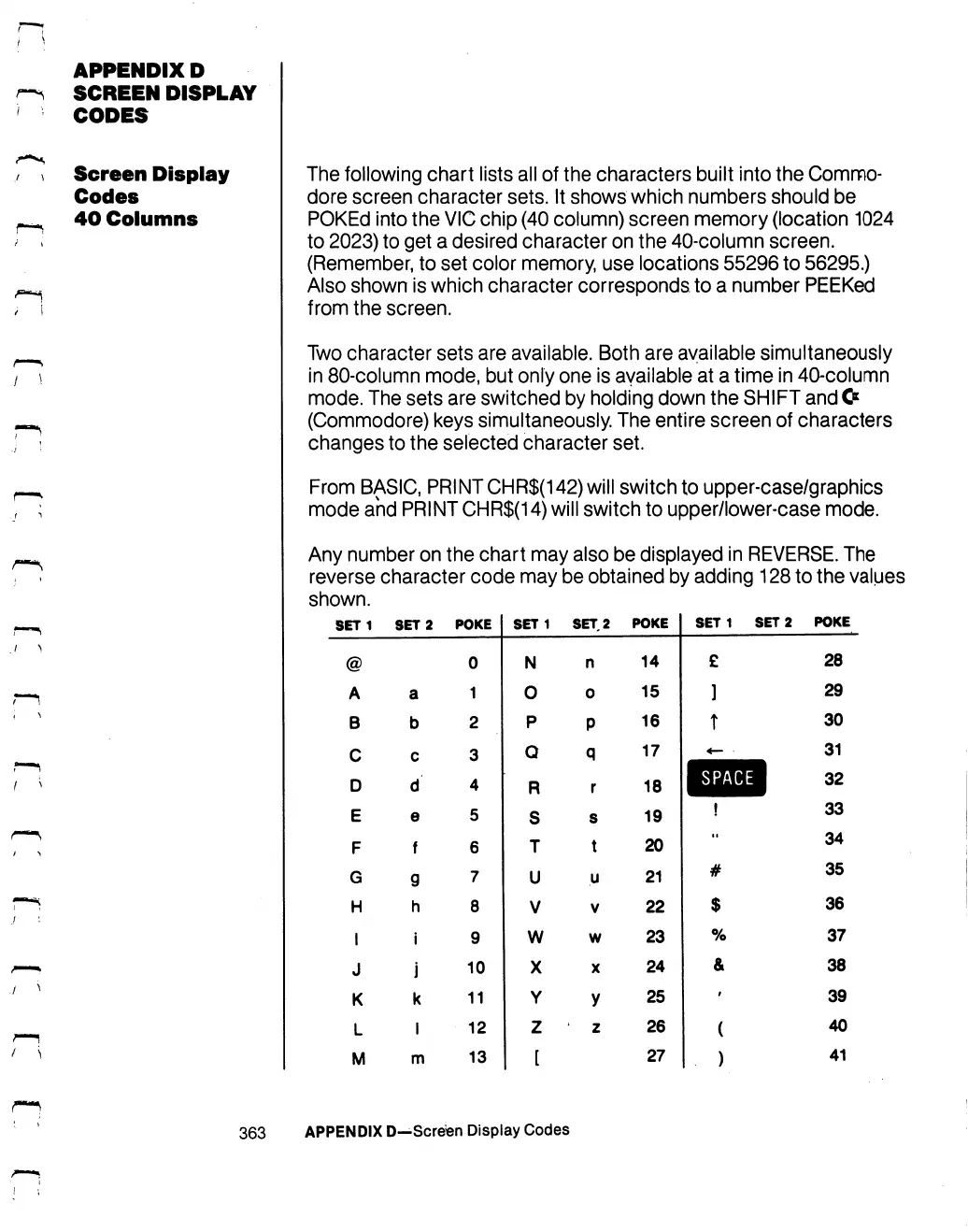
The
following
chart
lists
all
of
the
characters
built
into
the
Commo
dore
screen
character
sets.
It
shows
which
numbers
should
be
POKEd
into
the
VIC
chip
(40
column)
screen
memory
(location
1024
to
2023)
to
get
a
desired
character
on
the
40-column
screen.
(Remember,
to
set
color
memory,
use
locations
55296
to
56295.)
Also
shown
is
which
character
corresponds,
to
a
number
PEEKed
from
the
screen.
Two
character
sets
are
available.
Both
are
available
simultaneously
in
80-column
mode,
but
only
one
is
available
at
a
time
in
40-column
mode.
The
sets
are
switched
by
holding
down
the
SHIFT
and
&
(Commodore)
keys
simultaneously.
The
entire
screen
of
characters
changes
to
the
selected
character
set.
From
BASIC,
PRINTCHR$(142)
will
switch
to
upper-case/graphics
mode
and
PRINT
CHR$(14)
will
switch
to
upper/lower-case
mode.
Any
number
on
the
chart
may
also
be
displayed
in
REVERSE.
The
reverse
character
code
may
be
obtained
by adding
128
to
the
values
shown.
SET
1
@
A
B
C
D
E
F
G
H
I
J
K
L
M
SET
2
a
b
c
d
e
f
g
h
i
j
k
I
m
POKE
0
1
2
3
4
5
6
7
8
9
10
11
12
13
SET1
N
0
P
Q
R
S
T
U
V
w
X
Y
z
[
SET,
2
n
0
P
q
r
s
t
u
V
w
X
y
'
Z
POKE
14
15
16
17
18
19
20
21
22
23
24
25
26
27
SET
1
SET
2
£
]
T
SPACE
!
••
#
$
%
&
i
(
)
POKE
28
29
30
31
32
33
34
35
36
37
38
39
40
41
363
APPENDIX
D—Screen
Display
Codes

Table of Contents

Other manuals for Commodore 128D

Related product manuals