the number of values read. Line 60 PRINTsthe total, and line 70 divides
the total by the number of values to get the average.
By using a flag at the end of the DATA,you can place any number of
values in DATAstatements-which may stretch over several lines-
without worrying about counting the number of values entered.
Another variation of the READstatement involves assigning informa-
tion from the same DATAline to different variables. This information can
even be a mixture of string data and numeric values. You can do all this
in the following program that will READ
a name, some scores-say
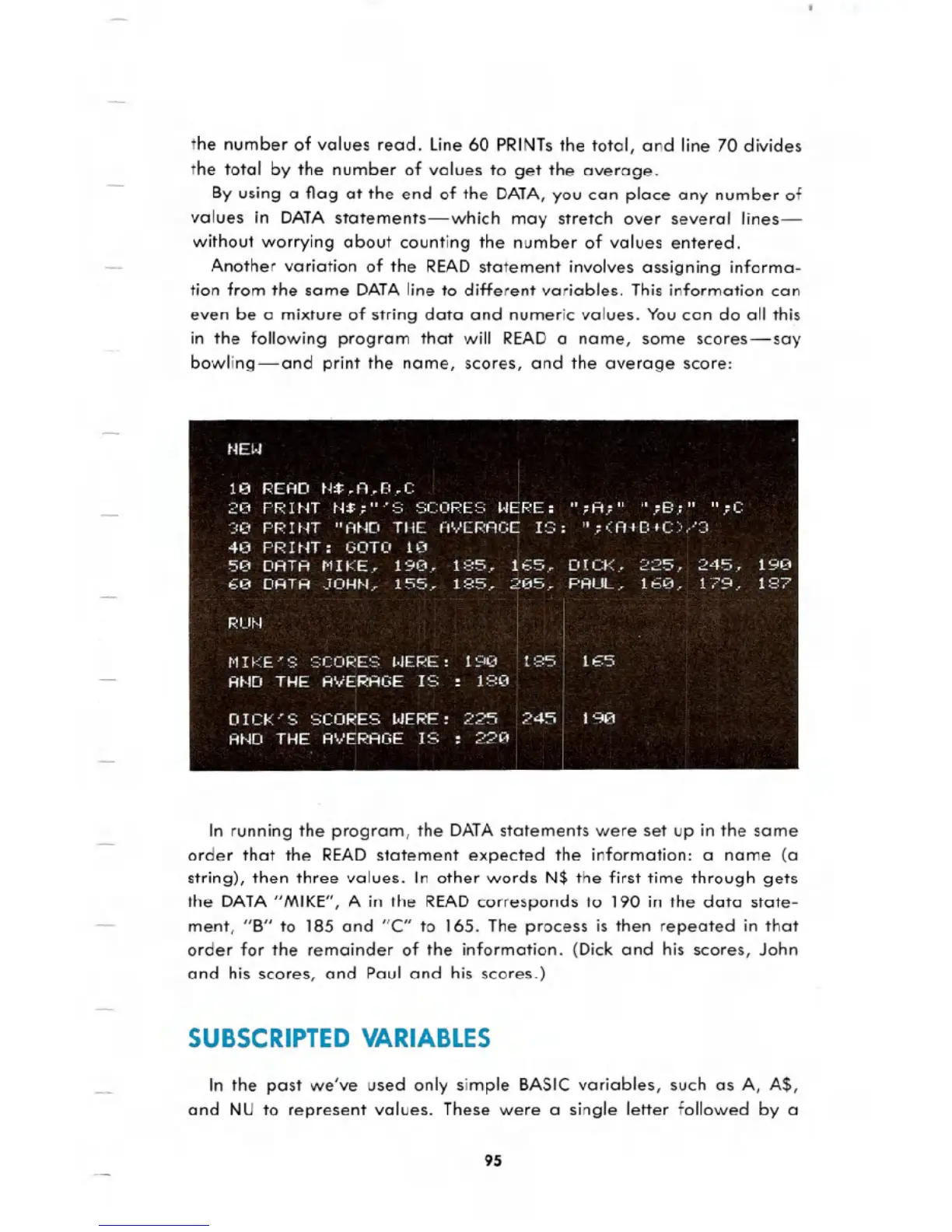
bowling-and print the name, scores, and the average score:
t.jE!.j
1(1 F:EAD tU.A .f:.C
20 PP I t.n tJ$;...' :=: :::;COPE:=; !.jEPE: "; A.;" ".; B;" ".; C
':::0 PP nn "At.m THE A EPACiE I:::;: "; 0::A+E:+C":o ::::
40 PPINT:
GOTO 10
50 DATA MIKE.. 190.. 185.. 165.. DICK.. 225.. 245. 190
60 DATA JOHN.. 155.. 185.. 205.. PAUL.. 160.. 179.. 187
F.; U t.J
t'1I f'::E":=; ::::COPE:::; !.jEF.:E: 190 1 ::::5 I8£iIiI
AND THE AVERAGE IS : 180
DICK" :::: SCOPE:::; !.jEF.:E: 225 245.:1m]
AND THE AVEPAGE IS : 220
In running the program, the DATAstatements were set up in the same
order that the READ statement expected the information: a name (a
string), then three values. In other words N$ the first time through gets
the DATA"MIKE", A in the READcorresponds to 190 in the data state-
ment, "B" to 185 and "c" to 165. The process is then repeated in that
order for the remainder of the information. (Dick and his scores, John
and his scores, and Paul and his scores.)
SUBSCRIPTED VARIABLES
In the past we've used only simple BASIC variables, such as A, A$,
and NU to represent values. These were a single letter followed by a
95





 To Next Page