Think of a BITas a switch that is either "on" or "off". When a BITis
"on" it has a value of 1; when a BIT is "off" it has a value of O.
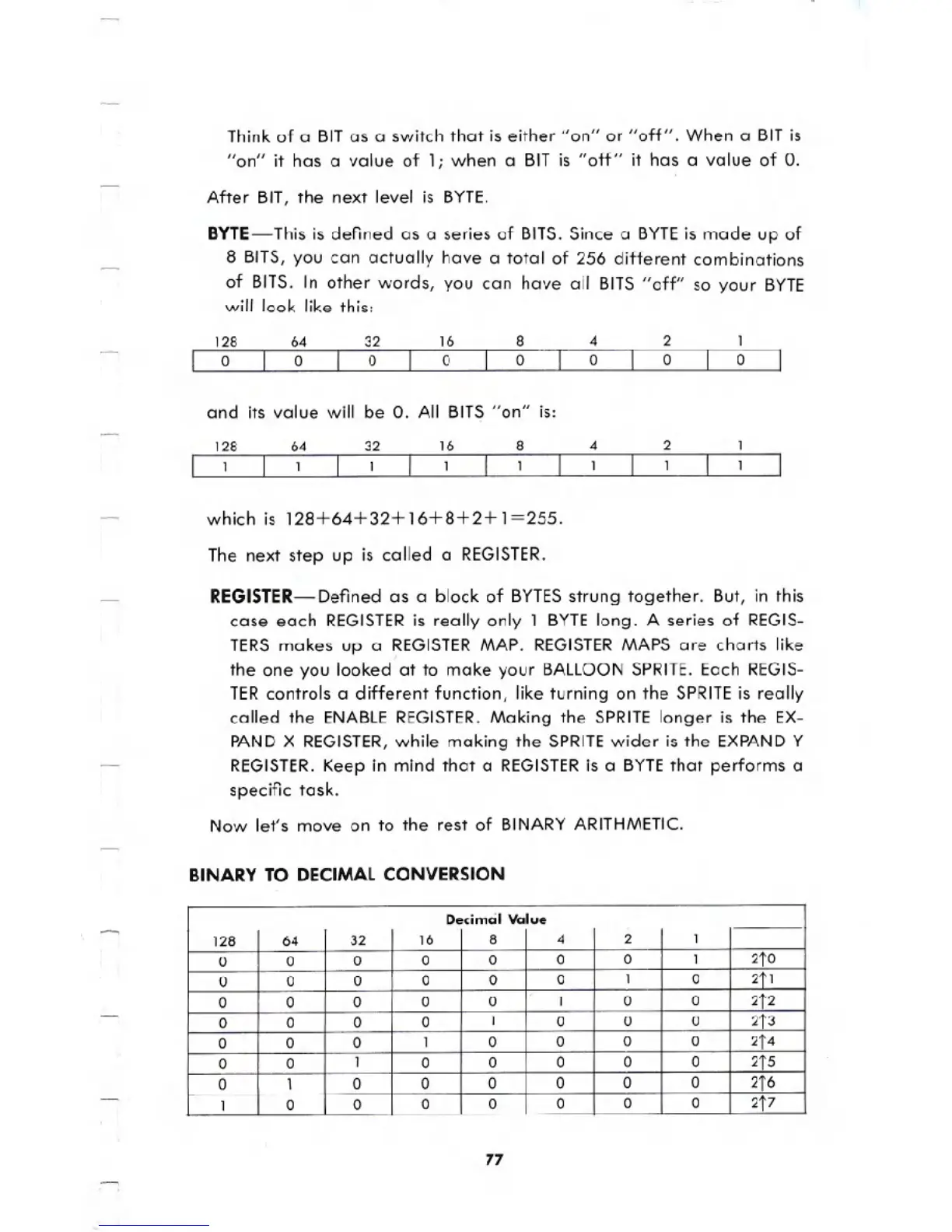
After BIT, the next level is BYTE.
BYTE- This is defined as a series of BITS. Since a BYTEis made up of
8 BITS, you can actually have a total of 256 different combinations
of BITS. In other words, you can have all BITS "off" so your BYTE
will look like this:
128
o
64
o
32
o
16
o
8
o
4
o
2
o
1
o
and its value will be O. All BIT~ "on" is:
128
1
64
1
32
1
16
1
8
1
4
1
2
1
which is 128+64+32+16+8+2+1=255.
The next step up is called a REGISTER.
REGISTER-Defined as a block of BYTESstrung together. But, in this
case each REGISTERis really only 1
BYTElong. A series of REGIS-
TERS makes up a REGISTERMAP. REGISTERMAPS are charts like
the one you looked at to make your BALLOONSPRITE. Each REGIS-
TERcontrols a different function, like turning on the SPRITEis really
called the ENABLEREGISTER.Making the SPRITElonger is the EX-
PANDX REGISTER,while making the SPRITEwider is the EXPANDY
REGISTER.Keep in mind that a REGISTERis a BYTEthat performs a
specific task.
Now let's move on to the rest of BINARYARITHMETIC.
BINARY TO DECIMAL CONVERSION
77
Decimal Value
128 64
32
16 8
4 2
1
0 0
0
0 0
0 0 1
2tO
0
0
0 0
0 0
1
0
2tl
0 0 0
0
0
1
0 0
2t2
0 0
0 0
1
0 0
0
2t3
0 0 0
1
0
0
0
0
2t4
0
0
1
0 0
0 0 0
2tS
0 1
0 0
0
0
0 0
2t6
1
0 0
0 0 0
0 0
2t7





 To Next Page