determine how long the note will be held at SUSTAIN volume before
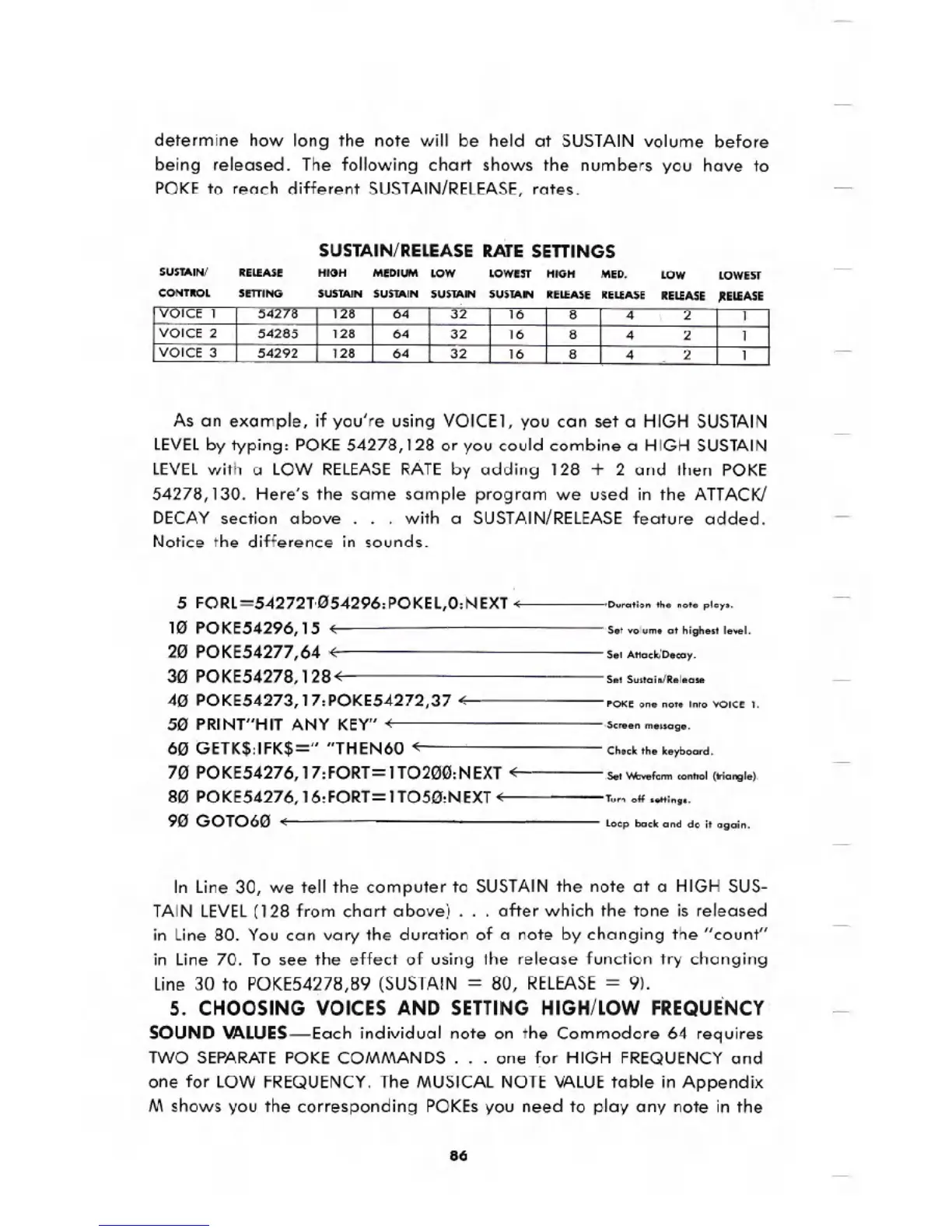
being released. The following chart shows the numbers you have to
POKE to reach different SUSTAIN/RELEASE,rates.
SUSTAIN/RELEASE RATE SETTINGS
SUSTAIN!
CONTIIOL
HIGH
SUSTAIN
LOWEST
SUSTAIN
As an example, if you're using VOICE1, you can set a HIGH SUSTAIN
lEVELby typing: POKE 54278,128 or you could combine a HIGH SUSTAIN
lEVEl with a lOW RELEASERATEby adding 128 + 2 and then POKE
54278,130. Here's the same sample program we used in the ATTACK!
DECAY section above. . . with a SUSTAIN/RELEASEfeature added.
Notice the difference in sounds.
5 FORl=54272T.054296:POKEl,0:NEXT <;
10 POKE54296,15 .,
20 POKE54277,64 .,
30 POKE54278, 128.,
40 POKE54273, 17:POKE54272,37 .,
50 PRINT"HITANY KEY".,
60 GETK$:IFK$=" "THEN60 .,
70 POKE54276, 17:FORT=lT0200:NEXT .,
80 POKE54276,16:FORT=lT050:NEXT<;
90 GOT060 <;
Duration the note plays.
Set volume at highest level.
Set Attack/Decay.
Set Sustain/Release
POKE one note into VOICE 1.
.Scr..n message.
Check the keyboard.
Set v.bvefonn control (triangle).
Turn off settings.
loop back and do it agoin.
In line 30, we tell the computer to SUSTAINthe note at a HIGH SUS-
TAIN lEVEL(128 from chart above)
. . . after which the tone is released
in line 80. You can vary the duration of a note by changing the "count"
in line 70. To see the effect of using the release function try changing
line 30 to POKE54278,89 (SUSTAIN = 80, RELEASE= 9),
5. CHOOSING VOICES AND SETTING HIGH/LOW FREQUE'NCY
SOUND VALUES-Each individual note on the Commodore 64 requires
TWO SEPARATEPOKE COMMANDS. . . one for HIGH FREQUENCYand
one for lOW FREQUENCY.The MUSICALNOTE VALUEtable in Appendix
M shows you the corresponding POKEsyou need to play any note in the
86





 To Next Page