this works, look at lines 85 and 90 in the musical scale program. In this
program, immediately after setting the frequency in line 80, we set the
CONTROL SETTINGfor VOICE 1 in line 85 by POKEing 54276,17. This
turned on the CONTROL for VOICE 1 and set it to a TRIANGLE
WAVEFORM(17). In line 70 we POKE 54276,16, stopping the note. la-
ter, we changed the waveform start setting from 17 to 33 to create a
SAWTOOTH WAVEFORMand this gave the scale a "harpsichord" effect.
See how the CONTROL SETTINGand WAVEFORM interact? Setting the
waveform is similar to setting the volume, except each voice has its own
setting and instead of POKEing volume levels we're defining waveforms.
Next, we'll look at another aspect of sound. . . the ADSR feature.
3. AnACKIDECAY SEnING-As we mentioned before, the ADSR
CONTROL SETTINGnot only defines the waveform but it also activates
the ADSR, or AnACKIDECAY/SUSTAIN/RELEASEfeature of the COM-
MODORE 64. We'll begin by looking at the ATTACK/DECAYsetting. The
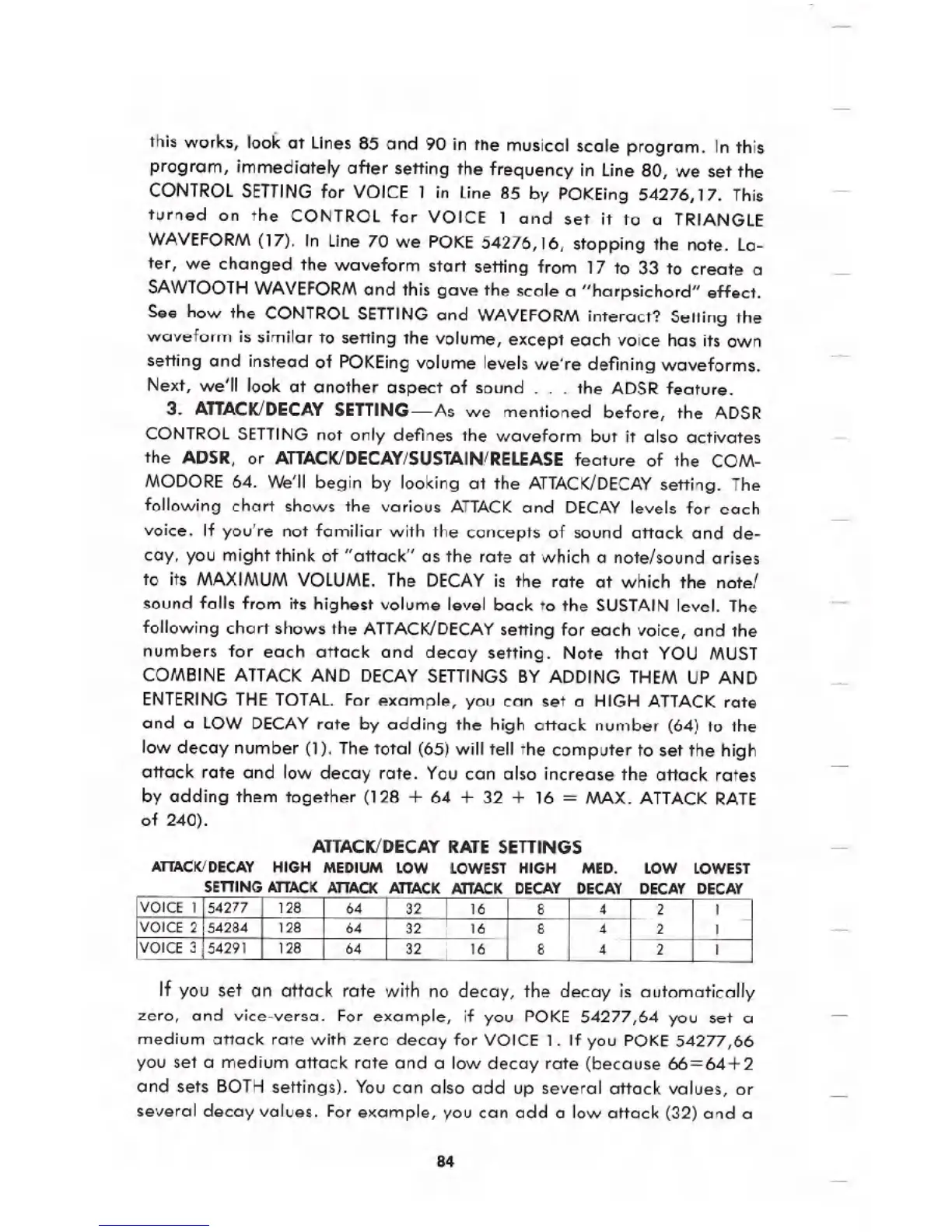
following chart shows the various ATTACKand DECAYlevels for each
voice. If you're not familiar with the concepts of sound attack and de-
cay, you might think of "attack" as the rate at which a note/sound arises
to its MAXIMUM VOLUME. The DECAYis the rate at which the note/
sound falls from its highest volume level back to the SUSTAINlevel. The
following chart shows the ATTACK/DECAYsetting for each voice, and the
numbers for each attack and decay setting. Note that YOU MUST
COMBINE ATTACKAND DECAY SETTINGS BY ADDING THEM UP AND
ENTERINGTHE TOTAl. For example, you can set a HIGH ATTACKrate
and a LOW DECAYrate by adding the high attack number (64) to the
low decay number (1). The total (65) will tell the computer to set the high
attack rate and low decay rate. You can also increase the attack rates
by adding them together (128 + 64 + 32 + 16 = MAX. ATTACKRATE
of 240).
AnACKIDECAY RATESEnlNGS
ATTACK/DECAY HIGH MEDIUM LOW LOWEST HIGH MED. LOW LOWEST
SETTING ATTACKATTACK ATTACK ATTACK DECAY DECAY DECAY DECAY
If you set an attack rate with no decay, the decay is automatically
zero, and vice-versa. For example, if you POKE 54277,64 you set a
medium attack rate with zero decay for VOICE 1. If you POKE54277,66
you set a medium attack rate and a low decay rate (because 66=64+2
and sets BOTH settings). You can also add up several attack values, or
several decay values. For example, you can add a low attack (32) and a
84
VOICE 1
54277 128 64
32 16 8 4 2 1
VOICE 2
54284 128 64
32
16 8
4 2 1
VOICE 3 54291 128
64 32 16 8
4 2 1





 To Next Page