Commodore 64's eight octave range. The HIGHand LOWFREQUENCY
POKE COMMANDS are different for each VOICE you use-this allows
you to program all 3 voices independently to create 3-voice music or
exotic sound effects.
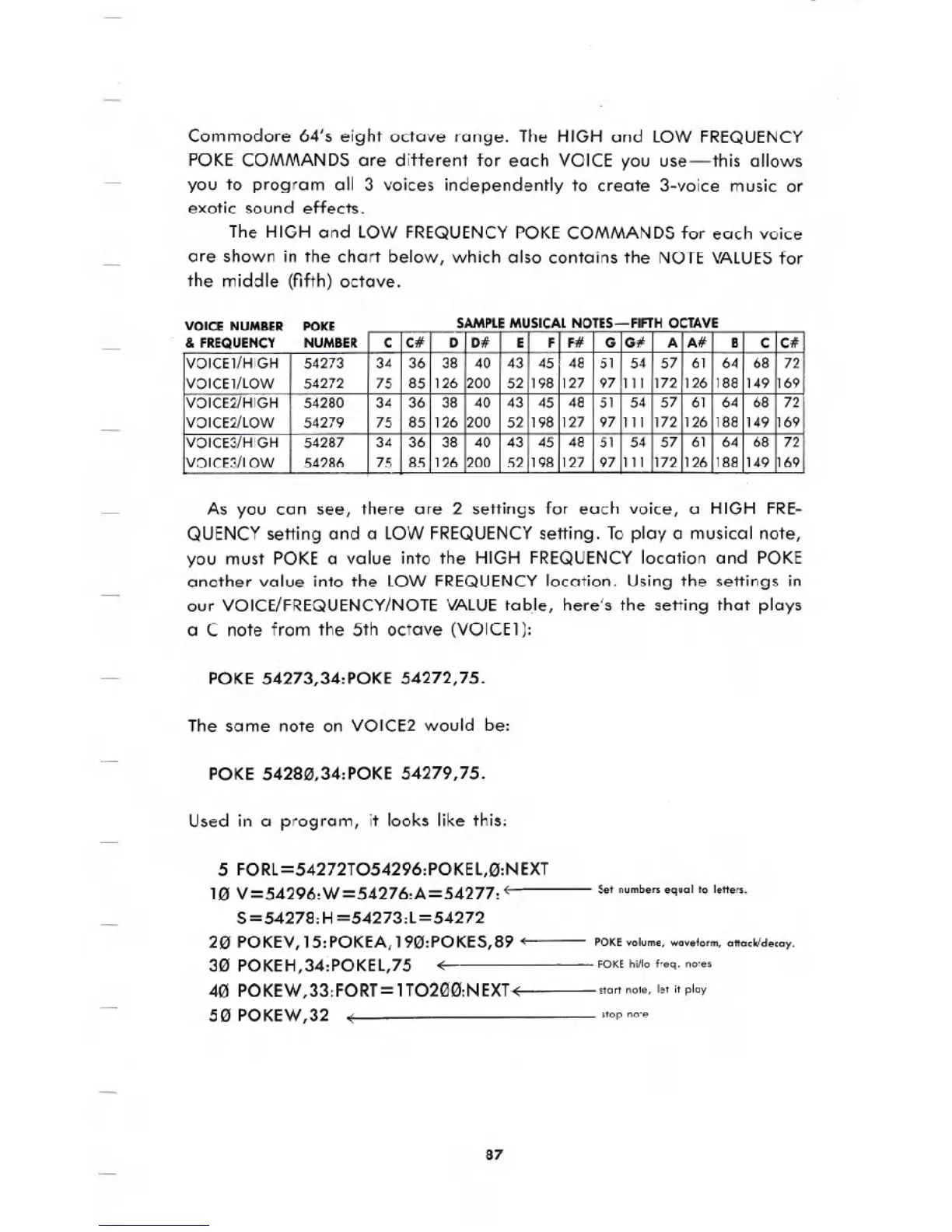
The HIGH and LOW FREQUENCYPOKE COMMANDS for each voice
are shown in the chart below, which also contains the NOTE VALUESfor
the middle (fifth) octave.
VOICE NUMBER POKE
SAMPLE MUSICAL NOTES-fiFTH OCTAVE
As you can see, there are 2 settings for each voice, a HIGH FRE-
QUENCYsetting and a LOW FREQUENCYsetting. Toplaya musical note,
you must POKE a value into the HIGH FREQUENCYlocation and POKE
another value into the LOW FREQUENCYlocation. Using the settings in
our VOiCE/FREQUENCY/NOTEVALUEtabJe, here's the setting that plays
a C note from the 5th octave (VOICE1):
POKE 54273,34:POKE 54272,75.
The same note on VOICE2 would be:
POKE 542813,34:POKE 54279,75.
Used in a program, it looks like this:
5 FORL=54272T054296:POKEL,0:NEXT
10 V=54296:W=54276:A=54277: (--
S=54278:H =54273:L=54272
20 POKEV,15:POKEA,190:POKES,89 <;
30 POKEH,34:POKEL,75 -:
40 POKEW,33:FORT=1T0200:NEXl-:
50 POKEW,32 ~
Set numbers equal to letters.
POKE volume, waveform, attack/decay.
POKE hi/lo freq. notes
start note, let it play
stop note
87
!ER C C# D D# E f f# G G# A A# B C C#
VOICE1/HIGH 54273
34
36
38 40
43 45 48 51 54
57
61 64
68
72
VOICE1/l0W 54272 75 85 126 200 52 198 127
.97
111
172
126 188 149 169
VOICE2/HIGH 54280 34 36 38 40 43 45
48
51 54
57
61 64
68 72
VOICE2/l0W 54279 75 85 126 200 52
198 127 97
111
172 126 188
149 169
VOICE3/HIGH
54287
34
36 38
40
43 45 48
51 54
57 61 64 68 72
VOICE3/l0W
54286
75 85 126 200 52 198
127 97 111 172 126 188 149 169





 To Next Page