10
20
G
25
30
40
C~:
70
75
~
80
90
r-100
LI10
120
130
REM BOUNCING BALL
!
PRINT "{CLR/HOME}I
FOR X = 1 TO 10 : PRINT "{CRSR/OOWN}":NEXT
FOR BL = 1 TO 40
PRINT" 8{CRSR LEFT}";:REM <8 is a SHIFT-Q)
FOR TM = 1 TO :5
NEXT TM
NEXT BL
REM MOVE BALL RIGHT TO LEFT
FOR BL = 40 TO 1 STEP -1
PRINT" {CRSR LEFT} {CRSR LEFT}. {CRSR LEFT} ";
FOR Tt'l= 1 TO 5
NEXT TM
NEXT BL
GOTO 20
effect on the program itself. line 20 clears the screen of any informa-
tion.
line 25 PRINTs 10 cursor-down commands. This just positions the ball
in the middle of the screen. If line 25 was eliminated the ball would
move across the top line of the screen.
line 30 sets up a loop for moving the ball the 40 columns from the left
to right.
line 40 does a lot of work. Itfirst prints a space to erase the previous
ball positions,then itprintsthe ball,and finallyitperforms a cursor-left
to get everything ready to erase the current ball position again.
The loop set up in lines 50 and 60 slows the ball down a bit by delay-
ing the program. Without it,the ball would move too fast to see. -;
line 70 completes the loop that prints balls on the screen, set up in
line 30. Each time the loop is executed, the ball moves another space to
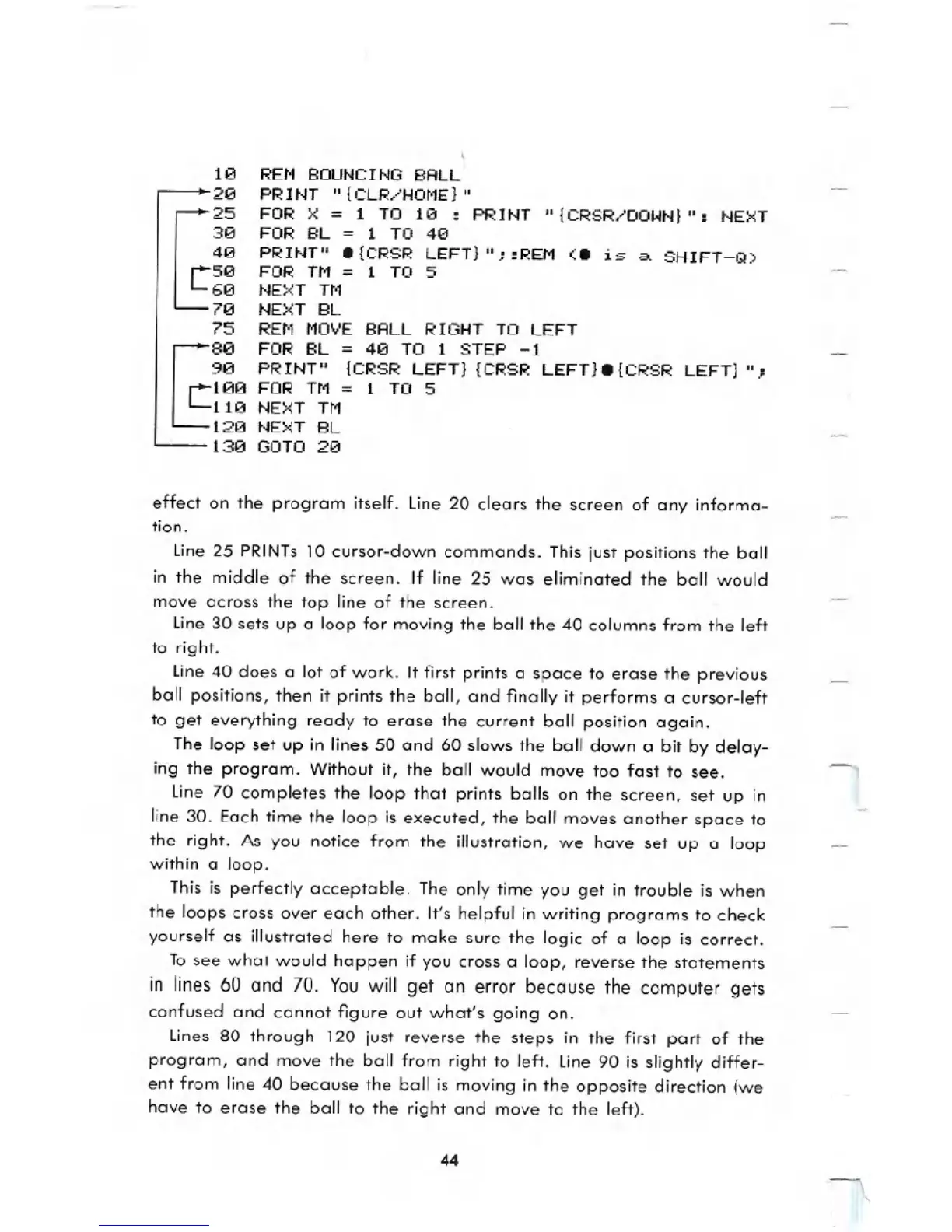
the right.As you notice from the illustration,we have set up a loop
within a loop.
This is perfectly acceptable. The only time you get in trouble iswhen
the loops cross over each other. It'shelpful in writing programs to check
yourself as illustrated here to make sure the logic of a loop is correct.
To see what would happen if you cross a loop, reverse the statements
in lines 60 and 70. You will get an error because the computer gets
confused and cannot figure out what's going on.
lines 80 through 120 just reverse the steps in the firstpart of the
program, and move the ball from right to left. line 90 is slightly differ-
ent from line
40 because the ball is moving in the opposite direction (we
have to erase the ball to the right and move to the left).
44





 To Next Page