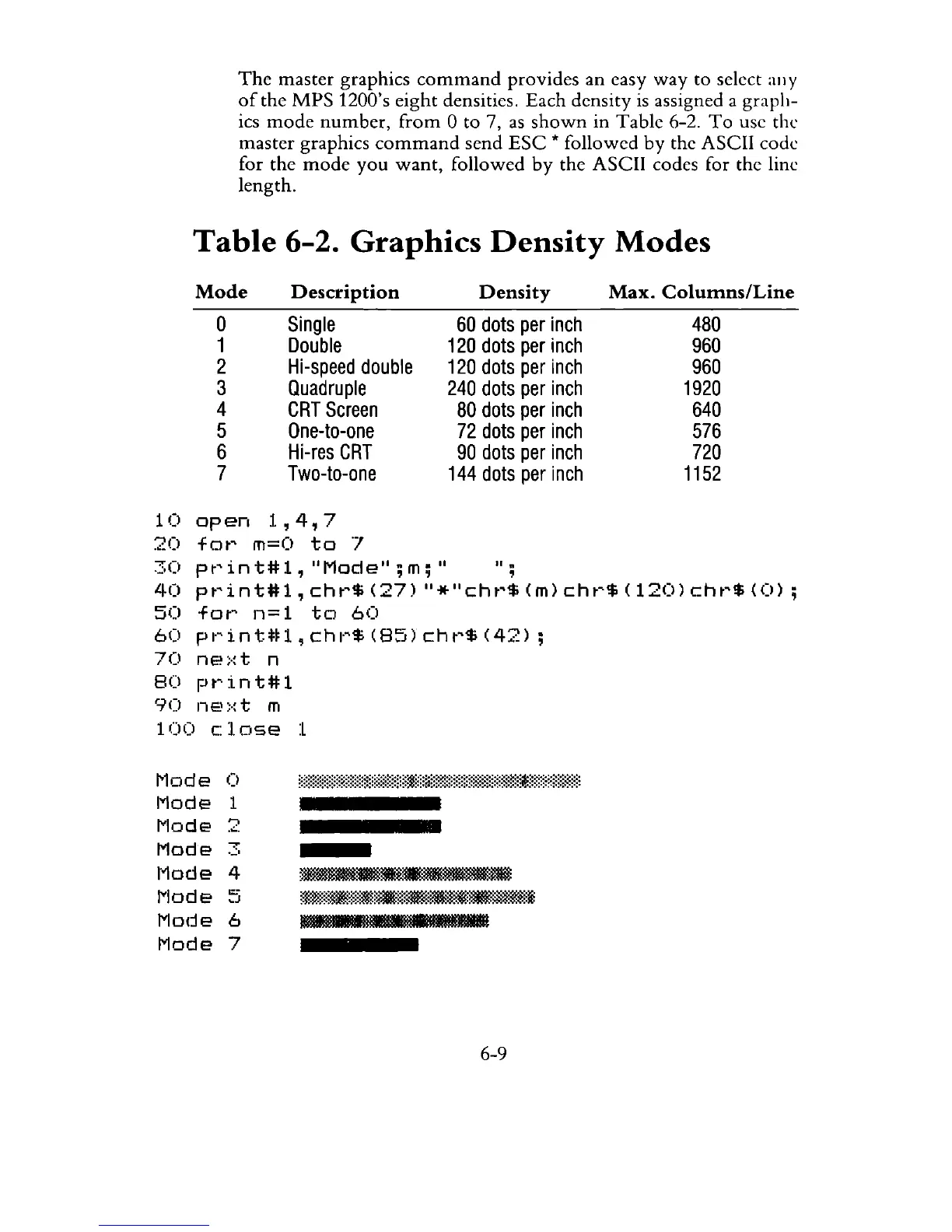
The
master graphics
command
provides an easy
way
to select
allY
of
the MPS 1200's eight densities. Each density
is
assigned a graph-
ics
mode
number,
from
0 to 7,
as
shown
in Table 6-2.
To
use the
master graphics
command
send
ESC
* followed by the ASCII code
for the
mode
you
want,
followed
by
the ASCII codes for the line
length.
Table
6-2. Graphics
Density
Modes
Mode
o
1
2
3
4
5
6
7
Description
Single
Double
Hi-speed
double
Quadruple
CRT
Screen
One-to-one
Hi-res
CRT
Two-to-one
1
(I
op
en
1,
4,
7
20
fot~
m=O
to
'7
Density
Max.
Columns/Line
60
dots
per
inch
480
120
dots
per
inch
960
120
dots
per
inch
960
240
dots
per
inch
1920
80
dots
per
inch
640
72
dots
per
inch
576
90
dots
per
inch
720
144
dots
per
inch
1152
30
pt~int#l,
"Mode";m;"
",
40
pt~int#l,
cht~$
(27)
"*"Cht~$
(m)
cht~$
(120)
cht~$
(0)
;
50
fot~
n=
1
to
60
60
print#1,chr$(85)chr$(42);
70
ne~·:t
n
80
pt~int#1
90
IIE.':-:t m
100
c:lose
:L
1'1ode
Mode
!"Iode
Mode
Mode
!"Iode
Mo(je
Mode
0
1
"'J
.
.:..
"
'-'
4
0::
~J
6
7
•
--=
....
~~
::'t·W~~$::~*9fi:~_"$.~:...,ruw.i
!M!!lIlIIlllIli!llIIliIliIIliilllilliiiIlIliIIIilHIl
6-9



 To Next Page